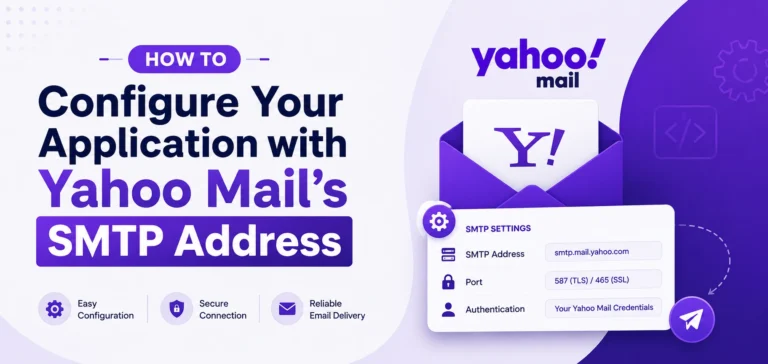
Configuring your application with Yahoo Mail’s SMTP address takes under five minutes, but one wrong setting blocks every outgoing message you try to send. The most common failure points are using your regular Yahoo password instead of an app password, entering the wrong port number, and missing the SMTP authentication toggle that most email clients leave unchecked by default. All three mistakes are fixable in under two minutes once you know exactly where each setting goes.
Key Takeaways
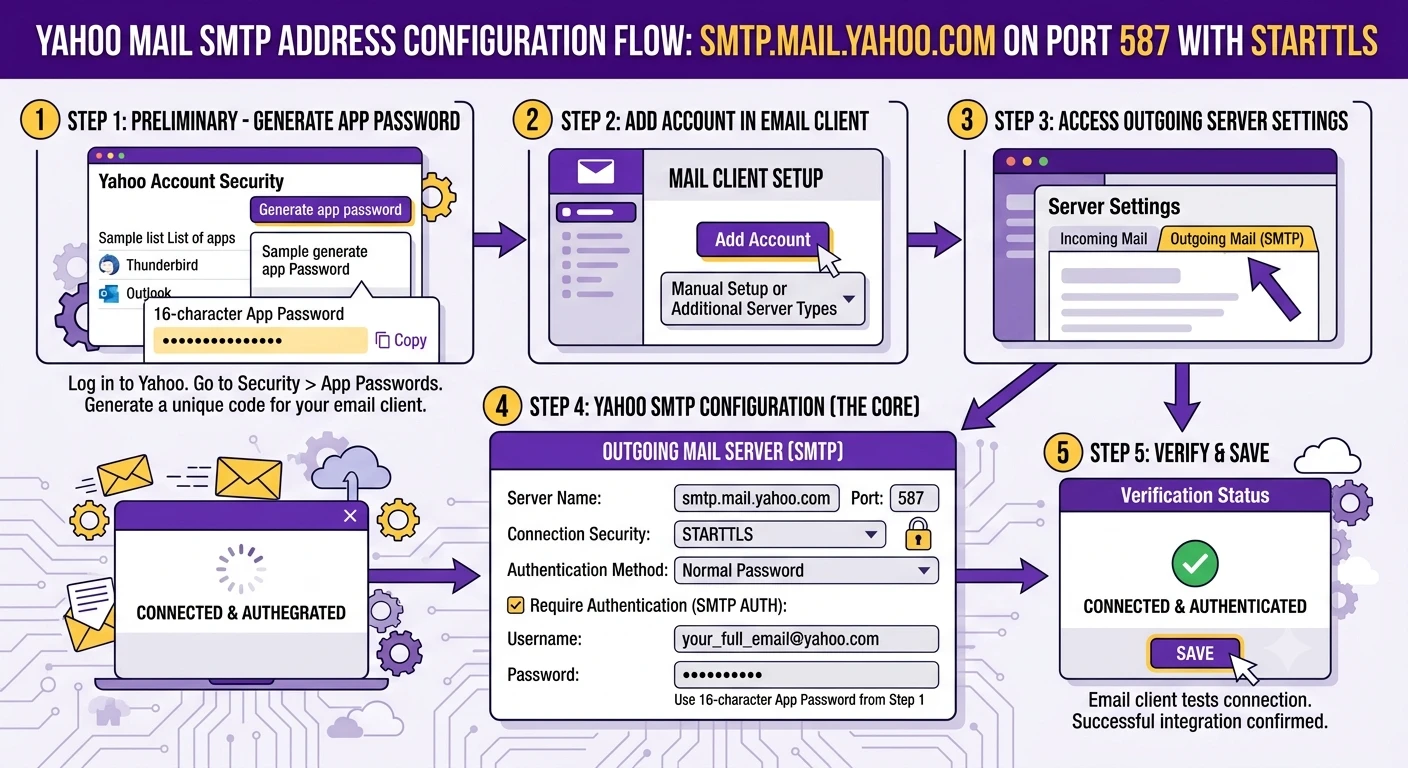
- Yahoo Mail’s outgoing server address is smtp.mail.yahoo.com, paired with port 465 using SSL encryption or port 587 using STARTTLS encryption.
- Yahoo requires an app-specific password for every third-party client connection. Your standard Yahoo account password returns an authentication error without exception.
- Android users can configure Yahoo Mail SMTP directly inside the Samsung Email app on One UI or the Gmail app on any Android device, using the same server address and port settings as desktop clients.
- Yahoo caps outgoing SMTP volume at approximately 500 emails per day and 100 recipients per individual message. Exceeding the hourly threshold triggers a temporary account block.
- IMAP access must be manually enabled in some Yahoo accounts. A client can fail to connect even when SMTP is configured correctly if IMAP remains toggled off.
What Yahoo Mail SMTP Is and How It Works
SMTP stands for Simple Mail Transfer Protocol. It is the standard protocol email clients and applications use to send outgoing messages through Yahoo’s mail servers.
Your email app handles communication through two separate functions. IMAP or POP3 manages incoming mail. SMTP manages outgoing mail. An app can receive Yahoo Mail correctly while sending fails entirely, because the two functions use different servers, ports, and credentials.
Here are the confirmed Yahoo Mail server settings for all three protocols. Keep this table open during setup.
| Protocol | Function | Server | Port | Encryption |
|---|---|---|---|---|
| SMTP | Outgoing mail | smtp.mail.yahoo.com | 465 | SSL/TLS |
| SMTP | Outgoing mail | smtp.mail.yahoo.com | 587 | STARTTLS |
| IMAP | Incoming mail | imap.mail.yahoo.com | 993 | SSL/TLS |
| POP3 | Incoming mail | pop.mail.yahoo.com | 995 | SSL/TLS |
Port 587 with STARTTLS is the current standard recommendation. Port 465 with SSL is the reliable fallback for older clients that do not support STARTTLS. Try port 587 first and switch to 465 only if the initial connection fails.
Choose IMAP for incoming mail if you access Yahoo on more than one device. IMAP keeps your messages on Yahoo’s servers and mirrors folder changes across every connected client. POP3 downloads messages to a single device only and does not sync.
Before you open any email client, confirm three things are in place. First, you have access to your Yahoo Account Security page to generate an app password. Second, your Yahoo account has two-step verification enabled, which is the default for accounts created after 2023.
Third, you have a compatible email client installed, such as Samsung Email on a Galaxy device, the Gmail app on any Android phone, Mozilla Thunderbird, or Microsoft Outlook.
Generate Your Yahoo App Password Before Anything Else
Yahoo Mail blocks every third-party client that tries to authenticate with your standard account password. This happens even when the password is correct. Yahoo requires a separate app-specific password for any external application that connects via SMTP.
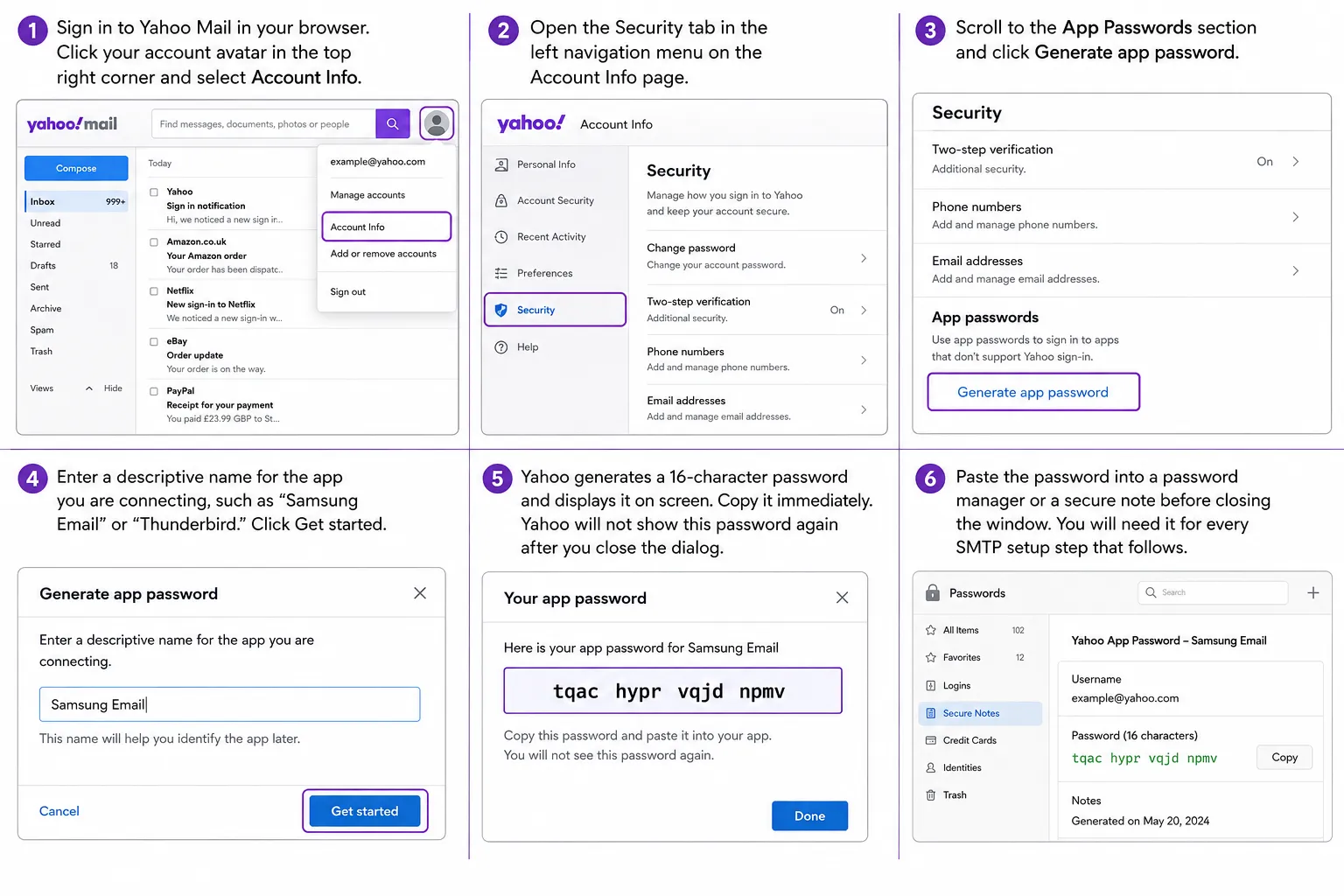
Step 1. Sign in to Yahoo Mail in your browser. Click your account avatar in the top right corner and select Account Info.
Step 2. Open the Security tab in the left navigation menu on the Account Info page.
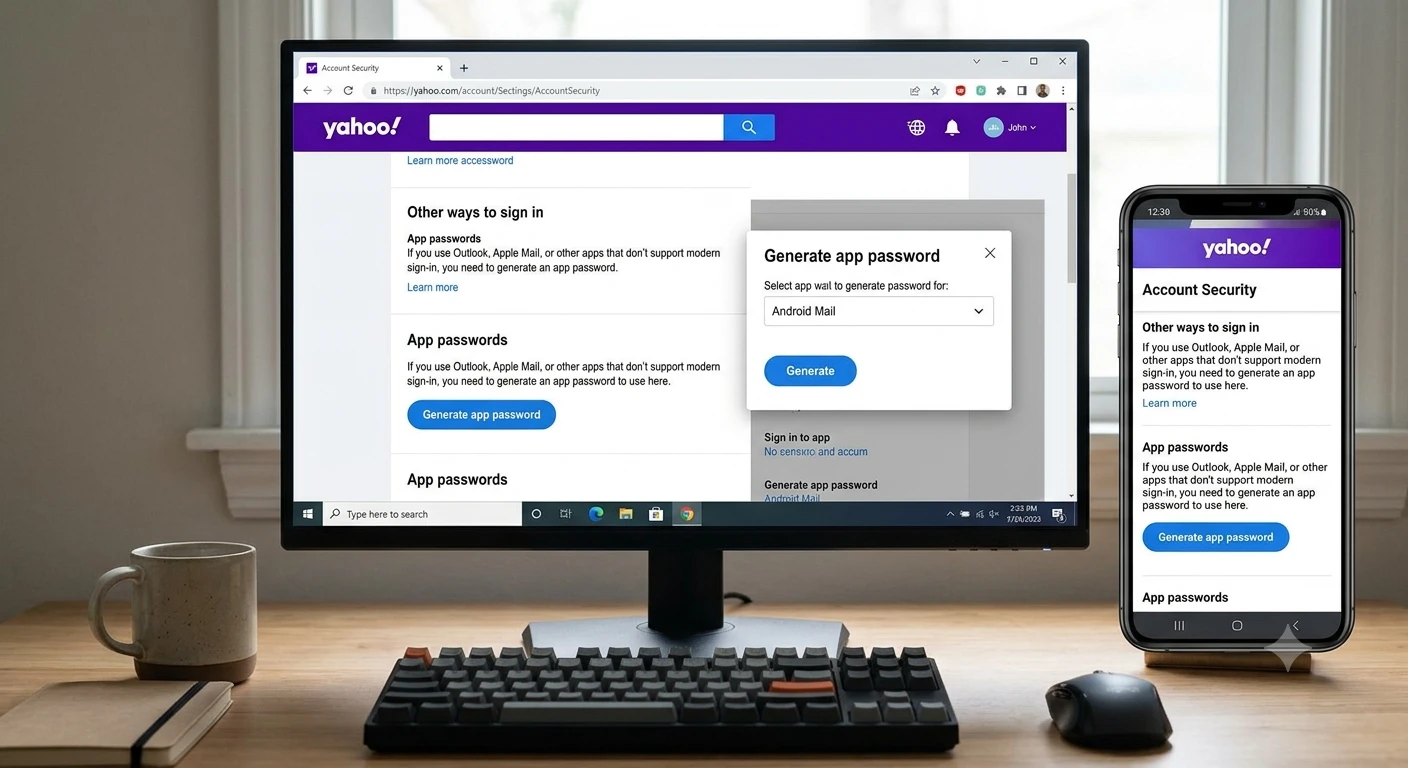
Step 3. Scroll to the App Passwords section and click Generate app password.
Step 4. Enter a descriptive name for the app you are connecting, such as “Samsung Email” or “Thunderbird.” Click Get started.
Step 5. Yahoo generates a 16-character password and displays it on screen. Copy it immediately. Yahoo will not show this password again after you close the dialog.
Step 6. Paste the password into a password manager or a secure note before closing the window. You will need it for every SMTP setup step that follows.
Yahoo’s official instructions for this process are on their generate and manage third-party app passwords page if your account displays an unexpected option or error during this step.
WARNING: Your main Yahoo account password will fail authentication in every third-party email client. The app password is the only credential Yahoo’s SMTP server accepts for external connections. Using the wrong password does not trigger a lockout, but it will block outgoing mail permanently until you correct it.
How to Configure Yahoo Mail SMTP on Android
Most Yahoo SMTP guides stop at Thunderbird and Outlook and say nothing about mobile. Android users with Samsung Galaxy devices or phones running stock Android face different setup screens and different menu paths. Both platforms use the same Yahoo SMTP server address, but the navigation differs in ways that catch people off guard.
Samsung Email App on One UI
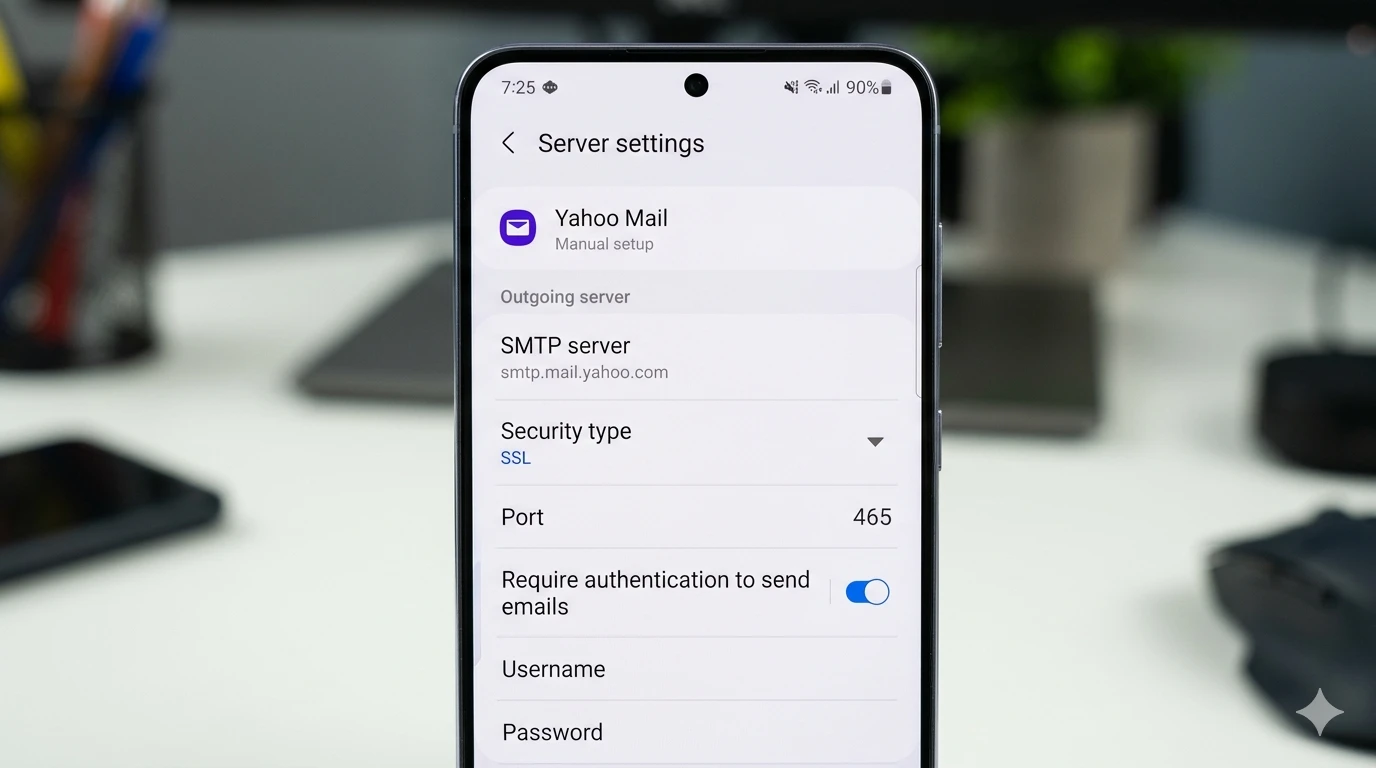
Samsung’s built-in Email app on Galaxy devices running One UI 6.x and One UI 7.x supports full manual SMTP configuration for Yahoo Mail. The key is selecting Manual setup rather than letting the app auto-configure, which often misses the outgoing server settings entirely.
Step 1. Open the Samsung Email app. Tap the three-line menu icon and select Settings.
Step 2. Tap Add account. When the provider list appears, select Other.
Step 3. Enter your full Yahoo email address. Tap Manual setup rather than allowing auto-configure to proceed.
Step 4. Select IMAP as the account type for incoming mail.
Step 5. Set the incoming server details: host imap.mail.yahoo.com, port 993, security type SSL/TLS. Enter your app password.
Step 6. Set the outgoing server details: host smtp.mail.yahoo.com, port 587, security type STARTTLS. Enter your full Yahoo email address and your app password in their respective fields.
Step 7. Tap Next. Samsung Email tests the connection to both servers. Assign a display name and tap Done.
Did the verification step return a connection error? Return to Step 6 and confirm you entered the app password in the password field, not your main Yahoo account password.
Gmail App on Android
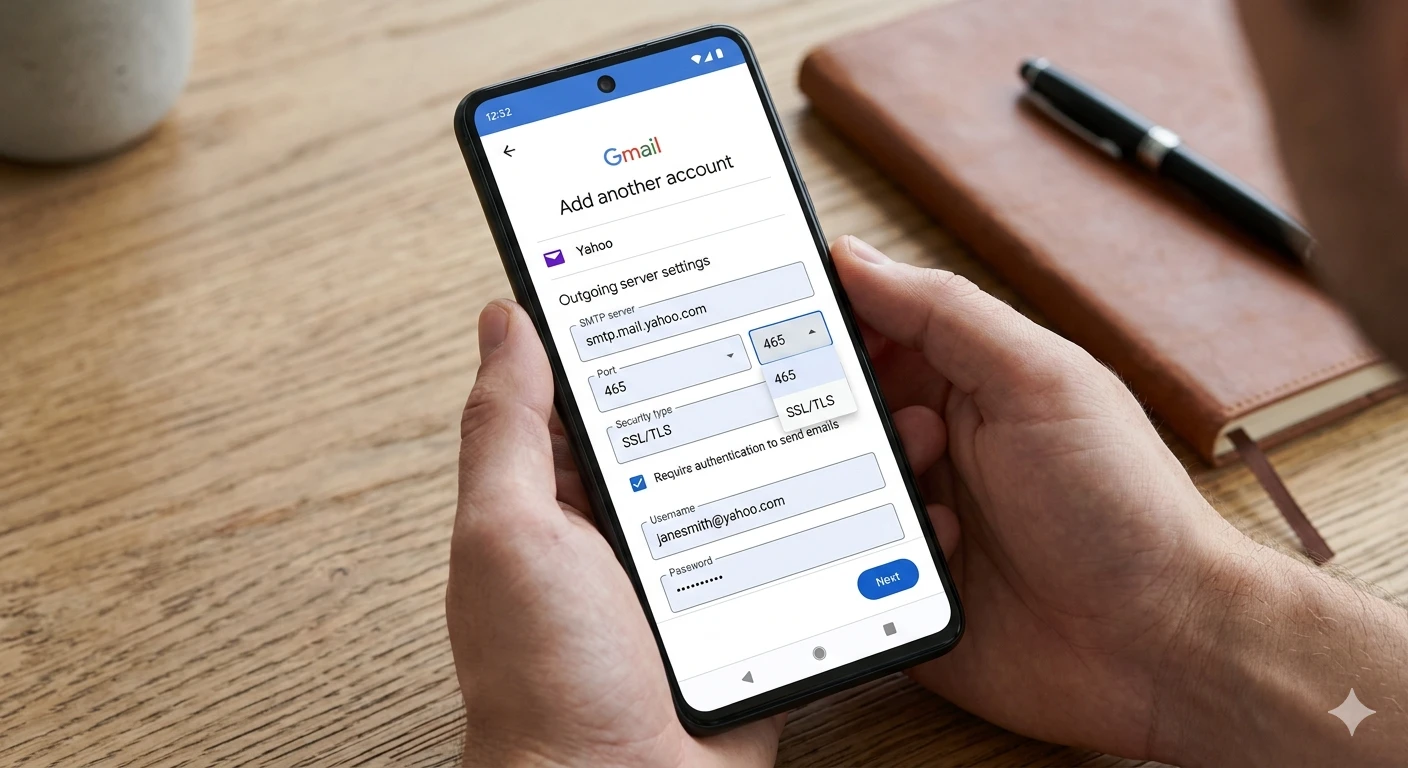
The Gmail app on any Android device supports adding Yahoo Mail as a secondary account through manual IMAP and SMTP setup. The critical step is choosing Other from the provider list rather than selecting the Yahoo shortcut, which routes the account through OAuth and bypasses direct SMTP credentials.
Step 1. Open the Gmail app. Tap your profile icon in the top right corner and select Add another account.
Step 2. Choose Other from the provider options. Do not tap the Yahoo-branded shortcut option.
Step 3. Enter your Yahoo email address and tap Next. Select Personal (IMAP) as the account type.
Step 4. Set the incoming server to imap.mail.yahoo.com, port 993, with SSL/TLS security. Enter your app password.
Step 5. Set the outgoing SMTP server to smtp.mail.yahoo.com, port 465, with SSL/TLS security. Enter your app password.
Step 6. Tap Next. Gmail tests both server connections. Set your sync frequency and enter a display name for outgoing messages from this account.
Have you ever tried using the Gmail app’s native Yahoo shortcut instead of the Other option? That path uses OAuth authentication, which works for standard mail but breaks direct SMTP credential entry that some third-party apps and scripts depend on.
How to Configure Yahoo Mail SMTP in Desktop Email Clients
Mozilla Thunderbird
Thunderbird auto-detects Yahoo Mail settings in most cases, which makes the setup fast. You still need the app password before you start, and a manual check on the outgoing server settings afterward is worth the thirty seconds.
Step 1. Open Thunderbird. Click the main menu button in the top right corner and select Account Settings.
Step 2. Click Account Actions at the bottom left and choose Add Mail Account.
Step 3. Enter your full Yahoo email address and your app password. Click Continue. Thunderbird contacts Yahoo’s servers and configures IMAP and SMTP automatically.
Step 4. Confirm the incoming server shows IMAP / imap.mail.yahoo.com / port 993 / SSL/TLS and the outgoing server shows smtp.mail.yahoo.com / port 587 / STARTTLS.
Step 5. Click Done and send a test message to confirm SMTP is active.
To review or edit the SMTP settings later, return to Account Settings and scroll to Outgoing Server (SMTP) at the bottom of the left sidebar.
Microsoft Outlook
Outlook’s automatic account setup fails with Yahoo far more often than it succeeds. Yahoo’s authentication requirements push most Outlook versions into a loop of password prompts or silent failures. Manual configuration is the reliable path for every Outlook version from 2016 through the current Microsoft 365 release.
Step 1. Open Outlook and go to File > Add Account.
Step 2. Enter your Yahoo email address and click Connect.
Step 3. Select IMAP from the account type screen.
Step 4. Enter the incoming server settings: imap.mail.yahoo.com, port 993, encryption SSL/TLS. Enter the outgoing server settings: smtp.mail.yahoo.com, port 465, encryption SSL/TLS.
Step 5. Enter your Yahoo app password when prompted. Click Next.
Step 6. Click More Settings after the credentials screen. Open the Outgoing Server tab. Check the box labeled My outgoing server (SMTP) requires authentication. Click OK.
Step 7. Complete the setup wizard and send a test email.
The authentication checkbox in Step 6 is what Outlook’s auto-configure skips consistently with Yahoo accounts. Outgoing mail fails silently until you enable it manually. Yahoo’s official server settings documentation confirms that authentication is required on all outgoing SMTP connections.
Common Yahoo Mail SMTP Configuration Problems and How to Fix Them
Problem: Authentication failed or “incorrect username or password” error
Cause: The email client is using your main Yahoo account password, or the username field contains only the local part of your email address without the “@yahoo.com” domain.
Fix:
- Generate a fresh app password from the Yahoo Account Security page.
- Delete the Yahoo account from your email client entirely.
- Re-add the account and enter your full email address, including “@yahoo.com,” in the username field.
- Enter the new app password when the credential screen appears.
Problem: “Connection timed out” or “Could not connect to outgoing mail server”
Cause: The SMTP server address or port number is incorrect, or your network is blocking outbound traffic on standard SMTP ports.
Fix:
- Verify the server address reads exactly smtp.mail.yahoo.com with no leading spaces, typos, or extra characters.
- Switch from port 587 to port 465, or from port 465 to port 587.
- Disable your firewall temporarily and test the connection.
- If neither port connects, contact your ISP. Some residential providers block ports 465 and 587 on outbound traffic by default.
Problem: SSL/TLS handshake failure or encryption error
Cause: The port number and encryption method are paired incorrectly, or the email client does not support the TLS version Yahoo’s servers require.
Fix:
- Match port 465 with SSL/TLS only. Match port 587 with STARTTLS only. Mixing these two pairings produces a handshake failure on every attempt.
- Update your email client to the latest available version. Yahoo’s servers require TLS 1.2 or higher.
- If the error persists after updating, switch from port 587 with STARTTLS to port 465 with SSL as a working fallback.
Problem: IMAP access is disabled for your account
Cause: Some Yahoo accounts have IMAP toggled off by default. This blocks all external client access to incoming mail. It can also trigger confusing SMTP errors during the account verification step inside some email clients.
Fix:
- Sign in to Yahoo Mail in a browser. Click the gear icon and select More Settings.
- Go to Mailboxes and click your Yahoo email address.
- Scroll to the IMAP Access section and enable the toggle.
- Return to your email client and retry the connection from the beginning.
Yahoo SMTP Sending Limits and Pro Moves for Your Account
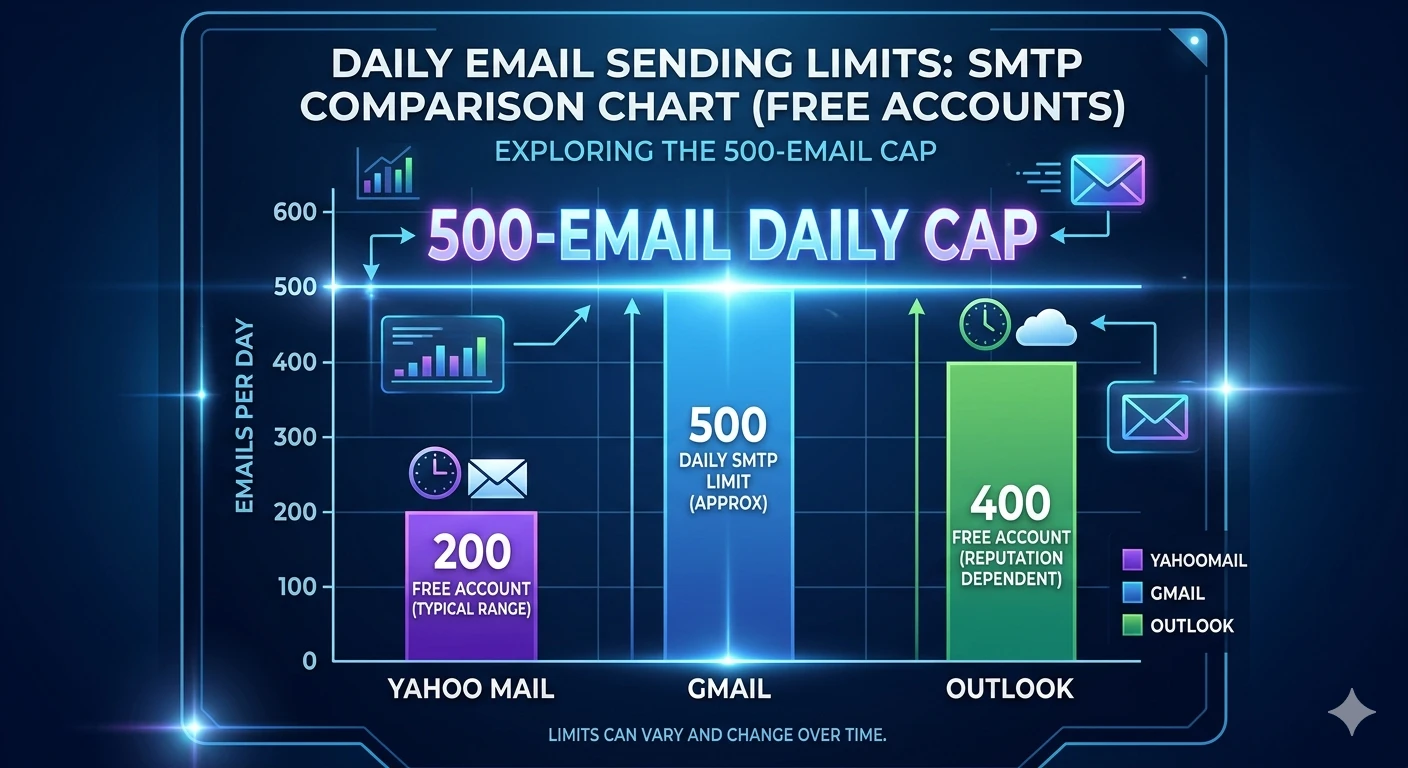
Yahoo does not publish its outgoing mail limits publicly. Based on consistent reporting from email deliverability sources, the daily SMTP cap sits at approximately 500 messages. Each message can address a maximum of 100 recipients. The hourly ceiling runs at roughly 100 emails.
For personal use, those numbers leave comfortable room. A freelancer managing client correspondence, a small business owner running customer follow-ups, or an Android user sending a personal newsletter to under 300 subscribers will never approach these thresholds.
The limits become friction for anyone running automated email scripts, marketing sequences, or notification systems through a Yahoo SMTP connection. When you exceed the hourly threshold, Yahoo blocks your account temporarily, not permanently. Spreading sends across a longer time window clears it without any account changes.
PRO TIP: If your application sends email in batches, add a five-second pause between each outgoing message. That pace keeps you well under Yahoo’s hourly threshold and prevents temporary blocks. If a block does occur before you can adjust the send rate, the guide on how to fix a temporarily blocked IP address covers the recovery steps.
Yahoo updated its sender requirements in 2024, making SPF, DKIM, and DMARC domain authentication mandatory for bulk senders. Configure those DNS records for your sending domain before you scale up volume. Yahoo’s email sender requirements page documents the current policy and what triggers enforcement.
PRO TIP: Yahoo’s 500-email daily cap applies per account with no paid upgrade path to increase it. If your application genuinely needs to send higher volumes, a dedicated transactional email service gives you higher limits, explicit rate documentation, and delivery analytics that Yahoo SMTP cannot provide.
Frequently Asked Questions About Yahoo Mail SMTP Configuration
Q: What is Yahoo Mail’s SMTP server address?
A: Yahoo Mail’s SMTP server address is smtp.mail.yahoo.com. Pair it with port 465 and SSL/TLS encryption, or with port 587 and STARTTLS encryption. Authentication is required for both options, using your full Yahoo email address and an app-generated password, not your standard account password.
Q: Why is Yahoo rejecting my password when I try to configure SMTP?
A: Yahoo Mail rejects your standard account password in third-party email clients because it requires an app-specific password for all external connections. Go to Yahoo Account Info > Security > App Passwords > Generate app password to create one. That 16-character credential replaces your regular password in every SMTP, IMAP, and POP3 configuration field.
Q: Can I configure Yahoo Mail’s SMTP address on an Android phone?
A: Yes. Both the Samsung Email app on One UI and the Gmail app on Android support full manual Yahoo Mail SMTP configuration. Set the outgoing server to smtp.mail.yahoo.com with port 587 and STARTTLS, and use your app password as the credential. In Samsung Email, select Manual setup after entering your email address to access the outgoing server fields. In the Gmail app, choose Other from the provider list rather than the Yahoo shortcut.
Q: What is the difference between Yahoo SMTP port 465 and port 587?
A: Port 465 uses SSL encryption, where the secure connection opens the moment the client contacts the server. Port 587 uses STARTTLS, where the connection starts as plain text and upgrades to encrypted during the handshake. Port 587 with STARTTLS is the current standard recommendation for new setups. Port 465 with SSL is the correct fallback for older clients that do not support STARTTLS. Both are secure in practice.
Q: How many emails can I send per day through Yahoo Mail SMTP?
A: Yahoo caps daily outgoing volume at approximately 500 emails, with a maximum of 100 recipients per message. Yahoo does not officially disclose these figures, but they appear consistently across email deliverability research. If your application requires higher sending volume for campaigns or transactional notifications, Yahoo SMTP is not built for that workload.
Q: Do I need to enable IMAP before Yahoo Mail SMTP will work?
A: SMTP handles outgoing mail and operates independently from IMAP. Your outgoing Yahoo SMTP configuration works without IMAP enabled. If you also want to receive Yahoo Mail in the same third-party client, you need IMAP enabled separately. Go to Yahoo Mail Settings > More Settings > Mailboxes, select your email address, and toggle on IMAP access.
Put Your Yahoo SMTP Configuration to Work
Open your email client and start with the app password. That one credential is what makes every other step succeed. Generate it from Yahoo Account Security, copy it before closing the dialog, and enter it exactly as generated in every SMTP password field you encounter.
If you also manage Gmail across the same applications, the guide to configuring Gmail’s SMTP address on cloudorian.net covers the same manual setup flow with Google-specific differences around OAuth and Workspace accounts.
After completing setup, send a test message immediately. A successful delivery confirms the configuration is correct. A bounce or an error message tells you exactly which setting to revisit, and the troubleshooting section above matches every common Yahoo SMTP failure to a numbered fix.
Drop a comment below if you run into a Yahoo SMTP error not covered in this guide. Include the exact error text and the name of the email client or app you are configuring.
Discover more from Cloudorian — Android, Samsung & Windows How-To Guides
Subscribe to get the latest posts sent to your email.
