

Your iPhone-to-Android texts have never been private in transit. Apple confirmed today that iOS 26.5 ships RCS end-to-end encryption in the Messages app. The feature closes a security gap that has existed since Apple added RCS support with iOS 18 in September 2024.
Key Takeaways
- iOS 26.5 ships RCS end-to-end encryption as a confirmed beta in the final public release
- The feature requires a supported carrier and an updated Google Messages app on the Android side
- Apple co-developed the encryption standard through the GSMA alongside Google
- A lock icon inside the chat confirms a thread is protected
- Apple will publish a full carrier support list before the public launch date
What iOS 26.5 RCS End-to-End Encryption Does to Your Messages
When you text an Android user today, your message travels through your carrier without content protection. iOS 26.5 adds end-to-end encryption to those RCS threads, so only your device and the recipient’s device hold the keys. No carrier, no network operator, and no third party can read your message content in transit.
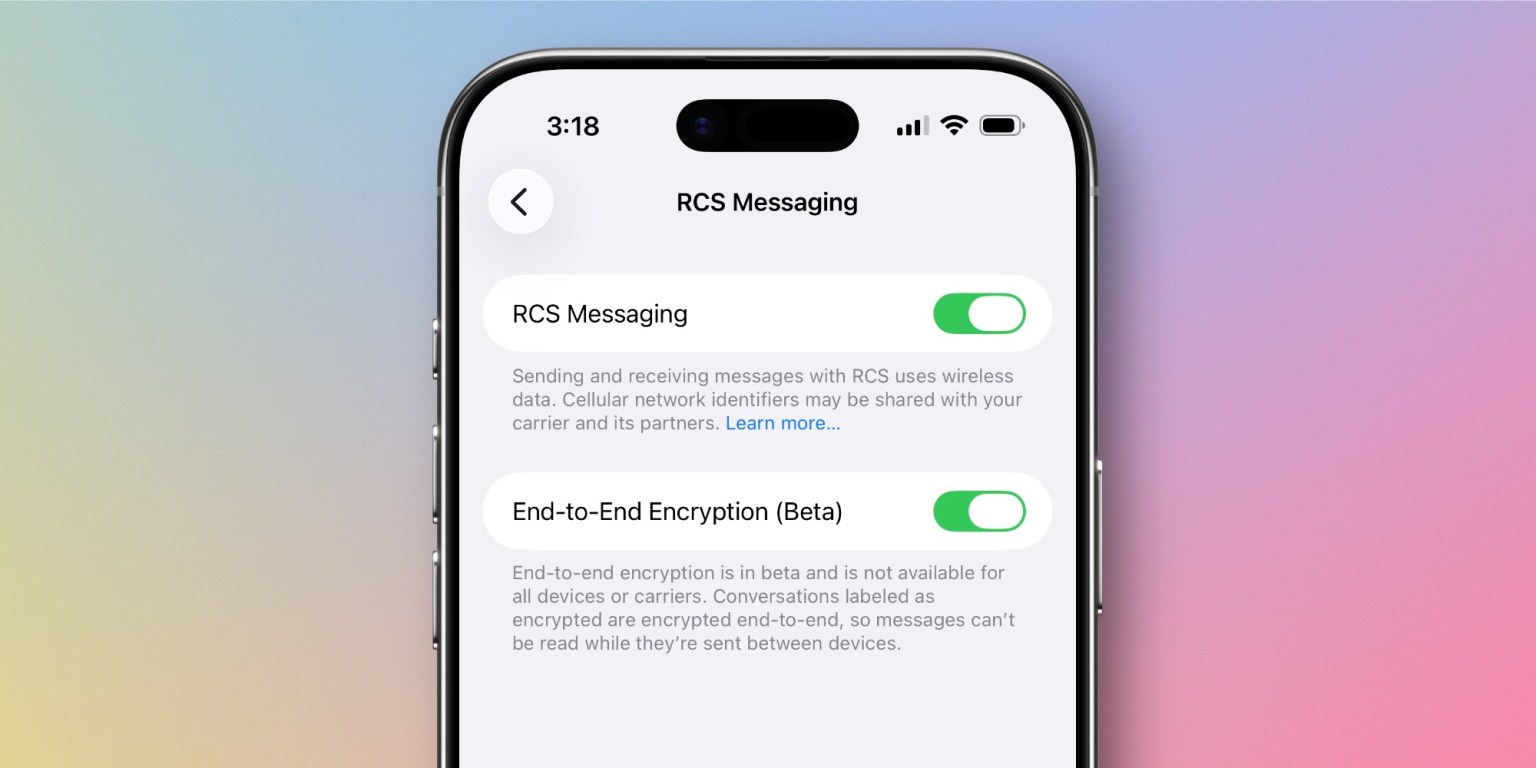
Apple’s iOS 26.5 RC release notes confirm the update ships end-to-end encrypted RCS messaging as a beta for supported carriers. The rollout covers qualifying networks and expands over time as more carriers activate support.
The beta label does not signal an incomplete or unstable feature. It tells you Apple is still activating carrier partnerships as the launch date approaches.
Group chats carry one known exception. If any participant in a thread connects through a carrier that does not yet support encryption, that entire conversation may not be protected under the beta rollout.
Why Cross-Platform RCS Encryption Took Until 2026
Apple added RCS to iPhone with iOS 18 in September 2024, bringing read receipts, typing indicators, and higher-quality media sharing to green-bubble conversations. Encryption was absent from that release because no shared cross-platform standard existed at the time.
The GSMA published RCS Universal Profile 3.0 in March 2025. That specification incorporated Messaging Layer Security, an open IETF standard built specifically for cross-platform end-to-end encryption. Apple co-developed the MLS specification alongside Google and other industry partners.
Apple first tested the feature in iOS 26.4 beta 2 in February 2026, opening it to iPhone-to-Android messaging for the first time. The company removed it before the stable iOS 26.4 launch, stating clearly in its developer notes that the feature would not ship in that update.
The feature returned in the iOS 26.5 beta, and Apple now officially confirms it ships in the final public version. Unlike the iOS 26.4 cycle, Apple issued no such warning during iOS 26.5 beta, which signalled the confirmation before it was made explicit.
Which Carriers Support iOS 26.5 RCS Encryption
Not every carrier qualifies on day one. Apple plans to publish a full list of supported carriers at its official RCS encryption carrier support page before iOS 26.5 reaches all users publicly. Check that page after the update ships to confirm your carrier qualifies.
Carrier support for encryption is a separate qualification from carrier support for RCS traffic. Your carrier may already carry RCS messages without supporting the Messaging Layer Security encryption layer added in Universal Profile 3.0.
Do you already see an RCS label in your green-bubble chats? Open a thread with an Android contact and look at the top of the conversation. A label reading “Text Message · RCS” confirms the channel is active between you, but the lock icon is the only sign encryption is in place.
Major carriers in the US have participated in RCS Universal Profile rollouts before, including AT&T, T-Mobile, and Verizon. Encryption support requires an additional activation step on each carrier’s network beyond basic RCS support.
How to Enable iOS 26.5 RCS End-to-End Encryption on iPhone
Confirming the Setting in Messages
Apple activates the feature by default when your carrier supports it. You can verify it is on and troubleshoot from Settings. Follow these steps after installing iOS 26.5:
- Open Settings on your iPhone.
- Tap Apps, then tap Messages.
- Scroll down and tap RCS Messaging.
- Confirm the End-to-End Encryption toggle is switched on.
If the toggle does not appear, your carrier does not yet support the feature. Monitor Apple’s carrier list and revisit after your network activates support.
What Your Android Contact Needs to Do
Your Android contact must run a version of Google Messages that supports the MLS encryption standard. Google has been rolling updates to Google Messages throughout the iOS 26.5 beta period. Have your contact update Google Messages from the Play Store before you test encrypted messaging together.
An outdated Google Messages version on the Android side is the most common reason the lock icon does not appear. Updating the app on both sides typically resolves the issue within seconds.
Reading the Lock Icon Correctly
Apple places a lock icon and an encrypted label at the top of a qualifying RCS chat once both sides meet the requirements. The label reads “Text Message · RCS | Encrypted” and persists throughout the conversation thread.
A missing lock does not mean RCS is broken or that the conversation failed. Three conditions can block encryption from activating:
- Your carrier has not enabled E2EE support yet
- Your Android contact has not updated Google Messages to the latest version
- A group chat includes a participant on an unsupported carrier or device
Most handshake issues resolve within seconds once both sides meet the requirements. Restart the Messages app if the lock does not appear after confirming both conditions are met.
What This Shift Means for Android Users on Google Messages
The iOS 26.5 RCS end-to-end encryption update arrives as the broader messaging space moves toward stronger default privacy. Google Messages already encrypted Android-to-Android RCS threads by default before this update. Apple’s addition covers the last major gap in standard cross-platform messaging security.
For broader context on how encryption rollouts work across Google’s mobile apps, the Cloudorian breakdown of Gmail end-to-end encryption on mobile covers the specific steps Google took when extending encryption from the web to Android and iOS. The carrier and admin activation requirements behind both rollouts follow a similar pattern.
For Galaxy users specifically, this update carries extra weight. With Samsung Messages shutting down in July 2026, all Samsung users are already moving to Google Messages as their default messaging client. That migration places the full Galaxy user base on an RCS client built to support this new encryption standard from day one.
Are you still on Samsung Messages? Switch to Google Messages now and run a full update before iOS 26.5 launches. That positions you to receive encrypted RCS messages from iPhone users without any delay after the update goes public.
The RCS encryption rollout, as described in Apple’s iOS 26.5 developer release notes, is carrier-dependent and will expand progressively. Users on unsupported carriers will gain access as their networks complete activation, not on a single fixed date.
Install iOS 26.5 and Verify Your Encryption Status
iOS 26.5 is expected to go public within the next week based on Apple’s release candidate timeline as of today. Install the update through Settings > General > Software Update as soon as it appears.
After installing, open Settings > Apps > Messages > RCS Messaging and confirm the encryption toggle is active. Start a chat with an Android contact on an updated version of Google Messages and watch for the lock icon at the top of the thread.
Bookmark Apple’s official carrier list and check it on launch day to confirm your network qualifies. If your carrier is not yet listed, you can still send RCS messages. You just wait for the encryption layer until your carrier activates support.
Discover more from Cloudorian — Android, Samsung & Windows How-To Guides
Subscribe to get the latest posts sent to your email.



