

Over 650 million monthly active users log into Google AI. Many users type long paragraphs of context for every prompt. Gemini Personal Intelligence solves this problem.
This feature connects your Google account data directly to the AI. The system reasons across your emails, calendar events, and photos. The AI already knows your family size, vehicle model, and daily schedule.
This guide explains how to enable Gemini Personal Intelligence. You will learn what data it accesses and how it manages your daily tasks.
The Core Functions of Gemini Personal Intelligence
Gemini Personal Intelligence links your Google applications into a single context engine. You grant the AI direct access to Gmail and Google Drive. The system also connects to Google Docs and Google Calendar.
The tool reads data from Google Photos, YouTube, and Google Search history. The AI uses this data to generate highly specific answers to simple prompts.
The Technology Behind the Context Engine
The feature relies on the Gemini 3.1 model. This model processes multiple data formats natively. The system cross-references text from an email with an image.
It uses this combined data to deliver an accurate answer. This native multimodality prevents the AI from treating different apps as isolated silos. The AI recognizes subtle patterns across your entire digital footprint.
How to Enable Gemini Personal Intelligence
Google disables this feature by default. You must activate the settings manually. The feature requires a personal Google account.
Google is currently rolling out the update to global users. You can access it on free and paid tiers.
Follow these exact steps to turn it on:
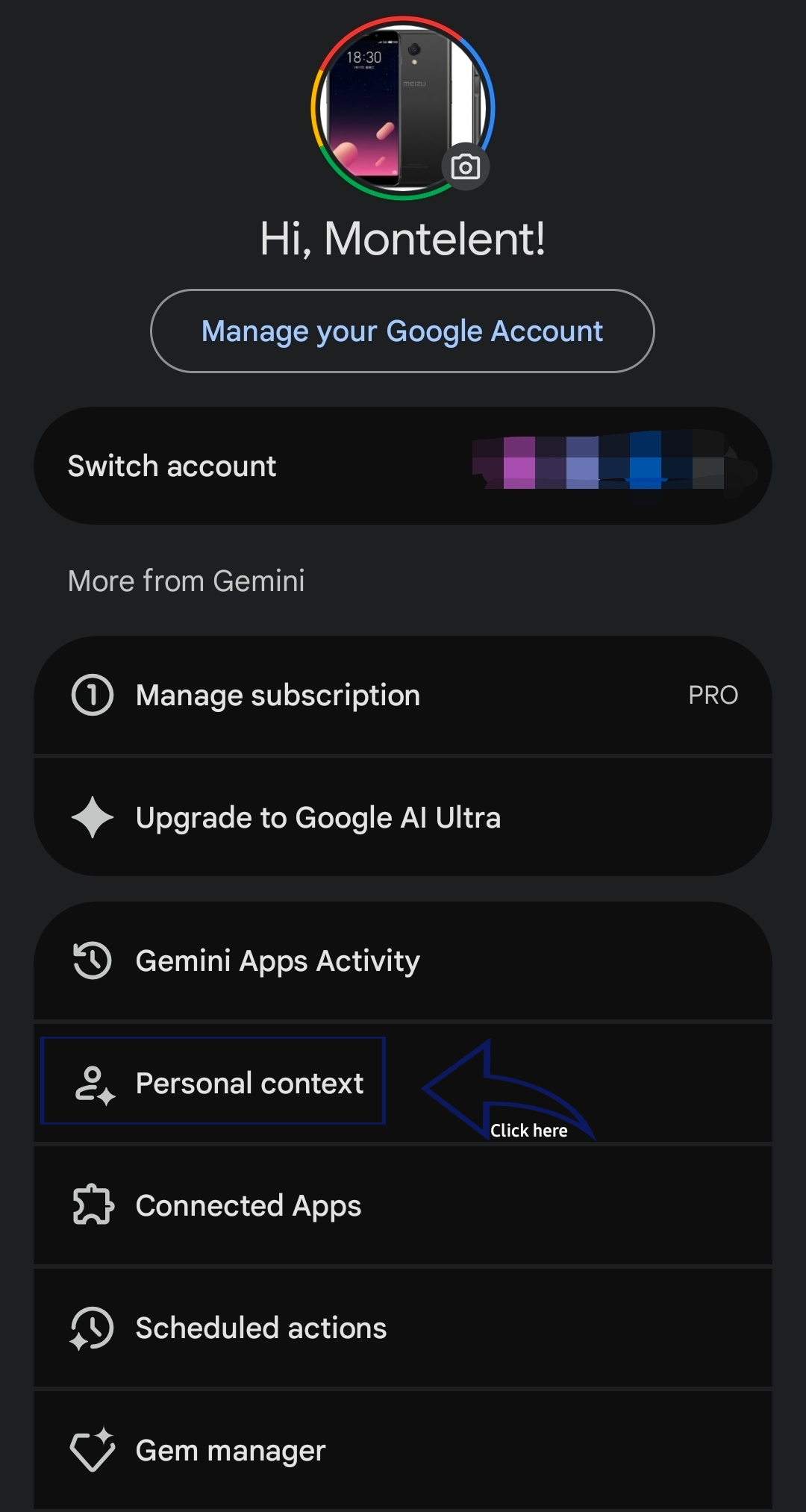
- Open the Gemini web interface or mobile app.
- Tap your profile picture in the top corner.
- Select the Settings menu from the dropdown list.
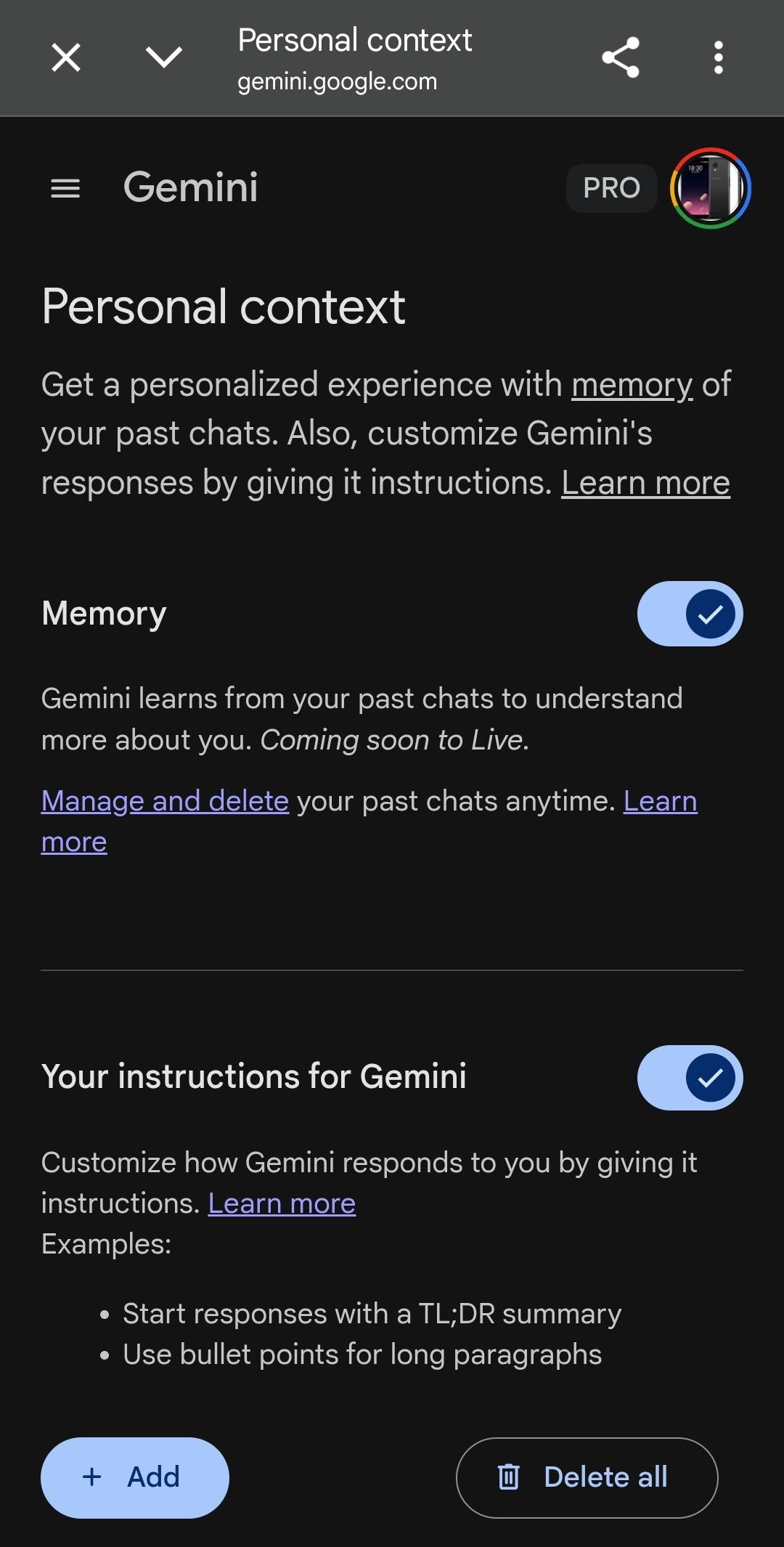
- Locate the Gemini Personal Intelligence/Personal Context section.

- Toggle the Memory switch to the “on” position.

- Open the Connect Apps menu.
- Toggle Google Workspace to activate Gmail and Drive access.
- Enable individual toggles for Google Photos and YouTube.
Real-World Testing and Contextual Memory
I tested the system to see how it handles vague prompts. I asked the AI for summer toy recommendations for my child. I omitted her age and our location from the prompt.
The AI immediately referenced my four-year-old daughter. It suggested water tables for the hot climate here in Nigeria. The system pulled this data directly from past email receipts.
The AI extracted my preferences from my recent search history.
Testing Vehicle Maintenance Queries
I ran a second test for vehicle maintenance. I asked the AI what tire size I needed for my truck. The system instantly named my 2017 Ram 1500 Quad Cab.
It provided the two exact factory tire sizes. The tool explained how to check the tire sidewalls. The AI extracted this vehicle data from old finance emails.
It also analyzed my truck photos in Google Photos. Are you tired of repeating your vehicle model to a chatbot? The system eliminates that repetitive typing entirely.
Privacy Controls and Data Security Measures
Privacy remains a major concern when connecting personal accounts. Google explicitly states its policy regarding your private Workspace data. The company does not use your emails or photos for training.
The public AI models do not learn from your private files. The system references your personal data in real time only. It uses this data strictly to answer your specific queries.
You retain full control over the application access. You can visit the privacy settings at any time. You can disconnect specific apps with a single click.
You can delete your entire memory cache instantly. The data transfer relies on certified security infrastructure. This infrastructure prevents unauthorized access during storage and transfer.
You can read the full policy on the official Google Gemini privacy page.
Managing Daily Tasks and Travel Logistics
The system excels at travel logistics and schedule management. You can ask the AI about an upcoming trip. The AI pulls the flight confirmation directly from Gmail.
It then cross-references your Google Calendar to build an itinerary. The tool uses your arrival time to suggest local activities.
Productivity and Email Tracking
Have you ever lost track of an important invoice? You can ask the AI if you replied to a specific message. The tool scans your sent folder immediately.
It reads the threads to provide a factual answer. The AI locates the exact date of your last reply. You save time by letting the AI search the inbox.
You can learn more about applying AI to your workflow. The platform offers deep technical guides for modern professionals.
Image Generation and Advanced Multimodality
Google recently added Nano Banana capabilities to the platform. This model powers advanced image generation within the Gemini interface. The AI generates images using your actual calendar events.
It creates visual content using your photo history. The system combines this visual generation with text-based reasoning.
The tool can create a custom itinerary graphic for your vacation. It analyzes your past trip photos to match your preferred travel style. The system tailors visual results entirely to your life.
Market Adoption and Business Impact
Google Cloud reports rapid growth in enterprise AI adoption. More than 70 percent of Google Cloud customers actively use Gemini-powered tools. This represents 27 million enterprise users globally according to Windows Forum data.
This high adoption rate indicates massive demand for connected AI ecosystems. The 650 million monthly active users prove the scale of the platform. Users want AI tools that understand their specific context.
The feature removes friction from daily digital interactions. Businesses use these contextual tools to speed up internal research. Employees spend less time digging through fragmented company documents.
The AI provides direct answers from the corporate data pool. Explore additional resources about enterprise AI solutions to stay updated.
Expanding the Google App Ecosystem
Google is expanding the ecosystem beyond the web browser. The company recently launched a dedicated Google app for Windows PCs. This app acts as a central hub for Gemini Personal Intelligence.
You can access the AI directly from your desktop interface. The system provides quick shortcuts to Gmail and Google Drive.
You can ask questions instantly while working in other applications. The AI provides contextual help depending on your active screen. This desktop app makes the AI a constant digital companion.
The system connects web services to local computing.
Troubleshooting Devices with AI Assistance
The contextual engine simplifies technical support and device troubleshooting. You can ask the AI why a specific device stopped working. The system checks your Gmail receipts to identify the exact model.
The AI finds the user manual for that specific serial number. It provides exact troubleshooting steps for your exact hardware.
You save hours of searching for product boxes or digital receipts. The AI gives you the manufacturer warranty information instantly. It even drafts a support email to the company for you.
This creates a frictionless support experience for household electronics.
Planning Group Events and Meetings
The AI makes group scheduling incredibly simple. You can ask the system to set up a meeting. The AI scans your calendar to find open time slots.
It checks the calendars of your frequent contacts simultaneously. The tool suggests the best meeting time for all participants.
The system drafts the invitation email with all necessary details. It includes relevant links from Google Drive in the meeting description. The AI tracks the RSVP responses in your Gmail inbox.
You manage the entire event through natural language prompts.
Take Immediate Action with Contextual AI
Open your Gemini settings panel right now. Toggle the Workspace connection to the active position. Ask the AI a highly specific question about an upcoming calendar event. Test the recall capability to see the time-saving benefits yourself.
Discover more from Cloudorian — Android, Samsung & Windows How-To Guides
Subscribe to get the latest posts sent to your email.



