

Three out of four adults globally say they would use smart home monitoring to support aging family members, according to an EY Global Consumer Health Study. Samsung answered that demand on April 16, 2026, with a significant SmartThings Family Care update. The update introduces new AI-powered features for remote caregivers and expands Galaxy Now Brief to TVs and Family Hub refrigerators. If you care for an aging parent from a distance, this update changes how you check in, respond to emergencies, and track daily patterns.
Key Takeaways
- Care on Call surfaces your parent’s activity data on your screen before a phone call connects
- Safety Patrol uses the Bespoke AI Jet Bot Steam Ultra robot vacuum to visually check on your loved one
- Care Insight tracks week-over-week behavior and environment patterns to flag early warning signs
- Now Brief expands to Samsung TVs from 2024 onward and Family Hub refrigerators from 2021 onward
What SmartThings Family Care Does for Remote Caregivers
SmartThings Family Care connects a care recipient’s Samsung appliances and mobile devices to a caregiver’s phone. The caregiver receives activity notifications, medication reminders, hospital appointment alerts, and location-based check-ins. All of it runs through the SmartThings app.
The service targets adult children managing the care of aging parents who live in a separate home. It works best when the care recipient already uses Samsung devices, since those devices feed the activity data that powers every feature.
SmartThings has surpassed 350 million subscribers worldwide as of 2026, which gives Samsung a substantial base of households where the hardware for this service already exists.
The Gap This Service Fills
Most families rely on phone calls and occasional visits to stay informed about an aging parent’s wellbeing. That method fails quietly. No one calls to report that their activity dropped off this week, or that the AC has not turned on during a heat wave.
SmartThings Family Care turns that silence into data. It monitors routines passively and alerts caregivers when something deviates from the norm. You do not need to ask the right questions because the system flags the pattern before you even dial.
How SmartThings Family Care’s Care on Call Feature Works
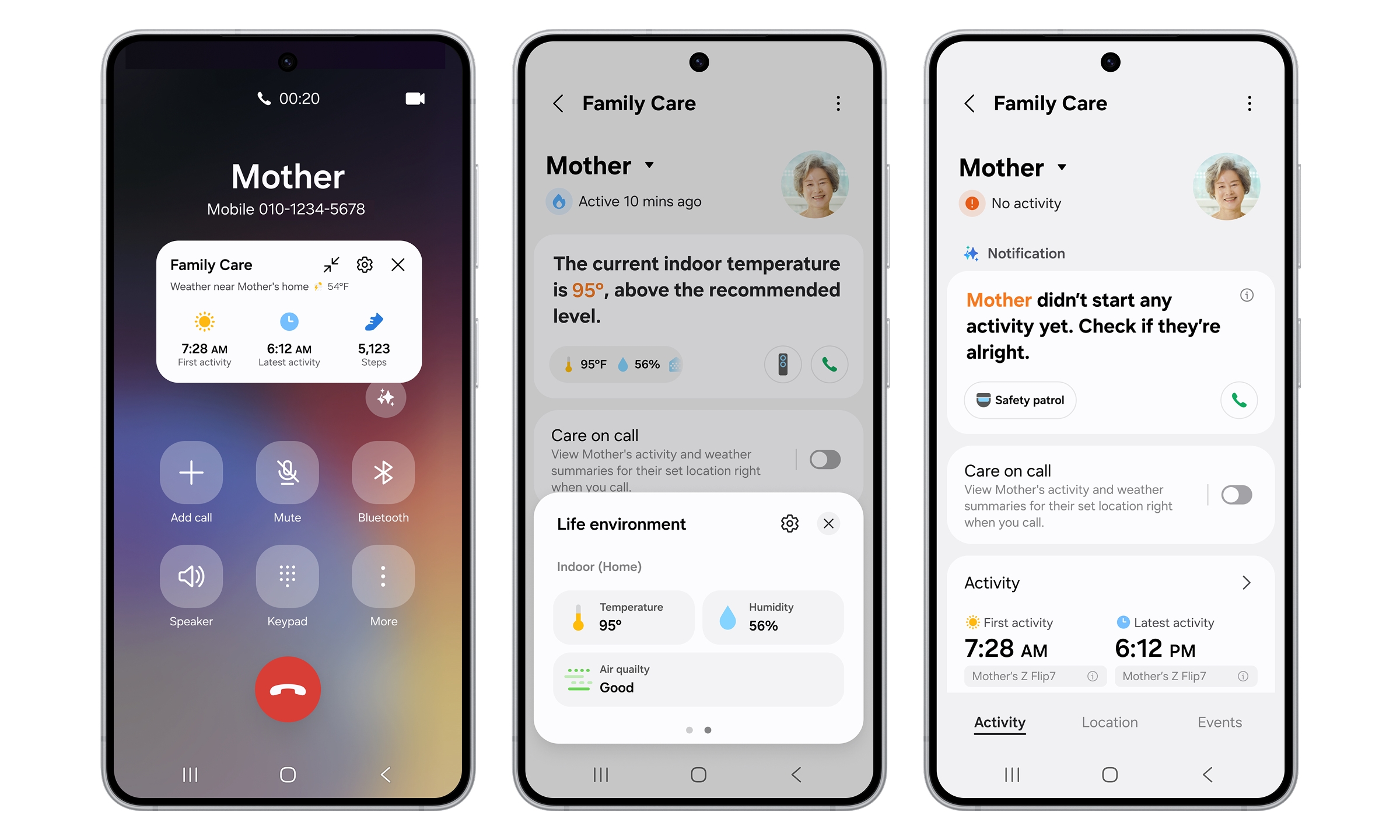
Care on Call is a new addition in this update. When you call a registered care recipient from your Galaxy phone, a floating pop-up appears on your screen before the call connects.
That pop-up shows three pieces of information:
- The time of the care recipient’s first recorded activity that morning
- Their most recent detected activity time
- Current local weather at their location
You walk into the conversation already knowing whether your parent got out of bed, how long ago they were last active, and whether the weather near them could create any health risk. The data comes from SmartThings-connected devices and any linked Galaxy wearables.
Care on Call runs on Galaxy smartphones with One UI 8.5 or later. Standard internet calls do not support it; the feature works with regular phone calls only.
Think about how that changes a typical check-in call. You no longer start with “How are you feeling today?” as a proxy for “Did anything go wrong?” You start with real context.
Safety Patrol: How SmartThings Family Care Turns a Robot Vacuum Into a Monitoring Tool
Safety Patrol is an expanded feature within SmartThings Family Care. The feature works with Samsung’s 2026 Bespoke AI Jet Bot Steam Ultra robot vacuum to check different areas of a care recipient’s home on demand.
If the care recipient shows no detected activity for a set period, you receive a notification on your phone. You can then remotely trigger Safety Patrol to send the vacuum on a visual check of the home.
What Happens When Safety Patrol Activates
Once activated, the robot streams live video from its built-in camera to your phone. You can watch what it sees in real time as it moves through the home. The vacuum also has a built-in speaker and microphone, so you can speak to your parent directly and hear their response from wherever you are.
The AI camera can detect a person lying on the floor. When it identifies this, it sends an emergency alert immediately. This gives families a fall-detection option that does not require a wearable device on the care recipient’s body.
Remote activation requires the caregiver account to have permission to control the care recipient’s devices inside SmartThings. The care recipient must approve this during setup. Availability varies by region and product model.
Environmental Monitoring: Climate and Air Quality Alerts for Your Parent’s Home
SmartThings Family Care now tracks the home environment in real time. The platform pulls continuous data from air conditioners, air purifiers, dehumidifiers, and humidifiers, monitoring temperature, humidity, and indoor air quality.
When the system detects an unusual pattern, it sends you a notification. You can also control those appliances remotely from your phone.
Consider this scenario: your parent’s city hits a heat wave, but their air conditioner shows no activity during peak afternoon hours. SmartThings spots the deviation and alerts you. You can turn on the AC remotely before indoor temperatures become dangerous, without needing to call and explain every step.
This level of monitoring goes beyond standard smart home alerts. Most platforms tell you a device is offline. SmartThings Family Care tells you a device’s behavioral pattern changed in a way that may affect your parent’s health.
Care Insight: The Weekly Pattern Tracker Inside SmartThings Family Care
Care Insight analyzes your parent’s activity data across time rather than in isolated snapshots. The feature compares the current week’s activity levels and connected device usage against the previous week.
If a significant change appears, you receive an alert. The feature pays close attention to temperature and humidity levels that fall outside comfortable ranges, tracking whether they correlate with changes in your parent’s activity patterns.
A subtle drop in kitchen appliance activity across two consecutive weeks could point to appetite loss. A bedroom door sensor that stops logging expected morning movement could indicate disrupted sleep. Care Insight does not diagnose anything, but it puts the data in front of you so you can raise the right questions with your parent’s doctor.
Among adults age 50 and older, AI usage nearly doubled from 18% in 2024 to 30% in 2025, according to AARP’s 2026 Tech Trends and Adults 50-Plus report. As older adults grow more comfortable with technology, the value of behavioral data from systems like Care Insight increases because the data becomes richer and more consistent over time.
Now Brief Comes to Samsung TVs and Family Hub Refrigerators
Now Brief is Samsung’s AI-powered daily briefing service. It launched on Galaxy phones as a one-screen summary of home activity, energy use, sleep data, and family check-in information.
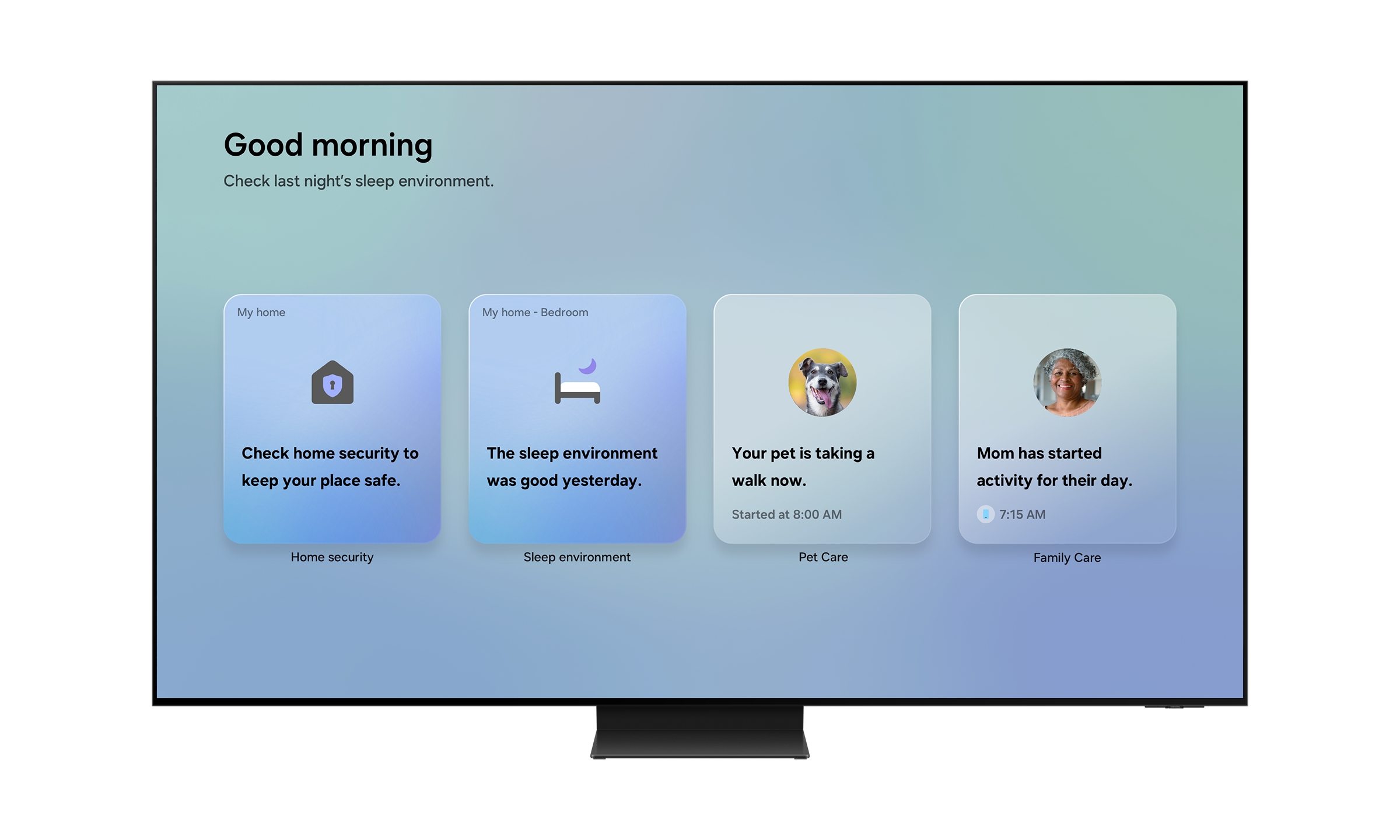
The April 2026 update expands what Now Brief covers and where it appears. On Galaxy phones launching with the Galaxy S26 series, Now Brief now includes Home Security, Family Care, and Pet Care alongside its existing Home Insight, Energy, and Sleep Environment Report sections. One screen shows door lock status, security mode alerts, parents’ daily activity updates, energy readings, sleep data from the previous night, and pet walking information.
Which Devices Now Support Now Brief and When
Samsung plans to roll out Now Brief to additional hardware in phases throughout 2026:
- Samsung TVs from 2024 or later will receive Now Brief through phased Over The Network (OTN) software updates
- Family Hub refrigerators from 2021 or later will also receive it in phases, depending on region
You do not need to manually open Now Brief on a TV or Family Hub fridge. Once you complete setup, it activates automatically when you approach the TV, touch the refrigerator screen, or open and close the fridge door.
This turns your morning routine into a passive briefing. You glance at the fridge screen as you reach for breakfast and already know whether your parent was active, whether the front door sensor logged anything unusual overnight, and how much energy your home used while you slept.
How to Set Up SmartThings Family Care in Under 20 Minutes
You and your parent both need the SmartThings app installed before any of this works. Here is the full setup sequence:
- Install SmartThings on your phone. Confirm your parent has it installed on theirs.
- Open the Life tab inside SmartThings and locate the Family Care section. Tap to enable it.
- Send an invitation link to your parent. The link walks them through a guided setup process they can complete without your help.
- Register your parent’s devices in their SmartThings account. This includes appliances, door sensors, door locks, and the robot vacuum.
- Request caregiver permissions to control devices remotely. Your parent approves this step through their app.
- Enable Now Brief in the Life tab for daily summaries. For TV and Family Hub support, check back after a software update confirms Now Brief availability for your specific model.
- For Care on Call, confirm your Galaxy phone runs One UI 8.5 or later. Go to Settings inside SmartThings and enable Care on Call under the Family Care section.
The care recipient controls every data category they share. They can turn off individual features or remove your caregiver access at any time through the SmartThings app. No data continues flowing once they revoke access.
Privacy Considerations for SmartThings Family Care
Any home monitoring system brings privacy questions. SmartThings Family Care is no exception.
Samsung says sensor data is processed and stored locally on the SmartThings hub rather than in the cloud, which limits the amount of behavioral data moving through external servers. Care alert notifications necessarily share some information with the designated caregiver, since that is the function of the service.
Are you comfortable with a robot vacuum camera activating in your parent’s living room? That question deserves an honest family conversation before you enable Safety Patrol. The feature serves a real safety purpose, but your parent’s comfort with it matters more than your peace of mind.
Data privacy concerns rank as the top barrier to tech adoption among adults 50 and over, cited by 25% of that group, according to AARP’s research. Setting clear expectations before turning on monitoring features prevents trust problems later. Your parent should know exactly what each feature does, what you can see, and how to turn it off if they change their mind.
What to Do With SmartThings Family Care Right Now
Start by checking device compatibility before anything else. Galaxy phones need One UI 8.5 or later for Care on Call. TVs from 2024 onward and Family Hub fridges from 2021 onward qualify for Now Brief. Safety Patrol’s enhanced capabilities require the 2026 Bespoke AI Jet Bot Steam Ultra specifically.
If your parent already uses Samsung appliances and a Galaxy phone, the hardware gap is likely smaller than you expect. Open SmartThings, go to the Life tab, and check whether Family Care appears for your account region. The full setup takes under 20 minutes when both caregiver and care recipient follow the guided steps together.
For more on how Samsung’s One UI 8.5 update shapes the Galaxy experience beyond smart home features, read the Samsung One UI 8.5 coverage at Cloudorian.
The AI-powered aging and elderly care market is projected to grow from $56.78 billion in 2025 to $387.52 billion by 2035 at a 21.3% annual growth rate, according to Insight Ace Analytic. Samsung’s SmartThings platform sits at the center of that market because it turns hardware most families already own into a functional caregiving network.
The biggest barrier to using SmartThings Family Care is not technical. It is the conversation. Talk to your parent about what they want to share, what makes them feel watched rather than supported, and where their comfort line sits. Once you have that conversation, the setup takes less than half an hour.
Discover more from Cloudorian — Android, Samsung & Windows How-To Guides
Subscribe to get the latest posts sent to your email.



