

Most creators shoot every scene at least twice. Once in vertical for Instagram Reels and TikTok. Once in horizontal for YouTube. That double-shoot habit costs time few creators can afford. According to Epidemic Sound’s 2024 Creator Economy Report, 49% of monetizing creators already spend 20 or more hours per week on content. Adding re-shoots on top of that is not sustainable. Double View, a new iOS camera app by CAMALOT LLC, removes the format re-shoot entirely. It records portrait and landscape video simultaneously from one tap. See 10 Must-Have Apps Everyone Should Be Using.
Key Takeaways
- Double View captures 9:16 vertical and 16:9 horizontal video in a single recording session
- Photo mode produces a 4:5 portrait and 5:4 landscape pair from one shutter press
- Each preview window has its own independent zoom slider
- Automatic color matching keeps both outputs visually consistent
- Free trial includes 5 photos and 5 videos before you subscribe
- Subscription costs $1.99 per month; iOS 17.0 or later is required
The Real Cost of Shooting for Two Platforms
Every major platform you publish on expects a different video orientation.
Instagram Reels, TikTok, and YouTube Shorts all favor 9:16 vertical. YouTube main videos and Facebook Watch play best in 16:9 horizontal. Posting to both means either re-shooting, cropping, or accepting that one version will look wrong.
Cropping is not a real solution. When you crop a 16:9 video into a 9:16 frame, you lose subject context on both sides. When you crop a 9:16 video into 16:9, you drop the top and bottom of your frame. Neither output matches what you saw through the lens.
According to Multipost Digital’s 2025 workflow research, reformatting content across multiple platforms adds roughly 15 minutes of administrative work per platform. Across a typical multi-platform strategy, that compounds into nearly two hours of pure formatting time per piece of content.
Double View cuts that formatting time at the source. You do not reformat afterward because you already have both files the moment you stop recording.
Why Re-Shooting Is Worse Than It Sounds
Re-shooting is not just about time. It introduces variables you cannot control.
Light changes between takes. Your subject moves. The energy shifts. The first take on any spontaneous moment is the only take you get.
This problem hits event photographers and travel creators especially hard. You cannot ask a street performer to repeat their act for your horizontal video. You cannot recreate the expression on someone’s face one minute later.
Double View captures both orientations at the same moment. What you see in both previews is what you record.
What Double View Actually Does
Double View is not a front-and-back camera recorder. That distinction matters.
Most dual camera apps on the App Store record the front camera and the rear camera at the same time. They let you see your face and the scene in front of you simultaneously. That solves a different problem.
Double View uses one camera direction and splits the output into two aspect ratios. The app runs two live preview windows on screen at the same time. Both previews show the same subject. Each preview frames it differently.
Storyblocks reported in 2024 that brands now shoot in high resolution specifically to produce multiple format outputs from a single session, delivering two versions of content for the effort of one. Double View brings that same strategy to individual creators shooting on iPhone.
Photo Mode: Portrait and Landscape in One Press
Photo mode captures a 4:5 portrait image and a 5:4 landscape image simultaneously. One shutter press produces both files.
The 4:5 ratio is the standard Instagram feed photo format. Instagram recommends it for the highest screen real estate on a phone display. The 5:4 ratio gives you a wider frame ready for horizontal posts, print output, or desktop viewing.
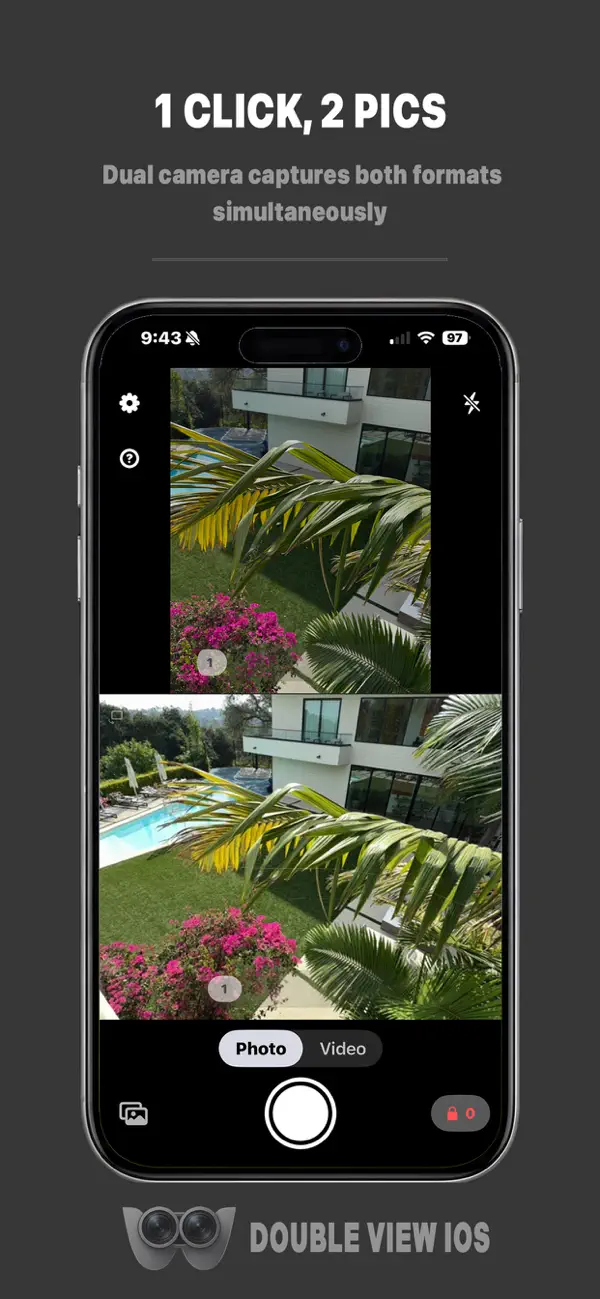
Both images land in your camera roll as separate files. You do not need to edit, crop, or export. They are ready to upload directly to each platform.
Video Mode: 9:16 and 16:9 From One Recording Session
Video mode records 9:16 vertical and 16:9 horizontal simultaneously. You choose 24fps or 30fps before you start.
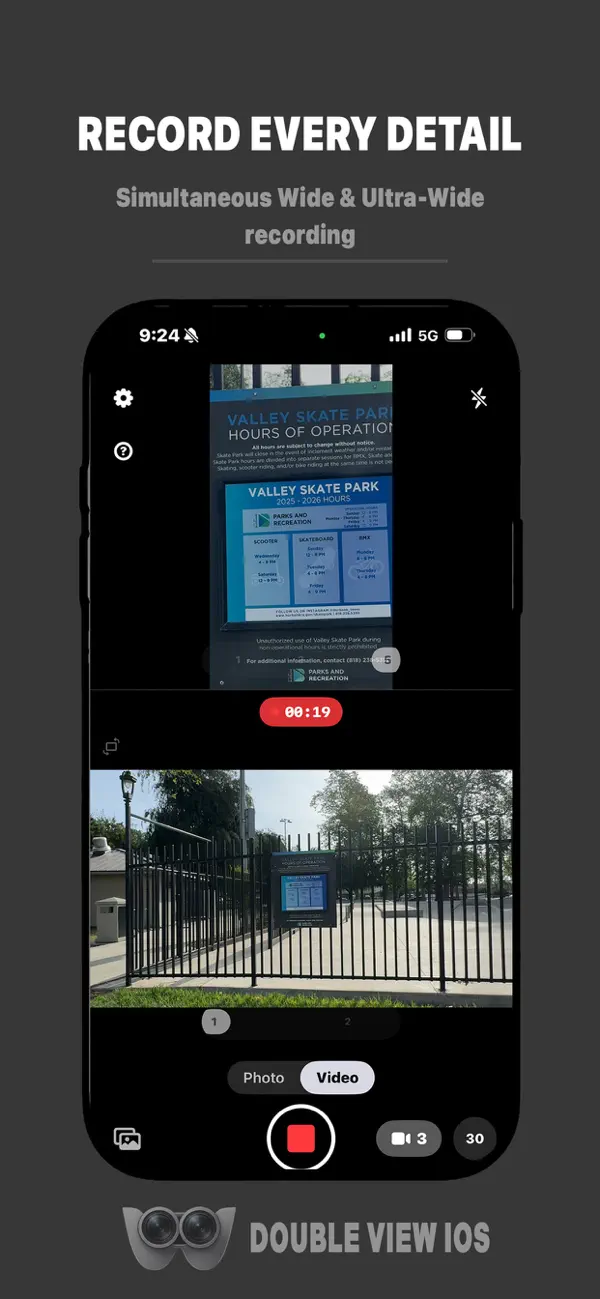
The 9:16 output goes directly to Instagram Reels, TikTok, or YouTube Shorts. The 16:9 file is ready for a YouTube upload, a Facebook video post, or any widescreen destination.
Both video files save separately to your camera roll. No merging, no splitting, no format conversion needed after the fact.
Live Dual Preview: See Both Frames Before You Shoot
The dual preview screen is one of Double View’s most practical features. You see both the portrait framing and the landscape framing on screen before you press record.
This preview matters because portrait and landscape compositions need different subject placement. A subject centered for portrait may sit awkwardly wide in the landscape frame. Seeing both live lets you adjust position, not fix it in post.
Each preview window has its own independent zoom slider. You can zoom the portrait frame to a tighter shot while keeping the landscape frame wide, or match them exactly. The app does not force both previews to share a zoom level.
Controls, Technical Performance, and Version 3.0 Updates
Double View 3.0 was a full rebuild of the app’s core controls. The original zoom controls required tapping buttons. Version 3.0 replaced them with a drag-based slider using logarithmic scaling.
Logarithmic scaling means small drag movements near the wide end produce fine adjustments. Larger drags at the telephoto end move zoom more aggressively. That mirrors how professional camera zoom controls behave.
The zoom pill fades from view when you are not touching it. It reactivates on contact. Pinch-to-zoom also syncs with the slider, so both inputs drive the same zoom position. Haptic feedback fires at preset zoom crossings, giving physical confirmation when you hit common focal lengths.
Thermal Optimization and the Camera Crash Fix
Earlier versions of Double View had a crash issue tied to multi-camera pixel format conflicts. This affected some iPhone models running the app in video mode.
Version 3.0 added a pixel format fallback that prevents the crash when the default format fails. The app also added thermal optimization, capping the preview frame rate at 30fps during recording to reduce heat generation on the device.
These are not cosmetic updates. They are stability improvements that make the app reliable during extended shoots.
Automatic Color Matching Between Both Outputs
Double View runs automatic color matching in the background during every capture. Both outputs stay visually consistent with each other regardless of zoom differences between the two preview windows.
This matters when you are publishing to two platforms. The portrait version of your video should not look warmer or cooler than the landscape version of the same clip. Color inconsistency between paired outputs is a quality problem that competing apps often leave for the creator to fix manually.
Who Gets the Most Value From Double View
Double View is a narrow tool that solves one specific problem. Not every creator needs it. But for those who do, it removes a real workflow bottleneck.
Instagram and YouTube Creators Publishing the Same Content
Are you posting the same shoot to both Instagram and YouTube every week? Then you already know how much time the format gap costs you.
Double View removes the gap at the recording stage. One session produces two format-ready files. You spend that saved time on editing, scripting, or engaging with your audience instead.
The creator economy currently sits at $191.55 billion and is projected to reach $528.39 billion by 2030. That growth means more creators competing for the same audience attention. Any tool that gives you back hours of production time compounds into a real competitive edge over time.
Event Creators and Unscripted Moment Capture
Wedding videographers, event photographers, concert documentarians, and street content creators all work in one-take environments. There is no second chance to re-capture the moment in a different orientation.
Double View solves this before the shoot starts. You open the app, set your framing in both preview windows, and record. When the moment happens, you get both orientations automatically.
The app also works for everyday users who simply want flexibility. A family birthday, a street performance, a travel highlight reel — any moment you want to post in multiple places benefits from dual-format capture.
Creators Building a Cross-Platform Presence
Do you manage your content across three or more platforms? Then reformatting is likely already eating into your weekly content hours.
Cross-platform publishing is the standard expectation for creators in 2025. You cannot rely on a single platform’s algorithm to carry your growth. That means every piece of content you shoot needs to work in multiple formats. Double View makes that happen automatically at the recording stage rather than after the fact.
Double View vs. Front-and-Back Dual Camera Apps
The App Store has no shortage of dual camera apps. Most of them serve a different use case than Double View. Understanding the difference saves you from downloading the wrong tool.
Apps like DoubleTake by Filmic, MixCam, and Duet Camera all record the front camera and rear camera simultaneously. They are built for reaction videos, vlogs where you want your face and the scene in one frame, and tutorials where viewers benefit from seeing both perspectives at once.
Double View does not do that. It uses one camera direction and produces two aspect ratio outputs. If you need your face on screen alongside the subject, Double View is not the right app. If you need the same subject delivered in both portrait and landscape from one shoot, it is exactly the right tool.
Here is how the use cases break down clearly:
| Your Goal | App to Use |
|---|---|
| Show face + scene in the same video | DoubleTake, MixCam, DualCapture |
| Record portrait + landscape from one take | Double View |
| Post to Instagram and YouTube without re-shooting | Double View |
| Reaction content with split-screen layout | DoubleTake, MixCam |
Picking the wrong category of app wastes your time. Double View belongs in a distinct category: format-split recording, not perspective-split recording.
Pricing, Compatibility, and How to Start
Double View is free to download from the Apple App Store. The free trial includes 5 photos and 5 videos before any payment is required.
That trial is enough to run through both modes and compare your outputs. Check how the 4:5 and 5:4 photos look side by side. Record a short clip and open both video files in your camera roll. That ten-minute test will tell you whether the app fits your workflow before you commit.
After the trial, the subscription runs $1.99 per month. CAMALOT LLC also offers an annual plan at a lower monthly rate for creators who commit to the tool long-term. The pricing is designed to be accessible, not a barrier.
The app requires iOS 17.0 or later. This limits access to iPhones that have received the iOS 17 update. If your device runs iOS 16 or earlier, you need to check compatibility before downloading.
Step-by-Step: Your First Dual Format Recording Session
- Download Double View from the Apple App Store and open the app.
- Grant camera access when the permissions prompt appears.
- Select Photo Mode or Video Mode from the main interface.
- Check both preview windows on screen. Confirm your subject sits well in both frames.
- Adjust zoom on each preview independently using the drag slider.
- Cycle through flash options — off, on, or auto — using the flash button.
- Tap the shutter button once to capture both formats at the same time.
- Open the gallery tab within the app to view your paired outputs.
- Export each file from your camera roll independently to the platform it belongs on.
Both files are stored as individual items in your camera roll. You upload them to Instagram, YouTube, TikTok, or any other destination as separate files.
Put It Into Your Workflow This Week
The fastest way to evaluate Double View is to replace your next scheduled shoot with it. Pick a piece of content you plan to post to both Instagram and YouTube. Shoot it with Double View instead of your standard camera app.
Compare the two outputs. Check the color consistency between the portrait and landscape files. Look at whether the independent zoom framing improved either version compared to what a crop would have produced.
If you post cross-platform content more than twice a week, the time you recover from eliminating re-shoots and crop work will add up quickly. At $1.99 a month, the math on that time recovery is straightforward.
Cloudorian covers the tools and apps helping creators get more from their devices, including the latest on camera apps, Android updates, and mobile content tools that affect how you publish. If you are building a cross-platform content workflow on iPhone, Double View is one of the few apps that addresses the format problem at the source — before post-production ever starts.
Discover more from Cloudorian — Android, Samsung & Windows How-To Guides
Subscribe to get the latest posts sent to your email.



