

Samsung released the One UI 8.5 beta for the Galaxy S23 FE on April 9, 2026. The build is already on Samsung’s test servers and registration is open right now. Galaxy S23 FE owners in India, South Korea, the UK, and the US can sign up through the Samsung Members app today.
Key Takeaways
- One UI 8.5 beta is now available for Galaxy S23 FE
- Beta build identifier: S711NKSUEZZD5, confirmed on the Korean test server
- The download weighs approximately 4.16GB and includes the April 2026 security patch
- Eligible countries: India, South Korea, UK, and US
- Stable release is expected in late April or May 2026
- You register through Samsung Members, not through Settings
What One UI 8.5 Is and Why It Matters for Galaxy S23 FE
One UI 8.5 runs on Android 16 QPR2. It is Samsung’s second major software update built on Android 16, released on top of One UI 8.0. Samsung describes it as the biggest mid-cycle upgrade the company has ever shipped to existing devices.
The Galaxy S26 series launched with One UI 8.5 preinstalled. All other Galaxy devices are receiving it through a rolling beta program that Samsung started in January 2026. The S23 FE is now part of that program.
The update brings a redesigned interface and a rebuilt Quick Panel. It also delivers a full Galaxy AI suite and system-level performance improvements. Samsung is delivering all of that to a phone it released in 2023.
What Is Inside the One UI 8.5 Beta for Galaxy S23 FE
A Fully Customizable Quick Panel
One UI 8.5 gives you complete control over the Quick Panel layout. You can move any widget, toggle, or card to any position on the panel. You can also delete most elements entirely if you never use them.
The update introduces a floating tab bar at the bottom of Samsung’s stock apps. It uses a pill-shaped element with a frosted color scheme. This design replaces the flat tab bar that shipped with every earlier One UI version.
Galaxy AI Features Arriving on Your S23 FE
Samsung is shipping several Galaxy AI upgrades with this beta. These are the key tools landing on the S23 FE:
- Photo Assist lets you generate and edit AI images without saving between each iteration.
- Now Nudge suggests actions and information based on what is currently on your screen.
- Meeting Assist transcribes and summarizes your calls and meetings in real time.
- Smart Clipboard organizes your recent copies and makes them instantly searchable.
- Notification Summaries group and condense your alerts automatically throughout the day.
Are you still running One UI 8.0 on your S23 FE? The AI tools in One UI 8.5 represent a clear generational step forward in what Samsung’s software can do.
Privacy and Security Upgrades
Privacy Protection is one of the most practical additions. When you share a screenshot, the feature automatically blurs sensitive content like bank details and personal ID numbers. You share the image and your phone handles the editing.
Samsung also added Partial Screen Recording with this build. You can record any selected area of the display without capturing the full screen. Samsung also ships Audio Broadcast, which turns your phone into a live microphone broadcasting audio to connected earbuds.
System Performance and App Updates
One UI 8.5 improves haptic feedback, thermal management, and multitasking on the Galaxy S23 FE. App launches are faster and screen transitions are smoother, according to Samsung’s official changelog on the Samsung Global Newsroom.
Samsung updated Health, Internet, Wallet, and Keyboard to match the One UI 8.5 design language. You will notice UI refinements and performance improvements across all four apps after installing.
The Gallery app now creates monthly, quarterly, and annual rewind stories from your photo library automatically. Samsung builds and organizes these collections without any input from you.
Which Countries Can Access the One UI 8.5 Beta for Galaxy S23 FE
Samsung is running the S23 FE beta as a phased rollout across four markets. You must register your device in one of these countries to qualify:
- India
- South Korea
- United Kingdom
- United States
The Galaxy Z Fold 5 and Z Flip 5 have a narrower reach, limited to Korea and the US only. The Galaxy A36 5G is currently limited to India. Samsung confirmed on April 9 that all four markets above are eligible for the S23 FE beta.
Samsung also confirmed the program will expand to more devices later in April. That expansion covers mid-range models including the Galaxy A55 and A56.
How to Download and Install the One UI 8.5 Beta on Galaxy S23 FE
Follow these steps to register and install the beta:
- Open the Samsung Members app on your Galaxy S23 FE.
- Check the home screen or the Notices tab for the One UI 8.5 beta registration banner.
- Tap the banner and complete the registration steps to enroll your device.
- Open Settings on your phone.
- Tap Software update.
- Tap Download and install.
- The beta build will appear as available. Tap Install now.

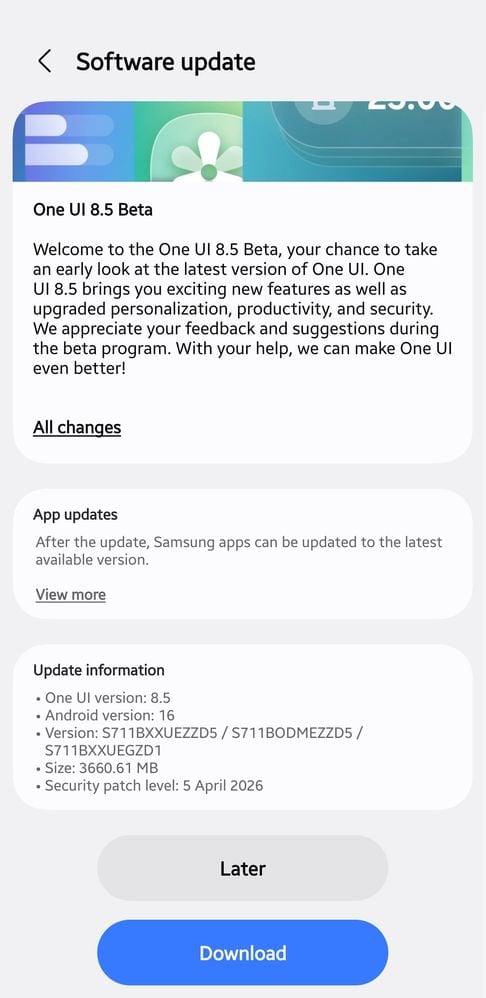
The download weighs approximately 4.16GB, as reported by SamMobile. Connect to Wi-Fi before starting. Save any open work before the installation begins, since your device restarts during the process.
Back up your data before proceeding. Beta firmware carries bugs and battery performance can fluctuate during the first few days after installation.
When Will the Stable One UI 8.5 Update Arrive for Galaxy S23 FE
Samsung has not confirmed a specific date for the stable release on S23 FE. Based on the current testing timeline, late April or May 2026 is the realistic window.
The Galaxy S25 series is already on its ninth beta build. The S23 FE is entering its first. That gap typically takes four to six weeks to close under Samsung’s current release cadence.
Do you prefer to skip the beta entirely and wait? You stay on One UI 8.0 until Samsung pushes the stable build. The stable version carries full bug fixes and delivers a cleaner experience than any early beta build.
See Cloudorian.net’s One UI 8.5 beta eligible device guide for the full confirmed list, including foldables and A-series phones.
What to Do Right Now
Open Samsung Members today and look for the One UI 8.5 beta registration banner. Samsung beta windows tend to close within days of opening. Missing the registration period means waiting for the stable release.
If you join the beta, submit bug reports through Samsung Members whenever you spot issues. Samsung’s engineering team actively monitors those reports and uses them to push fixes in subsequent builds. Your feedback directly shapes what lands in the stable release.
If you are outside the four supported regions, check your Samsung Members app anyway. Samsung sometimes expands beta access quietly before making an official announcement.
Discover more from Cloudorian — Android, Samsung & Windows How-To Guides
Subscribe to get the latest posts sent to your email.



