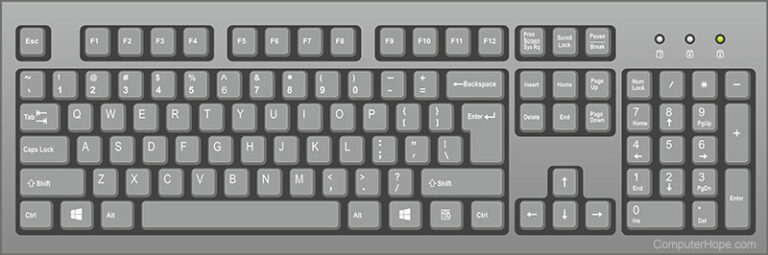
Welcome to your guide to the QWERTY keyboard! In this guide, you’ll learn about the history of the QWERTY keyboard, its advantages and disadvantages, and its importance in the world today. You’ll also find useful information on the different types of keyboards, the importance of ergonomics, and the different keyboard layouts available.
History of the QWERTY Keyboard
The QWERTY keyboard was first developed in the late 19th century for use on typewriters. It was designed by Christopher Latham Sholes to prevent the typebars from jamming when typing quickly. The letters were arranged in such a way that the most commonly used letters were far away from each other. This prevented them from touching and jamming. The QWERTY layout has been used ever since and is now the most commonly used keyboard layout in the world.
Advantages of the QWERTY Keyboard
The QWERTY keyboard is the most widely used keyboard layout in the world today. This is because of its familiarity. People are used to typing on a QWERTY keyboard layout and find it easier to use than other keyboard layouts. It is also the standard keyboard layout for computers and laptops, making it a familiar and easy-to-use keyboard for most people.
Another advantage of the QWERTY keyboard is its variety. Because it is the world standard, you can find a wide variety of designs to choose from when using a QWERTY keyboard. Some have ergonomic designs, while others are made with office, internet, or gaming use in mind. While you can find QWERTY keyboards at any computer store, you may have to look a little harder to find a Dvorak or Colemak keyboard.
Disadvantages of the QWERTY Keyboard
One of the biggest disadvantages of the QWERTY keyboard is that it is not as efficient as other keyboard layouts. It places letters that are rarely used in the most optimal positions, while your fingers need to stretch for the keys you use all the time. Long sequences of letters require you to use the same hand to type them, which can be inefficient because your hand has to move around the keyboard to get back to the home row.
Another disadvantage is that it can be difficult to switch to another keyboard layout if you’re used to typing on a QWERTY keyboard. For instance, if you decide to switch over to a Dvorak or Colemak keyboard, you might struggle to type QWERTY again and end up frustrated when trying to work on other people’s computers.
The Ergonomy Factor
Unfortunately, the QWERTY keyboard is not built with comfort in mind. Stress is amplified because of the high proportion of identical fingers. Carpal tunnel syndrome is more likely to develop on a QWERTY keyboard than on a keyboard with a more ergonomic layout if you use it for long periods of time. You’ll experience more hand fatigue because you’ll have to reach further than on a Dvorak keyboard to reach certain keys.
Other Keyboard Layouts
Although the QWERTY keyboard is the most widely used keyboard layout, there are other layouts that are more efficient and ergonomic. For instance, the Dvorak keyboard was designed to be more efficient and reduce finger strain. It was claimed that a user could improve his typing speed by more than 70% on a Dvorak keyboard. Some users of the Dvorak keyboard also report improved accuracy in their typing.
The Colemak keyboard was designed to be more efficient than the QWERTY, but with a short learning curve if you are switching over from QWERTY to Colemak, as the locations of only 17 keys were changed.
Conclusion
The QWERTY keyboard is the world-standard keyboard layout that is used on computers and laptops. It is familiar and easy to use, but it is not as efficient as other keyboard layouts such as the Dvorak and Colemak. It also puts a strain on the fingers due to its high same-finger ratio. If you type constantly on the QWERTY keyboard, you should consider switching to a more ergonomic layout for improved typing speed and accuracy.
Discover more from Cloudorian — Android, Samsung & Windows How-To Guides
Subscribe to get the latest posts sent to your email.
