

Users spend 32 percent of their app time consuming status content. Burying this feature in a separate tab creates unnecessary friction for daily users. This article breaks down the new WhatsApp status updates chat list interface and its impact on your communication habits.
The mechanics of the new WhatsApp status updates chat list
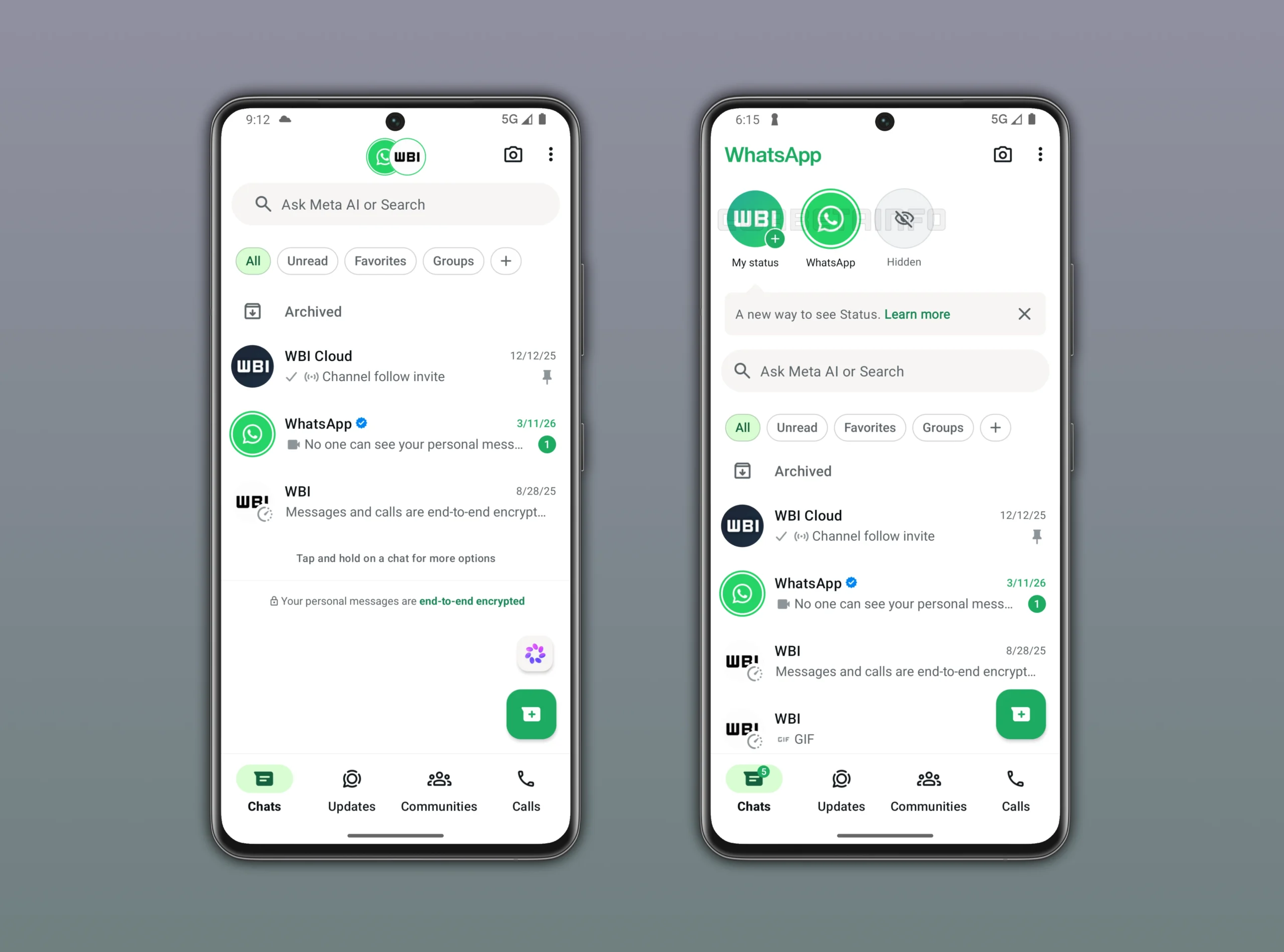
According to WABetaInfo, the latest beta version moves status previews directly above your active conversations. You see up to three recent updates from your contacts immediately upon opening the app. Scrolling down reveals additional updates from archived chats and inactive contacts.
This design mimics the story layout popularized by other major platforms. The dedicated updates tab remains available for a complete visual overview. The main chat screen now offers a compact representation of these same updates.
The application hides the top left logo when you view these new status previews. The logo reappears the moment you scroll down the interface. This responsive header frees up screen space for your active conversations.
Developers designed this layout to make viewing updates more immediate. You no longer need to switch tabs to see recent activity. The interface brings ephemeral content closer to your main conversation list.
This interface adjustment reflects a deep understanding of mobile user behavior. People want immediate access to visual media without navigating complex menus. The top bar placement solves this exact user experience problem.
How this layout shifts user attention and daily habits
Placing stories above messages forces immediate visual engagement with ephemeral content. Data from Jesty CRM shows 500 million people already use this feature daily. This prominent placement will likely push that daily usage number much higher.
You will notice a shift in how quickly you consume contact updates. The friction of switching tabs disappears entirely with this new design. Do you find yourself checking statuses before replying to urgent messages?
This layout prioritizes passive consumption over active messaging. Users often prefer watching updates instead of initiating direct conversations. The new interface caters directly to this passive viewing behavior.
The compact view requires less commitment than opening a full tab. You can quickly glance at thumbnails while managing your daily messages. This direct placement keeps you engaged within the primary application window.
Brands will benefit massively from this increased organic visibility. Small businesses rely on these updates to showcase new products daily. The chat list placement turns your messaging app into a storefront.
Meta is currently testing this layout with a limited group of Android users. The rollout targets users running version 2.26.17.1 from the Google Play Store. You might not see this change immediately on your personal device.
Developers use this phased approach to monitor interaction patterns. They gather feedback to determine if the placement distracts from core messaging features. This mirrors the testing strategy seen during the WhatsApp liquid glass interface rollout.
Experimental features often undergo several refinements before a public release. The company tracks how often users click these top bar previews. They compare this data against traditional tab navigation metrics.
The final public version might look different based on this testing data. Beta testers provide the usage statistics needed to finalize the design. You must wait for the global release to experience the final polished interface.
Beta programs help developers catch bugs before a massive global launch. You can join these testing programs through the official app store. Participation gives you early access to upcoming interface changes.
Analyzing the algorithm behind the new ranking system
The application does not display these top bar updates chronologically. A specific ranking system determines which three contacts appear first. This system evaluates your past interactions to predict relevance.
Users who message you frequently will dominate your top bar. The algorithm also tracks whose updates you view most often. This creates a personalized feed built for your specific relationships.
You cannot manually pin specific contacts to this new top section. The system relies entirely on automated behavioral analysis. This mirrors the algorithmic feeds used by major social networks.
The ranking ensures you see content from your closest connections first. You spend less time searching for updates from important contacts. The software learns your preferences automatically over time.
This intelligent sorting prevents your screen from becoming cluttered with irrelevant content. You only see updates from people who matter to your daily life. The algorithm filters out the noise automatically.
Managing your privacy and visibility in the new interface
Increased visibility means your contacts will see your updates much faster. You must review your privacy settings to control who views your content. The new design removes the extra step of navigating away from chats.
You might want to find and change your WhatsApp phone number for privacy. Keeping personal updates separate from business contacts becomes more critical now. The top bar placement leaves little room for accidental oversharing.
Review your contact list and remove individuals who should not see your daily activities. The algorithm ranks these updates based on your interaction patterns. Frequent contacts will always appear first in your top bar.
Are you comfortable with your updates appearing instantly above chat lists? You must take proactive steps to secure your digital footprint. The platform gives you the tools to restrict your audience.
Your digital privacy requires constant vigilance as applications evolve. Take five minutes today to audit your current visibility settings. A small adjustment now prevents potential embarrassment later.
Preparing your account for the WhatsApp status updates chat list
You can take specific steps to manage this new layout effectively. These actions ensure the interface enhances rather than clutters your experience. Follow these steps to optimize your daily messaging routine.
- Open your Google Play Store app and check for pending updates.
- Review your current status privacy settings to exclude specific contacts.
- Mute accounts that post excessively to keep your top bar clean.
- Archive inactive chats to maintain a streamlined main interface.
This proactive approach keeps your messaging environment organized. You maintain control over the content that demands your attention. Take charge of your digital space before the global rollout completes.
You will adapt quickly to this new visual hierarchy. The design simplifies how you interact with your network. Enjoy the streamlined experience once the update reaches your device.
These simple habits will transform how you use the application daily. You will spend less time scrolling and more time connecting. Embrace these changes to improve your daily communication speed.
Discover more from Cloudorian — Android, Samsung & Windows How-To Guides
Subscribe to get the latest posts sent to your email.



