How-ToHow to Find and Change Your WhatsApp Phone Number

How to Find and Change Your WhatsApp Phone Number

-

You’ve found the best place to learn how to change or find your WhatsApp phone number. The WhatsApp number you use is an important piece of data that’s tied to your account. It is important to know how to update and locate this number in order for you stay connected with all your WhatsApp contacts.

Find Your Current WhatsApp Phone Number

Let’s start by figuring out how you can quickly locate your WhatsApp number.

  1. Tap the three dots at the top right corner of WhatsApp.
  2. Click on Account Settings.
  3. You will find your phone number at the top of your profile, next to both name and photo

That’s it! You can see the phone number that your WhatsApp account currently belongs to with just a couple of taps. What if you want to switch your WhatsApp number?

How to Change Your WhatsApp Phone Number

You may be required to update your WhatsApp number in certain situations:

  • How to get a phone with a unique number
  • Switching SIM cards or carriers
  • You want to change your WhatsApp number

WhatsApp allows you to easily change your number, while retaining your chat history and account information. Here’s how:

  1. Open WhatsApp Settings
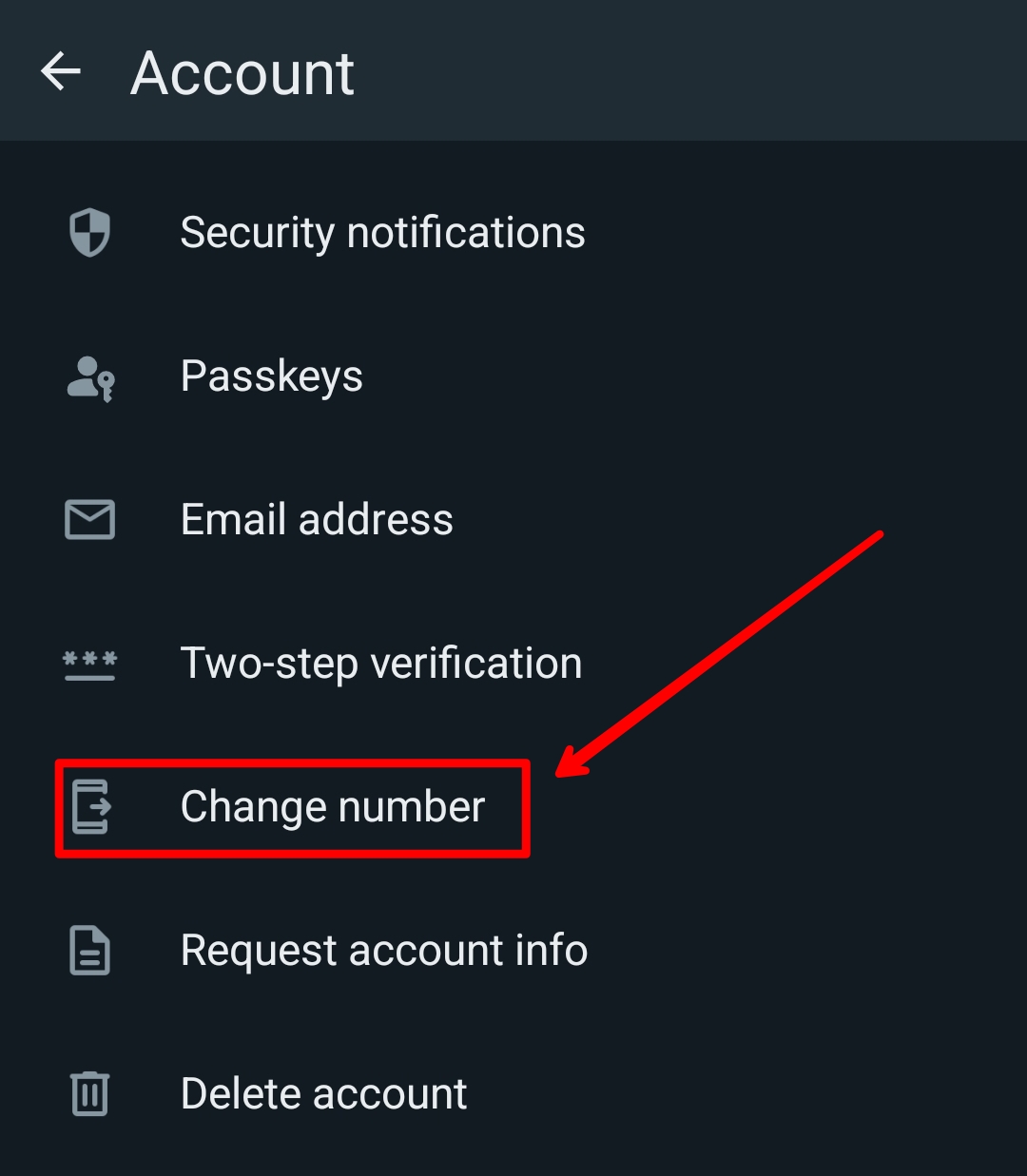
  2. Click Account > Change NumberHow to Find and Change Your WhatsApp Phone Number
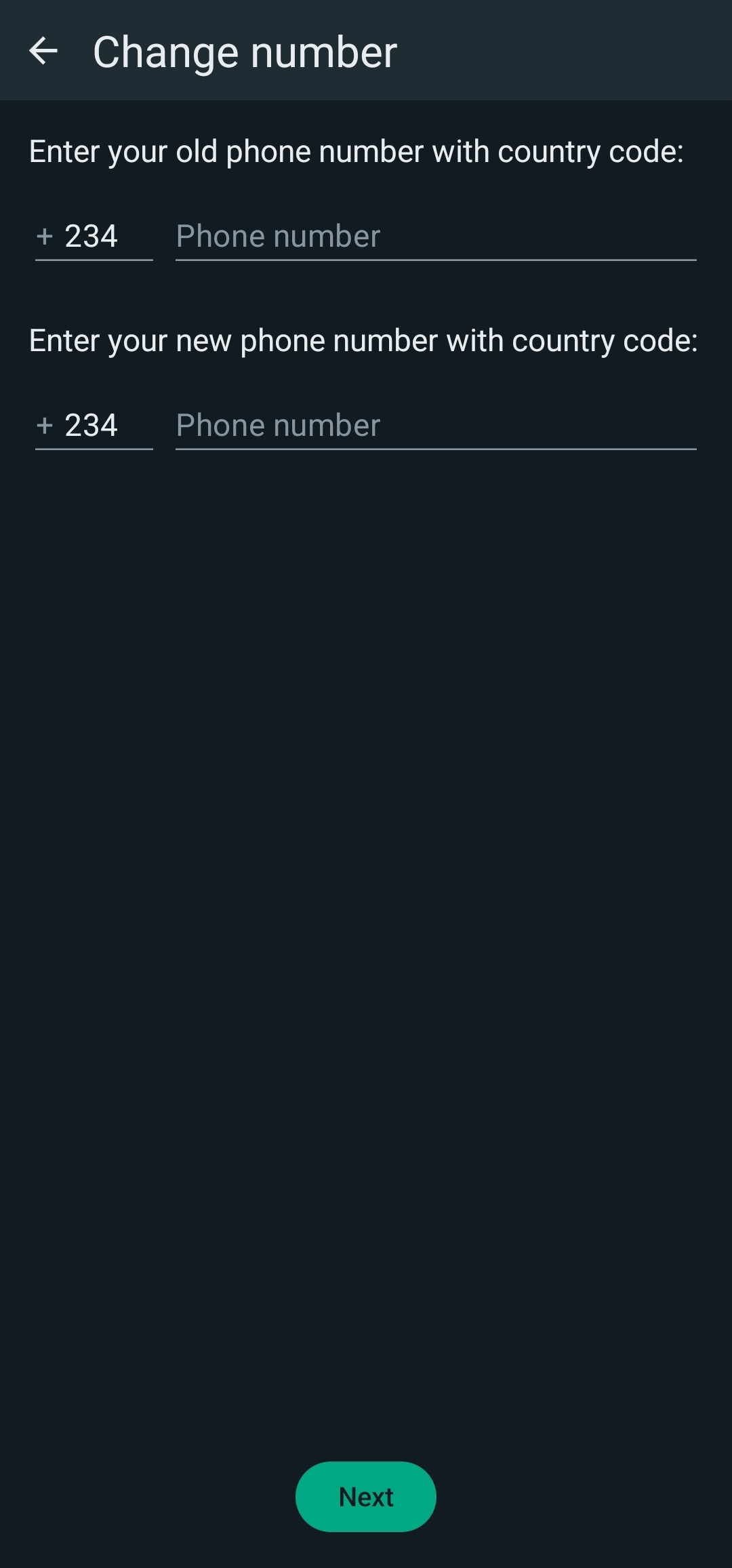
  3. Please enter your old phone number and new oneHow to Find and Change Your WhatsApp Phone Number
  4. Click Done to verify the new number.

Now, your WhatsApp number has been updated. You will now be able to update your WhatsApp phone number.

Inform Contacts about Your New Phone Number

You can notify contacts of your new WhatsApp number after changing it. WhatsApp displays a list with contacts and groups that you can notify. You can select to inform all your contacts, or only certain people. Your contacts will receive a notification in chat that you have changed your phone number.

Update your WhatsApp number

It is easy to find and change your WhatsApp number. In your account settings, you can check your current phone number in just seconds. WhatsApp allows you to easily change your phone number without losing any of your chats or contacts. You’ll never miss a message important from your friends, colleagues or family if you keep your WhatsApp number up to date.


Discover more from Cloudorian — Android, Samsung & Windows How-To Guides"

Subscribe to get the latest posts sent to your email.

Montel Anthony
Montel Anthonyhttps://www.cloudorian.net/
Montel Anthony is a passionate/enthusiastic Blogger who loves creating helpful guide contents for its users. I'm also a web developer, Graphics designer and Writer.

Leave a Reply

This site uses Akismet to reduce spam. Learn how your comment data is processed.

Latest news

Samsung One UI 8.5 Rollout Starts May 6 — Eligible Devices and Key Features

Samsung's One UI 8.5 rollout officially began in South Korea on May 6, 2026, targeting flagship phones, foldables, and...

Samsung Software Roadmap May 2026: One UI 8.5, 39 Security Fixes, and Three Devices Dropped

Samsung shipped 39 security fixes to Galaxy devices on May 6, 2026, while simultaneously launching the stable One UI...

UK Mandates iPhone Age Checks For Adult Content Access

Millions of UK users face immediate device lockouts following the recent iOS 26.4 update. You must verify your adult...

iOS 26.5 RCS End-to-End Encryption Is Official: What Changes for Your Texts

Your iPhone-to-Android texts have never been private in transit. Apple confirmed today that iOS 26.5 ships RCS end-to-end encryption...

GUIDES

Clear Cache on Your Samsung Tablet: 3 Fast Methods

Learn how to clear cache on your Samsung tablet with 3 proven methods. Fix lag, free up storage, and speed up your Galaxy Tab today. Step-by-step guide inside.

How to Clear Cache on Your Android Phone (Step-by-Step)

Learn how to clear cache on your Android phone: per-app, Chrome, and system partition. Free up space, fix slow apps, and stay safe doing it.

Why NextDNS Beats AdGuard for Ad Blocking on Android

Most Android users keep tolerating ads because they assume a real fix requires root access or a battery-draining VPN....

What the Gemini Lyria Music Generator Does That Paid Tools Cannot

Google Gemini ships with a free music generator that most users walk past every day. Dedicated AI music platforms...

Gemini for Home Continued Conversation Is Now Live — No More Repeating “Hey Google” After Every Question

Saying "Hey Google" before every follow-up question is now optional. Google just rolled out Gemini for Home Continued Conversation...

Must read

How to Use Quick Share on Android: Most Users Are Missing These Features Entirely

Most Android users scroll right past Quick Share without...

11 Best Burner Phone Number Apps in 2025 (Free & Paid)

Looking to get a temporary or disposable phone number...

You might also likeRELATED
Recommended to you