

The most recognizable icon in Gemini’s privacy toolkit changed overnight, and Google has not told anyone about it. On April 23, 2026, a server-side update replaced the dotted chat bubble with a new oval-and-pencil design. Users who depend on Temporary Chat now face an entry point that looks completely different.
What the Original Gemini Temporary Chat Icon Communicated
The original Temporary Chat icon was a chat bubble drawn entirely in a dotted outline. That broken border was a deliberate visual signal. It communicated impermanence without requiring any text label or explanation.
This design stayed consistent from the August 2025 launch of Temporary Chat. Earlier UI updates repositioned the icon, and a server-side regression in April 2026 removed it from affected devices. But the dotted chat bubble never changed its visual form through any of those disruptions.
That stability built user recognition fast. Tapping a dotted outline to open a private session became automatic for frequent users. The new design replaces a learned behavior, not just a graphic asset.
What the New Gemini Temporary Chat Icon Looks Like
The replacement is a compact oval with a pencil extending from one side. It occupies the same top-right corner of the chat screen as the original. Its rounded shape matches the visual language Gemini uses in its text input box and bottom action row.
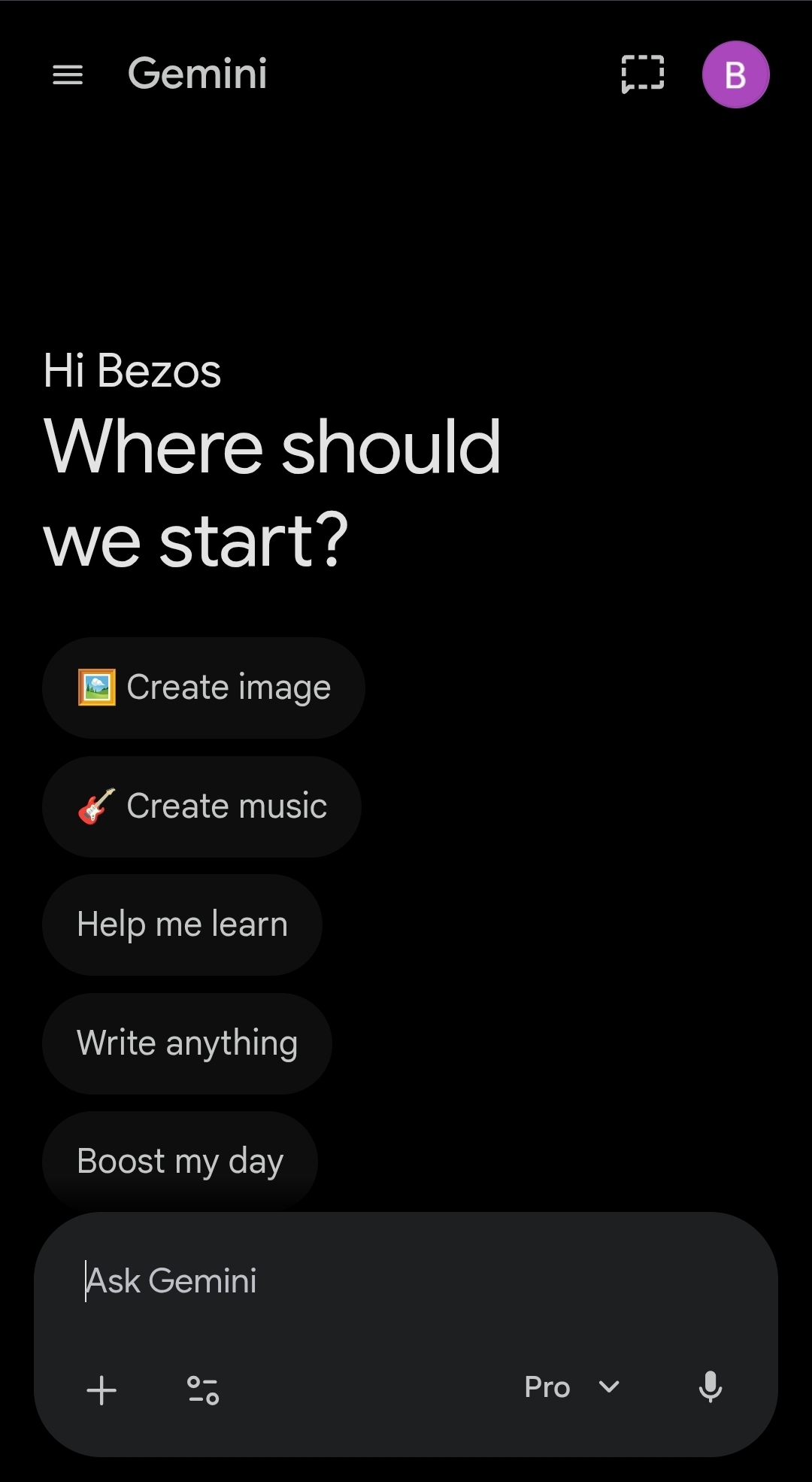
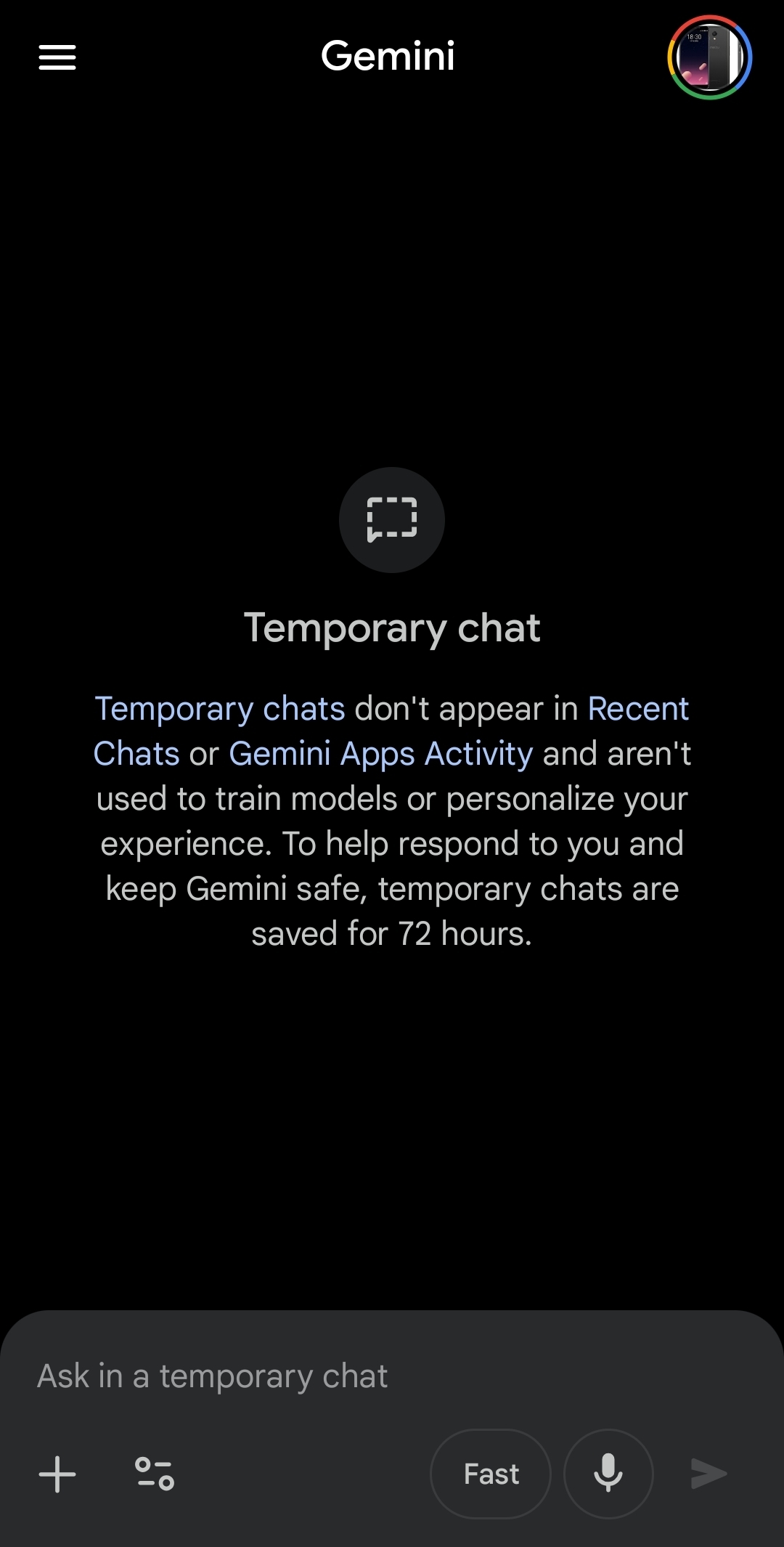
Tap the new icon and the original dotted chat bubble appears at the center of the screen. That central image still accompanies the feature description that explains what Temporary Chat does. The new icon also highlights blue when you activate the mode.
The visual confirmation step works identically to the original design. Only the mobile app has received this change. The desktop interface still shows the original dotted outline icon.
Why the New Gemini Temporary Chat Icon Creates a Recognition Problem
An oval with a pencil reads as a general writing or editing action. It does not signal privacy or impermanence the way a dotted border does. Users who built a tap habit around the dotted outline need to relearn the gesture.
Tapping the standard new chat button by accident sends your session into your recent chat history immediately. That session also starts contributing to Gemini’s personalization engine from your first prompt. Switching to Temporary Chat during an active session does not protect anything you already sent.
The icon is the only entry point to this protection from the standard chat screen. Have you opened Gemini this week and struggled to find where the Temporary Chat button went? The new icon is in the same spot with a completely different shape.
How Gemini Temporary Chat Works and What It Protects
Temporary Chat functions like incognito mode for Gemini conversations. Sessions in this mode do not appear in your recent chat history. They also do not influence Gemini’s personalization engine for future sessions.
According to Google’s official Gemini release notes, Temporary Chat sessions are not used to train Google’s AI models. The Gemini Apps Privacy Hub confirms Google retains this data for a maximum of 72 hours for safety and service purposes. The data is deleted after that window.
Medical questions, personal financial research, and exploratory searches all benefit from this mode. What happens if you start typing before checking which icon you tapped? Those prompts enter your standard history and begin shaping future Gemini responses immediately.
Is the New Gemini Temporary Chat Icon a Bug or a Deliberate Change
The icon change arrived as a server-side push. Google updated the icon for all mobile users at once without releasing a new app version. This is the same delivery method behind the April 2026 regression that removed the Gemini Temporary Chat icon and other features from affected devices — you can read the full breakdown in the Gemini app bug coverage on Cloudorian.
The oval-and-pencil design fits Gemini’s visual system better than the boxy dotted bubble did. That visual coherence makes an intentional redesign plausible. Google may be running a limited A/B test to measure user interaction patterns before committing to a permanent rollout.
No official confirmation exists either way as of April 24, 2026. The desktop version of Gemini still shows the original dotted icon. A public changelog entry and a desktop update should follow if the oval-and-pencil design is here to stay.
What to Do Before Your Next Temporary Chat Session
Open the Gemini mobile app and find the oval-and-pencil icon in the top-right corner of the new chat screen. Tap it once and look for the dotted bubble and feature description to appear at the center of the screen. That confirmation tells you Temporary Chat is active before you type anything.
If you use Temporary Chat for sensitive queries, add icon verification to your session-start routine. A two-second check before your first prompt prevents an accidental logged conversation. The Gemini Personal Intelligence guide on Cloudorian covers the privacy controls worth configuring before you connect any Google apps to the assistant.
Discover more from Cloudorian — Android, Samsung & Windows How-To Guides
Subscribe to get the latest posts sent to your email.



