

Samsung ships four productivity apps on every Galaxy phone that quietly kill subscriptions you still pay for. Most owners install OneNote, Todoist, or a paid file manager without checking what One UI 8.5 already does better. This list ranks the Samsung productivity apps worth switching to, ordered by how much money each one saves you.
How We Picked These Samsung Productivity Apps
Every app here had to replace a product people actually pay for. I tested each one on a Galaxy S25 Ultra running One UI 8.5 over several weeks. Three factors decided the ranking.
- Feature depth mattered most, so each app had to match or beat the core features of the paid tool it replaces.
- Galaxy integration counted next, meaning the app had to connect with Gemini, Secure Folder, and Reminders without extra setup.
- Real savings sealed each pick, so I checked the current price of the paid alternative it displaces.
You care about these factors because a free app that misses key features costs you more later. You reinstall the paid tool and pay anyway. How many of these subscriptions are draining your account right now?
Quick Comparison Table
| App | Replaces | Best For | Standout Feature | Price |
|---|---|---|---|---|
| Samsung Notes | OneNote, Evernote, scanner apps | Writers and S Pen users | PDF markup and document scanning | Free |
| Samsung Reminders | Todoist, Any.do | Errands and deadlines | Location-based full-screen alerts | Free |
| Samsung Gallery | Google Photos, Lightroom | Local edits and private albums | Galaxy AI photo editor | Free |
| Samsung My Files | Solid Explorer, cleaner apps | Cloud and local file juggling | Storage breakdown and duplicate cleanup | Free |
1. Samsung Notes: The Note App That Replaces OneNote and Your Scanner
Best For: writers, students, and S Pen users who annotate PDFs and scan documents.
Samsung Notes ended two of my subscriptions at once. It handles handwriting, typed notes, PDF markup, and document scanning in one place. On the Galaxy S25 Ultra, Screen off memo lets me write with the S Pen before I unlock the phone. Gemini can summarize a long note or pull one buried detail from an old document.
It is not for people deep in the Apple ecosystem who need notes synced to a Mac. Cross-platform teams on Notion or Evernote will also feel boxed in. Do you really need a separate scanner app sitting on your home screen?
Key Features:
- Samsung Notes edits and annotates PDFs directly, so you mark up contracts and worksheets without a separate PDF app.
- The built-in scanner captures documents as searchable files, which removes the need for a paid app like CamScanner.
- Gemini integration summarizes long notes and creates fresh notes from AI answers inside the app itself.
Pricing: Free on every Galaxy phone. The tools it replaces run around $6.99 a month for CamScanner Premium and up to $14.99 a month for Evernote Personal.
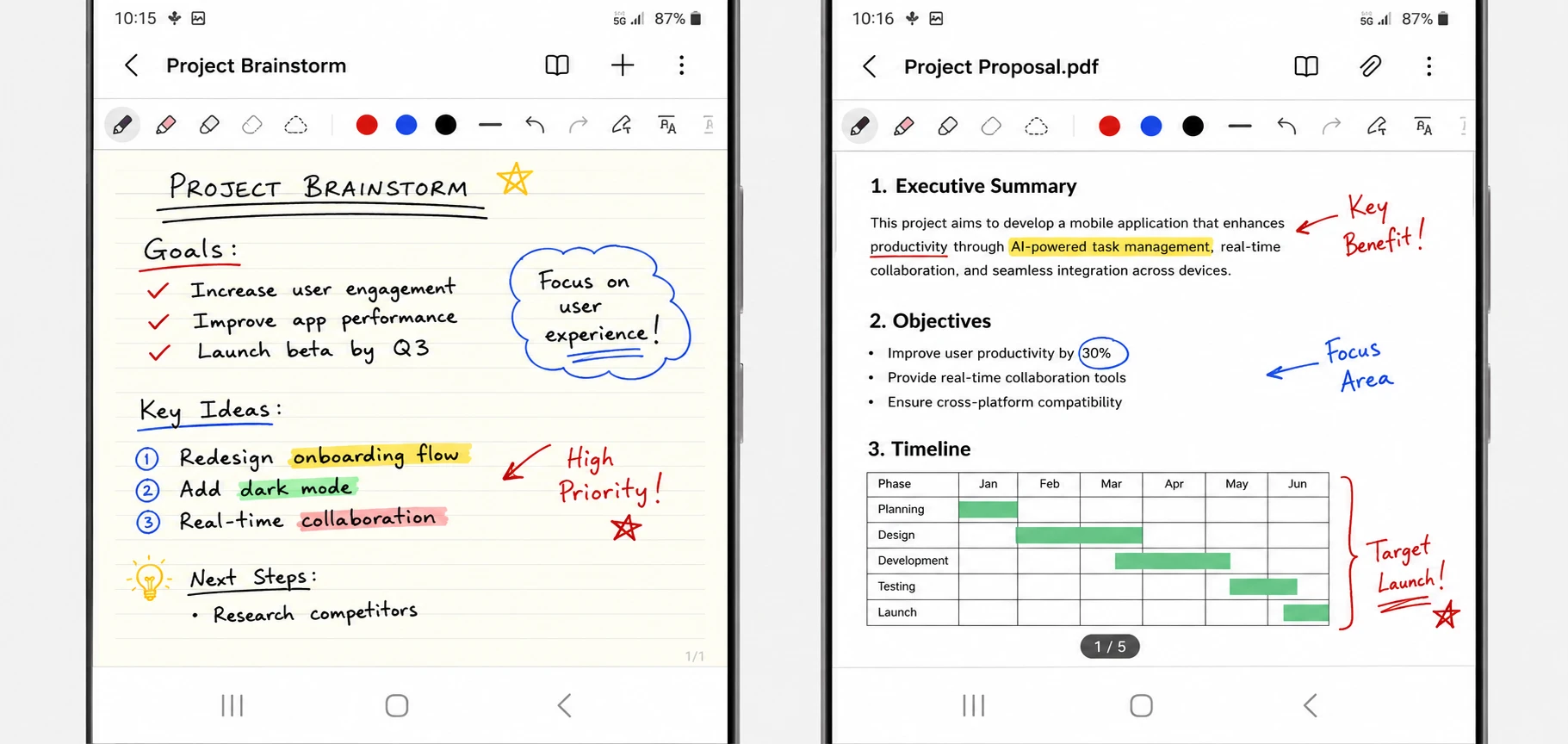
PRO TIP: Turn on Screen off memo in Settings so the S Pen opens a blank note the moment you pull it out.
2. Samsung Reminders: The Task Manager That Replaces Todoist
Best For: anyone managing errands, deadlines, and location-based tasks on a single phone.
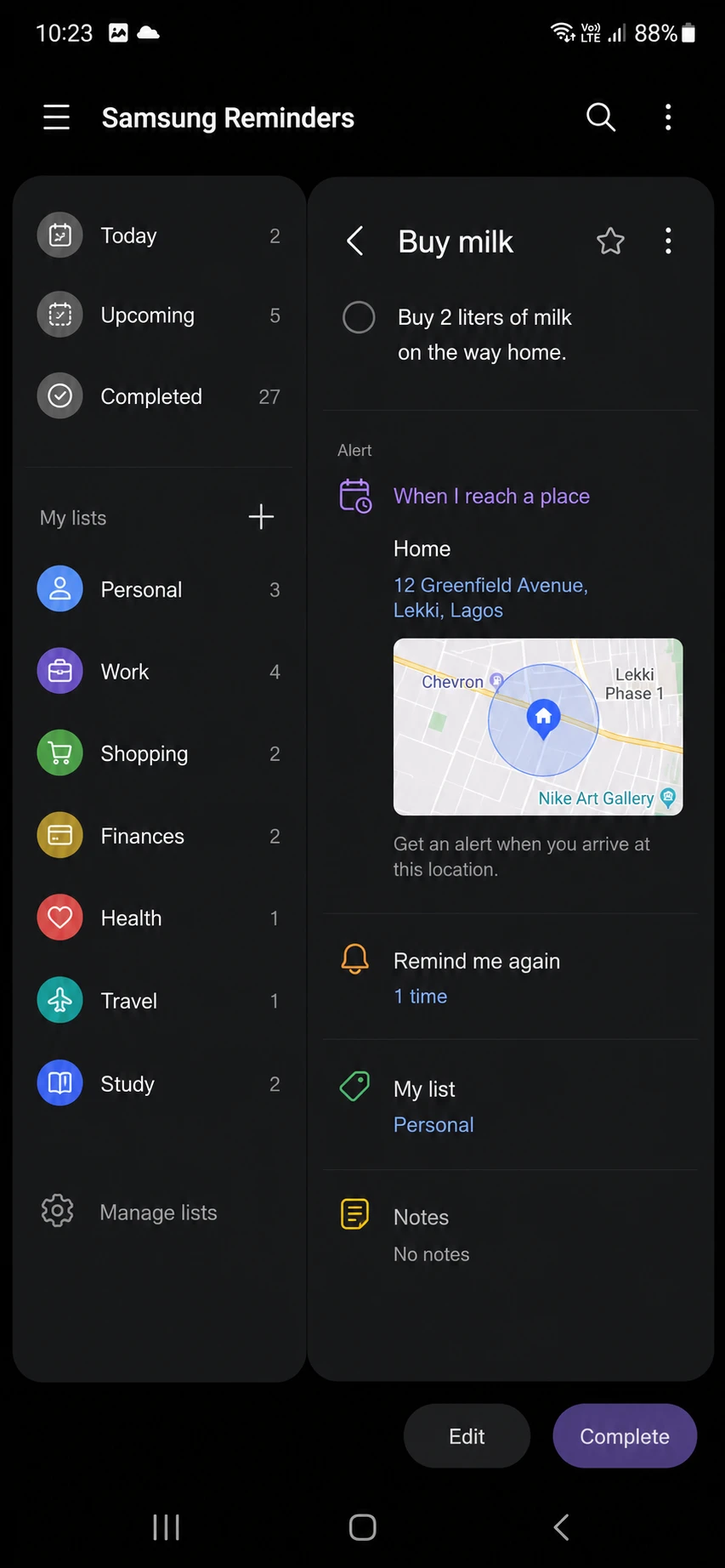
Samsung Reminders does the job most people buy Todoist Pro to do. You create tasks in plain language, attach notes, and set alerts tied to a location. Custom categories keep work, shopping, and household tasks apart. Full-screen alerts take over the display, so a reminder is hard to swipe away and forget.
It is not for teams that share projects or hand tasks to each other. Anyone split across Windows and iPhone will miss cross-platform sync. Gemini adds real convenience here, since you can ask it to remind you to call someone tomorrow afternoon and it builds the task.
Key Features:
- Location-based reminders trigger tasks when you arrive somewhere, so the grocery list appears at the store.
- Full-screen notifications take over the entire display, which stops you swiping a task away and forgetting it.
- Gemini creates and finds reminders through natural voice requests without opening the app first.
Pricing: Free. Todoist Pro costs around $4 a month billed annually, and Any.do Premium runs about $7.99 a month.
3. Samsung Gallery: The Photo Manager That Replaces Google Photos and Lightroom
Best For: people who want fast edits and private albums without a cloud subscription.
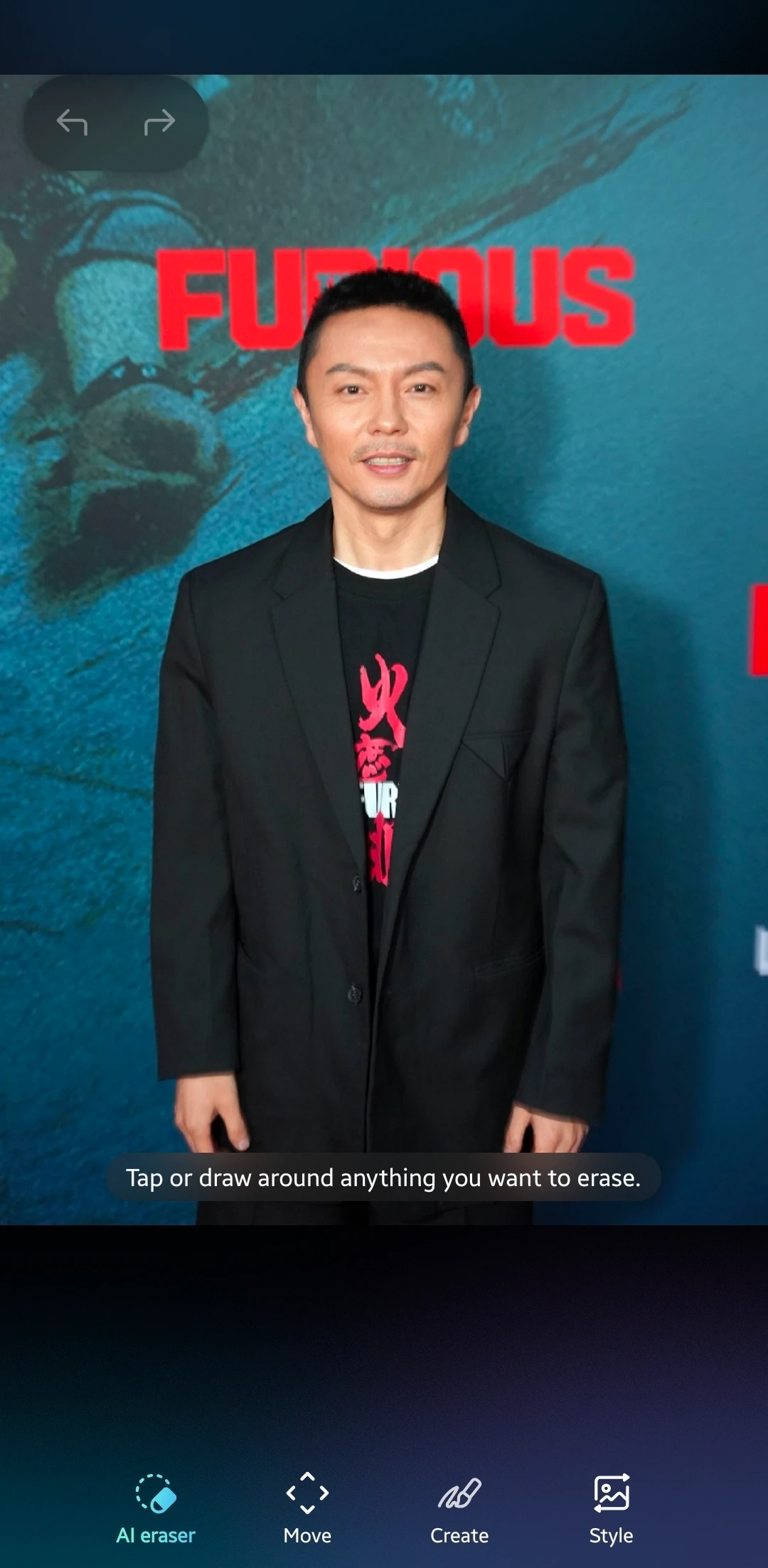
Samsung Gallery loads faster than Google Photos because it works locally first. Photos appear instantly with no backup prompts or sync delays. The Galaxy AI editor crops, filters, and runs generative edits inside the app. Samsung Studio turns photos and clips into finished videos, and Secure Folder hides sensitive shots behind biometrics.
It is not for iPhone switchers who need every photo mirrored across devices through the cloud. The Gemini photo search stayed inconsistent in my testing and surfaced wrong images when I searched for keyboards.
Key Features:
- The Galaxy AI editor runs generative edits and object removal, covering work people pay Lightroom to do.
- Private Album and Secure Folder lock photos behind biometrics, so sensitive images stay off the main grid.
- Samsung Studio builds finished videos from photos and clips without a separate video editor.
Pricing: Free. Adobe’s photography plan with Lightroom starts around $9.99 a month, and extra storage through Google One begins at $1.99 a month.
WARNING: Samsung Gallery keeps photos on the device by default. Set up a backup before any factory reset or you can lose everything.
4. Samsung My Files: The File Manager That Replaces Paid Storage Tools
Best For: people who juggle local files, OneDrive, and Google Drive on one phone.
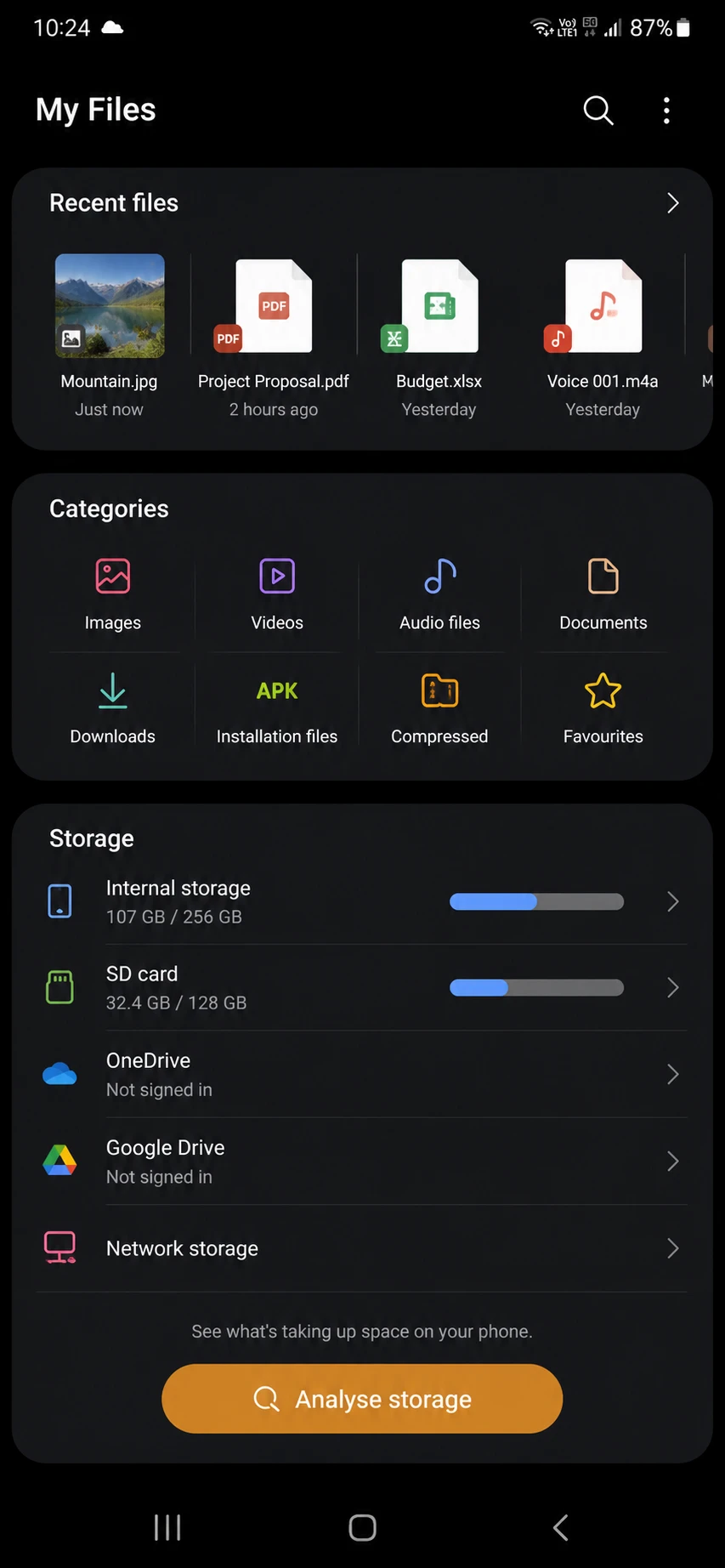
Samsung My Files handles cloud drives, USB storage, and cleanup without a paid app. The storage breakdown shows exactly what images, videos, and installation files consume. You connect OneDrive and Google Drive, read USB drives, and reach network storage from one screen. Duplicate and large-file cleanup comes built in, which pairs well with our guide to freeing up storage on Android.
It is not for power users who want FTP servers, root access, or deep archive tools. Those people still want Solid Explorer or FX File Explorer.
Key Features:
- The storage analysis shows what images, videos, documents, and downloads consume, so cleanup takes only minutes.
- My Files connects OneDrive, Google Drive, USB drives, and network storage on one screen without extra apps.
- Built-in duplicate detection finds repeated files and folders without any third-party storage analyzer.
Pricing: Free. Paid managers like Solid Explorer charge a one-time fee of around $2.99, and dedicated cleaner apps push monthly subscriptions.
Common Mistakes to Avoid When Choosing Samsung Productivity Apps
Mistake: You reinstall a paid app out of habit before testing the Samsung one.
Why It Happens: You carried the same apps across three phones and never questioned the routine.
Fix: Delete the paid app for one week. Use the Samsung version for every task. Reinstall only if a feature you rely on is truly missing.
Mistake: You ignore the Gemini integration and treat these as basic stock apps.
Why It Happens: Built-in apps earned a reputation for being stripped down years ago.
Fix: Open Notes or Reminders and ask Gemini to summarize, search, or create an item. The AI layer is the reason these apps now compete with paid tools.
Mistake: You skip backups on local-first apps like Gallery and My Files.
Why It Happens: You assume everything syncs to the cloud on its own.
Fix: Turn on a backup for photos and important files. Confirm it before any reset. You can also trim clutter first by learning to remove or disable preinstalled Samsung apps.
Honorable Mentions
Samsung Internet earns a spot for its per-site controls and strong ad blocking, which beat stock Chrome for privacy. Samsung Keyboard has also improved, with split-finger app launching and solid swipe typing that many people replace with Gboard for no real gain.
Frequently Asked Questions About Samsung Productivity Apps
Q: Are Samsung productivity apps free?
A: Yes. Samsung Notes, Reminders, Gallery, and My Files all ship free on Galaxy phones with no in-app subscription. That is the core reason these Samsung productivity apps replace paid tools so well.
Q: Can Samsung Notes replace OneNote?
A: For most people on a Galaxy phone, yes. Samsung Notes covers handwriting, PDF markup, scanning, and Gemini summaries. OneNote still wins if you need notes synced to a Mac or a Windows PC daily.
Q: Do Samsung apps work with Gemini?
A: Yes. Notes, Reminders, and Gallery connect with Gemini for summaries, task creation, and search. The Gallery photo search can miss, so treat it as a bonus rather than a core feature.
Q: Is Samsung Gallery better than Google Photos?
A: For speed and privacy, Samsung Gallery wins because it loads locally with no backup prompts. Google Photos is the better pick if you want automatic cloud sync across many devices.
Q: Can I use Samsung Reminders on a non-Samsung phone?
A: Not really. Reminders ties into the Samsung account and Galaxy system, so it does not sync cleanly to iPhone or Windows. Cross-platform users should stay on Todoist or Any.do.
Q: Do these apps need a Samsung account?
A: Basic use works without one. Sync across your Galaxy devices, Secure Folder, and some Gemini features ask you to sign in with a Samsung account.
Which Samsung App to Switch to First
Start with Samsung Notes if you want the biggest payoff. It replaces a note app and a scanner app in one move, which is the fastest way to cut two subscriptions this week. Test it against your current paid tool for seven days before you decide.
For a smoother Galaxy setup overall, walk through the Samsung phone features worth disabling on day one next. Which of these four apps are you switching to first, and which paid tool are you finally canceling? Drop it in the comments.
Discover more from Cloudorian — Android, Samsung & Windows How-To Guides
Subscribe to get the latest posts sent to your email.



