

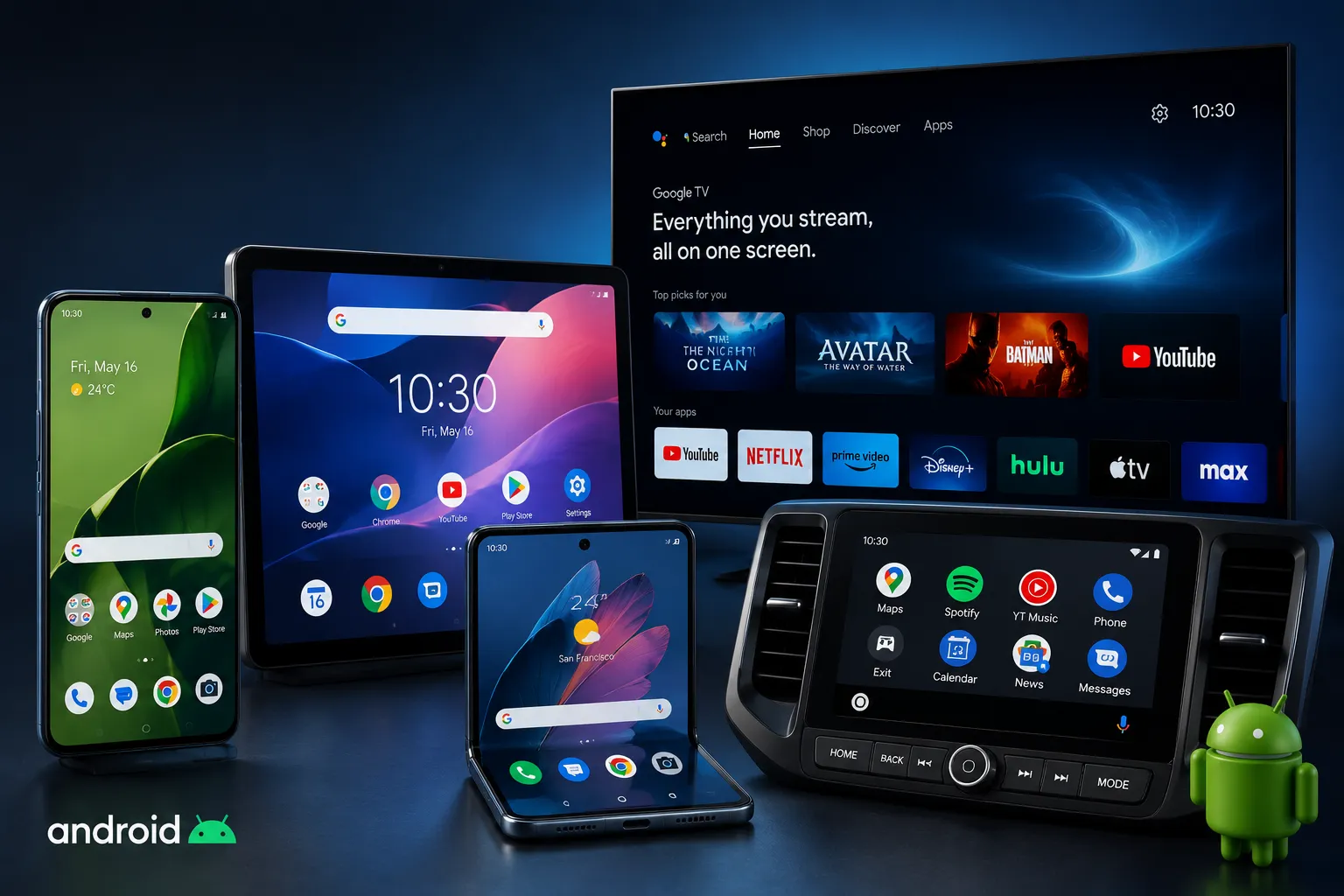
Android now spans phones tablets foldables cars and TVs. Users move between them expecting continuous experiences. This guide maps the entire environment for Nigerian Android users.
What the Android Ecosystem Is and Why It Matters
The Android ecosystem connects devices services and apps under one platform. It covers smartphones foldables tablets watches cars and smart home gear.
Continuity defines it. Start reading on your phone and pick up on your tablet at the same spot. Copy on your laptop and paste on your phone. Do you use multiple Android devices daily?
Google calls this Adaptive Everywhere. Multi device users spend 9 times more. Foldable users spend 14 times more. The ecosystem premium is real.
The Hardware Landscape: Every Android Device Type Explained
Smartphones: The Foundation
Smartphones remain the primary entry point. In 2026 choices span all prices and forms. You get everything from 50 dollar feature phones to 2000 dollar flagships.
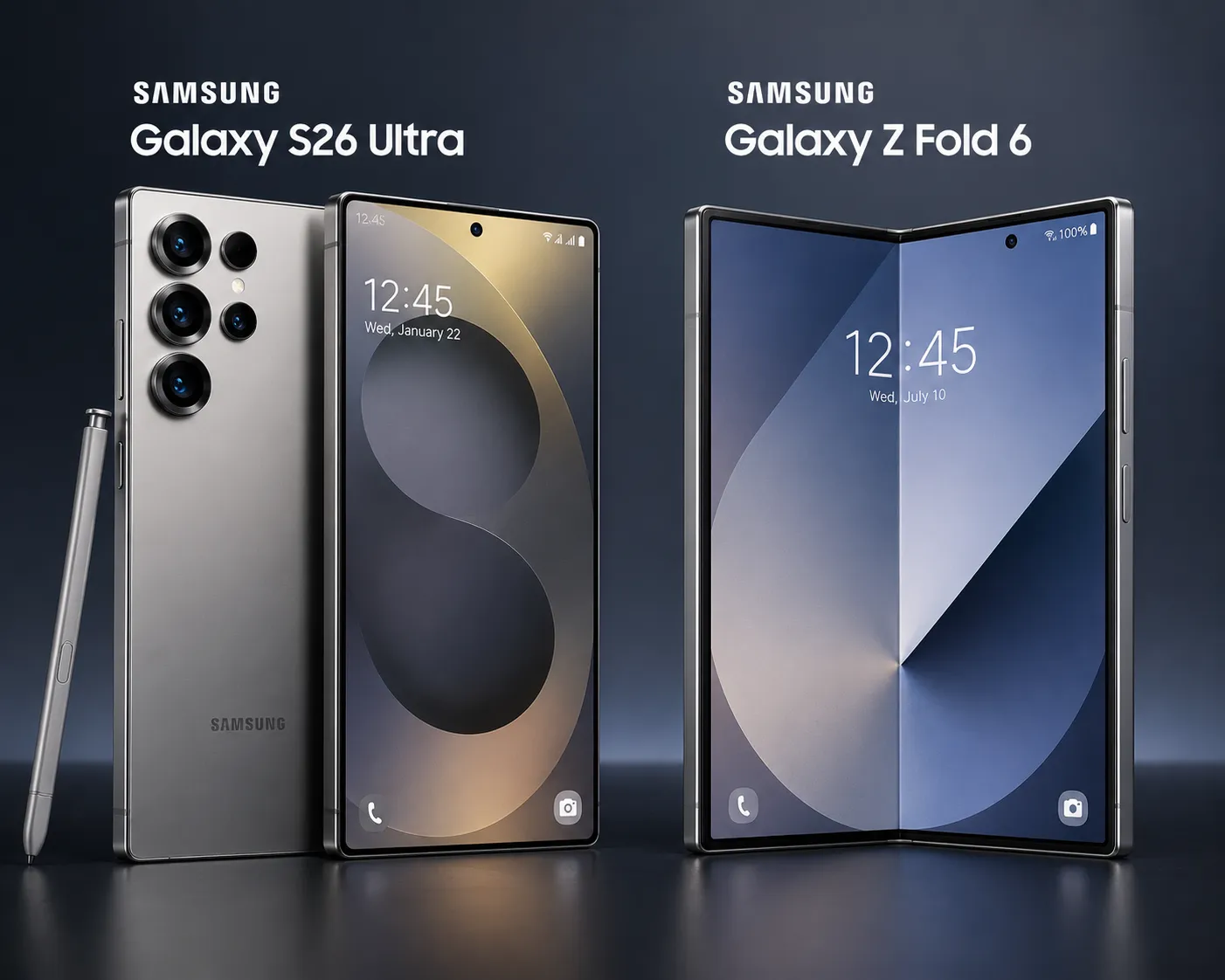
Samsung leads Android vendors with 19.7 percent market share. It controls 30.8 percent of the Android ecosystem. Galaxy S and A series cover premium to mid range while Galaxy Z series dominates foldables.
Galaxy S26 Ultra brings the latest Snapdragon chip. Improved cameras and titanium frame make it a powerhouse. Galaxy A series offers great value with long software support.
Xiaomi holds 15.9 percent share. Their Redmi and POCO lines target budget users. Flagship Xiaomi and Mi series compete with Samsung.
Transsion brands Tecno Infinix and Itel lead in Nigeria. Their aggressive pricing suits local budgets. Tecno Camon series focuses on camera performance. Infinix Note series offers big batteries.
Motorola returns with clean Android experiences. Their Edge series competes in premium segment. Budget Moto G series remains popular.
Foldables: The Growth Segment
Foldables grow fastest. Samsung Galaxy Z Fold and Flip series lead with refined designs. Fold 6 improves hinge durability. Flip 6 adds better cover screen.
Global foldable market share hits 10 to 12 percent by late 2026. Android 17 forces apps to support all screen sizes. No opt out exists.
Huawei Mate X and Honor Magic V compete globally. In Nigeria foldables remain niche due to high prices. But interest grows as prices drop.
Foldable app support improves. More apps now support multi window. Split screen usage becomes common and productivity on foldables increases.
Tablets: The Productivity Layer
Android tablets now rival iPads. Galaxy Tab S series and Pixel Tablet lead. Xiaomi Pad and Lenovo Tab series offer alternatives.
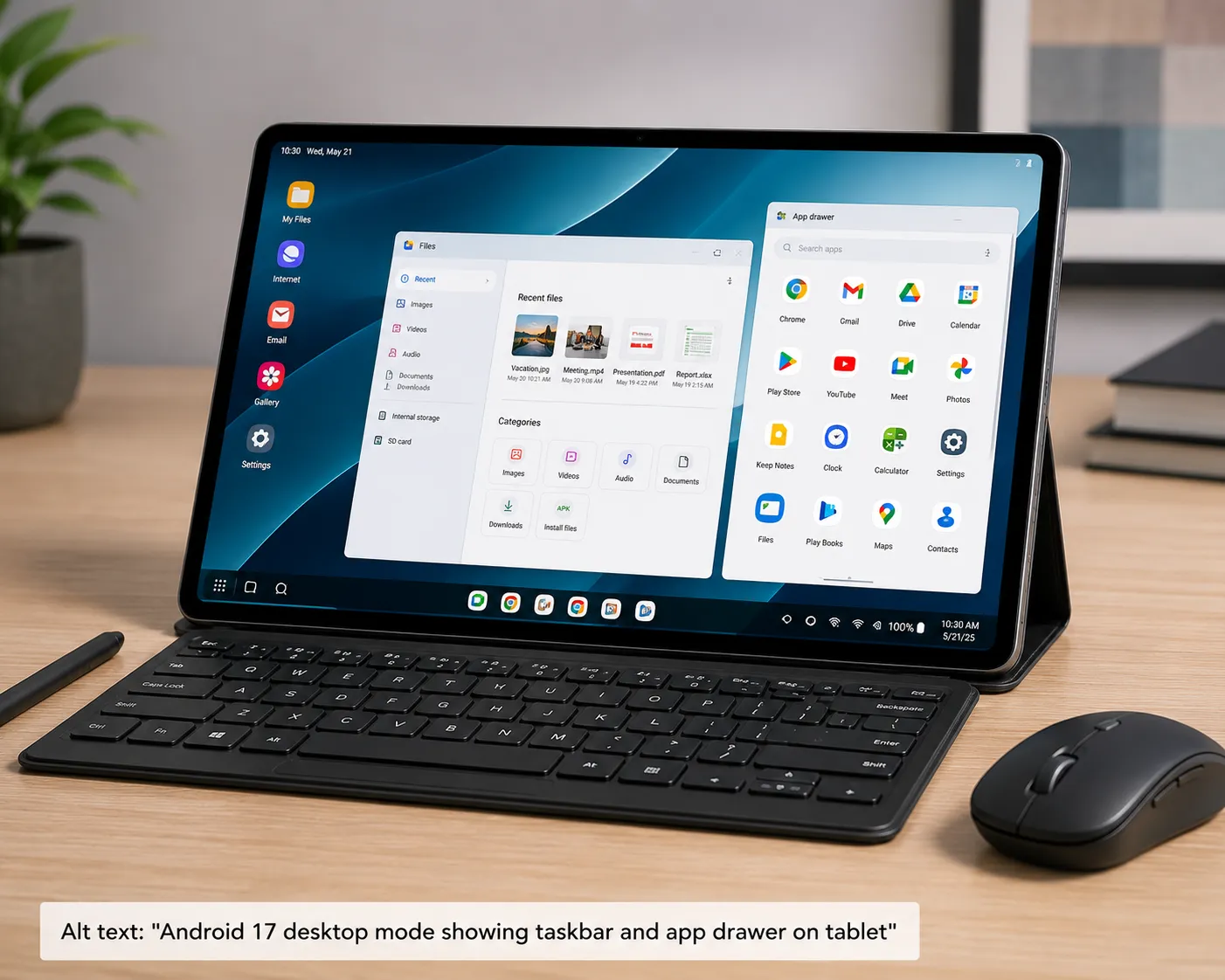
Android 17 adds proper desktop mode. Connect to a monitor. Get a taskbar app drawer and recent apps. Tablets become laptop replacements.
S Pen support on Galaxy Tab S series enables note taking. Drawing apps work well. Students and professionals benefit.
Productivity apps improve. Google Docs Sheets and Slides work better. Microsoft Office compatibility deepens. Tablets handle real work now.
Wearables: The Extension Layer
Wear OS runs on watches from Samsung Google Fossil. Galaxy Watch series remains most popular. Galaxy Watch 7 brings new health sensors.
Wear OS 5 brings better battery life. Health sensors improve. Compatibility with Android 17 deepens. Fall detection and ECG work better.
Google Fit tracks activity across devices. Sleep tracking improves while stress monitoring becomes more accurate and third party apps integrate deeper.
Watch faces customize extensively. Download from Play Store. Many free options exist. Premium faces add unique styles.
Cars: The Mobile Extension
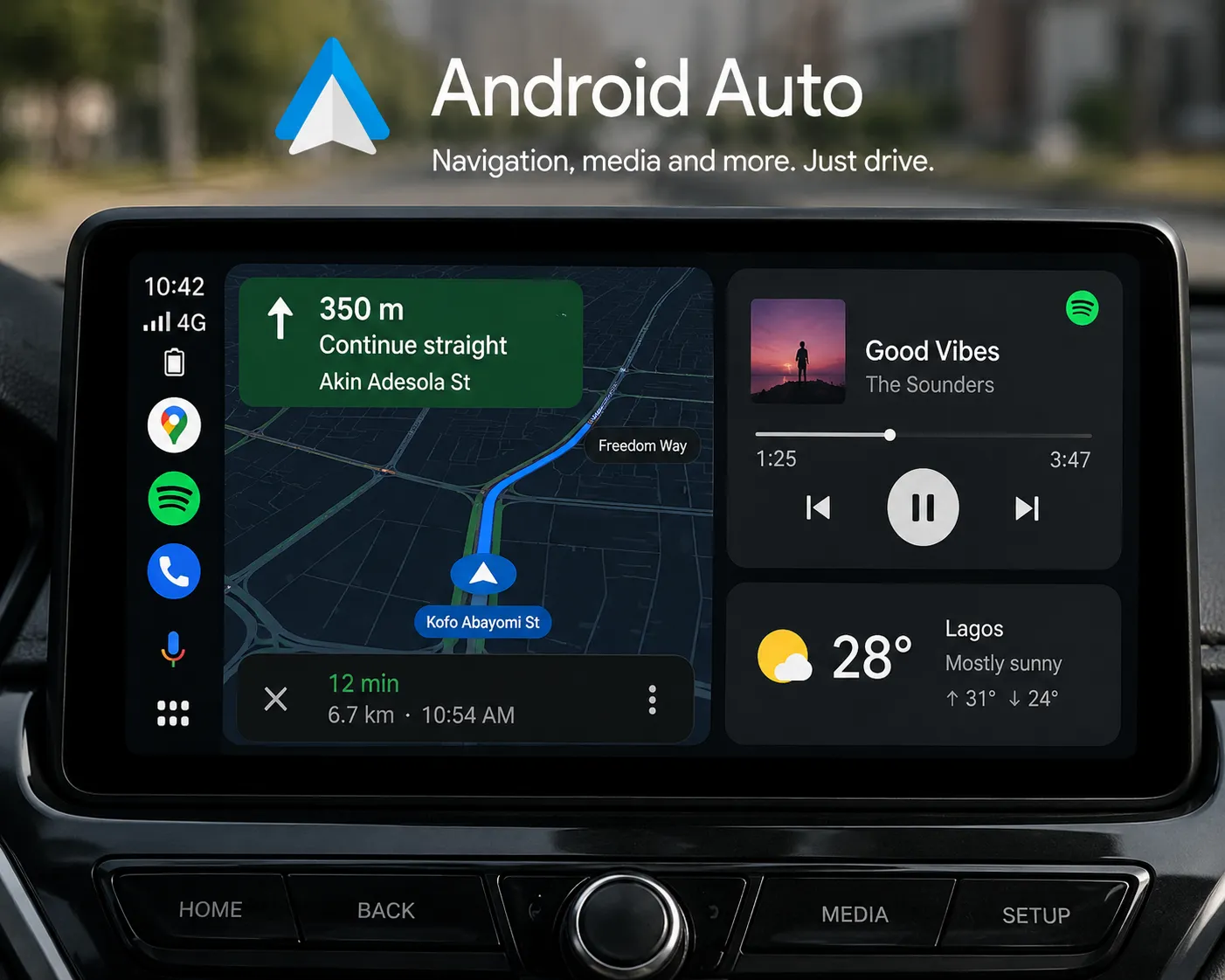
Android Auto turns car screens into Android interfaces. Wireless support expands in 2026. More car models add native support.
Android Automotive OS runs natively in some cars. Volvo and Polestar use it. No phone needed. Google apps run directly.
Navigation improves with Google Maps. Assistant handles voice commands. Media apps integrate deeply. Spotify YouTube Music and local apps work well.
In Nigeria Android Auto adoption grows. Local car brands add support. Aftermarket head units provide options for older cars.
TVs and Streaming: The Living Room
Android TV and Google TV power smart TVs. IROKOtv and local platforms integrate deeply in Nigeria. Startimes and GOtv apps work well.
Google TV adds content focused recommendations. It personalizes across services. Netflix Amazon Prime and local content appear together.
Chromecast brings Android TV to any screen. Cast from phone or tablet. Mirror your device display. Good for presentations or sharing photos.
Gaming on Android TV improves. Cloud gaming services work better. Controller support expands. Mobile games port to TV.
The Fragmentation Reality
Diversity brings fragmentation. Android 10 still runs on 7.8 percent of devices in early 2026. Android 11 holds 15.2 percent. Android 12 has 28.5 percent.
Budget phones may get security patches late. Some never get them. This remains Androids core challenge. Google works to improve this.
Project Mainline moves components to Play Store. Updates come faster. Security patches reach more devices. But hardware limitations remain.
PRO TIP: Pick manufacturers with strong update policies. Samsung flagships get 4 OS years and 5 security years. Pixel gets 7 years. Xiaomi and Motorola offer 2 to 3 years.
Check update history before buying. Some brands promise updates but deliver late. Others stop support early. Research matters.
The Software Platform: Android 17 and What Changed
Android 17 codenamed Android Vanilla Ice brings major shifts. It focuses on multi device experiences. Security and privacy get stronger. Developer requirements tighten.
The beta program started in February 2026. Pixel devices got first access. Samsung One UI 9 beta followed in March. Final release comes in August 2026.
Adaptive Everywhere Mandate
Android 17 enforces adaptive development. Apps must work on phones tablets foldables and desktops. No exceptions.
Developers cannot restrict screen orientation or resizability. Manifest attributes are ignored on large screens. Apps must adapt or face Play Store rejection.
Google provides new tools. Jetpack Compose helps build adaptive UIs. New testing tools verify app behavior across devices while documentation expands significantly.
Cross Device Handoff
Handoff API enables cross device continuity. Start reading on phone. Continue on tablet at same scroll position. Works for many app types.
Developers implement onHandoffActivityDataRequested callback. It returns HandoffActivityData with state information. Users see smooth transitions.
Supported activities include reading browsing editing. More types add over time. Requires same Google Account on both devices.
Enhanced Desktop Mode
Connect Android 17 to a display. Get a real desktop interface. Taskbar appears with pinned apps. System tray shows notifications.
App drawer and recent apps show in the taskbar. Window management improves. Resize windows freely. Snap to edges for split screen.
File manager adds desktop view. Drag and drop between windows works. External keyboard and mouse support better. Productivity boosts significantly.
Graphics and Performance
Vulkan becomes the official graphics API. Android 16 started the transition. Android 17 completes it for most devices.
Gamers get better performance. Ray tracing becomes possible on supported hardware. Frame rates improve. Load times decrease.
Developers must update engines to Vulkan. Unity and Unreal Engine add better support. Game quality rises across the board.
Security Improvements
On device anomaly detection monitors resource intensive behaviors. It catches compatibility regressions before they cause issues.
SMS OTP protection expands. Non recipient apps get delayed access to OTP messages. Reduces fraud and phishing risks.
Contact Picker API gains granular controls. Search profile switching and multi selection come built in. Apps request only needed permissions.
Google Play Protect scans apps continuously. Harmful app detection improves. Installation blocking gets smarter. User warnings become clearer.
Privacy Enhancements
Privacy controls tighten. Apps face more restricted access to sensitive data. Permission requests become more specific.
Background location access gets stricter. Apps must justify need. Users get clearer explanations. Temporary permissions expand.
Privacy Dashboard shows app data access clearly. Timeline view adds while export options improve and control increases significantly.
Photo picker improves. Apps access only selected photos. No full gallery access needed. Privacy preserved while maintaining functionality.
Google Services: The Connective Tissue
Google services glue the ecosystem together. They work across all Android devices. Many also work on iOS and web. This cross platform nature makes them effective.
Google Account: The Single Sign On
Your Google account unlocks the ecosystem. It syncs apps data contacts and settings across all devices. One login accesses everything.
Find My Device Google Assistant and cross device copy paste depend on it. Nigerian users often manage multiple accounts for work and personal use.
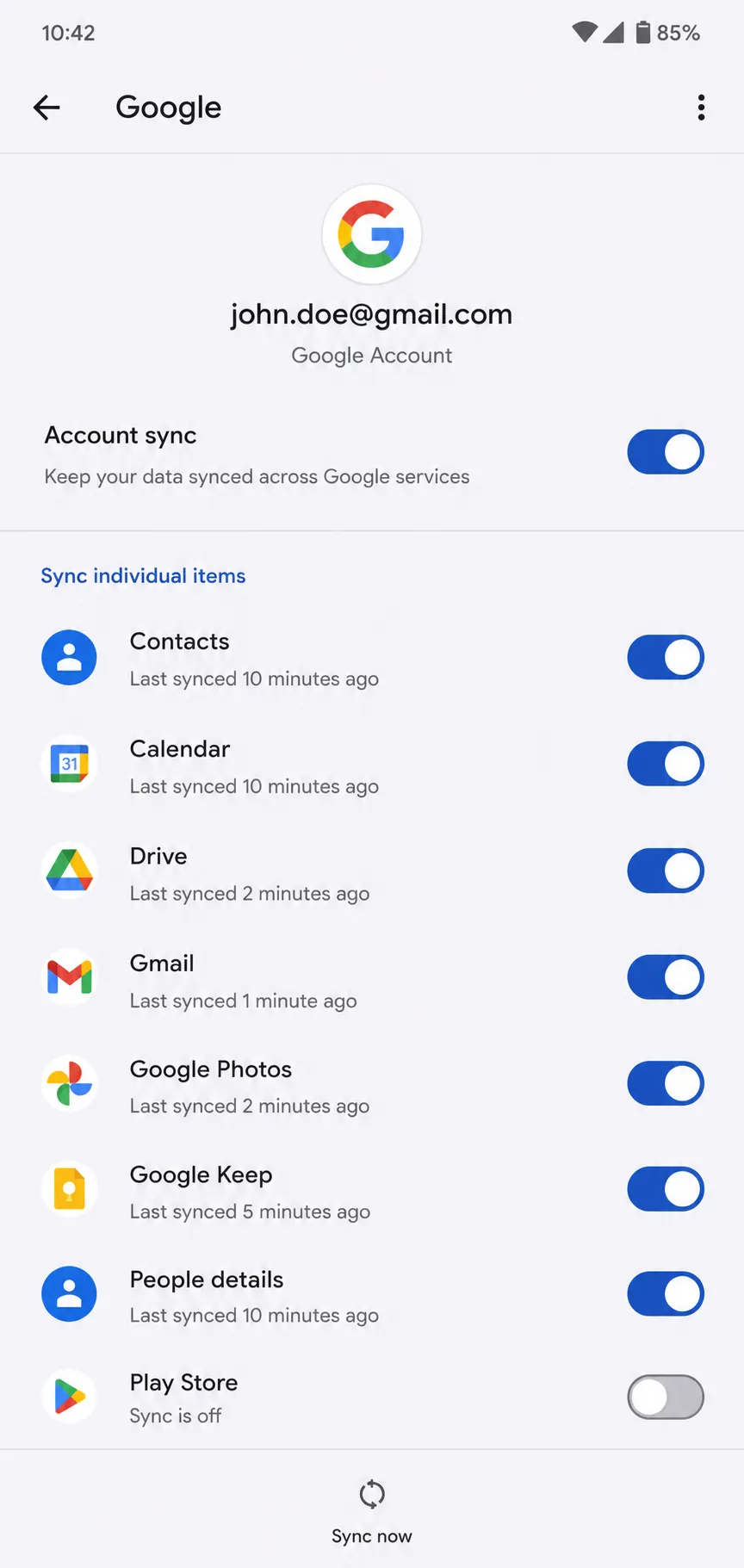
Add up to 4 accounts to one device. Switch between them easily in Google apps. Gmail shows profile pictures for quick switching.
Account activity page shows all connected devices. Security alerts notify of suspicious logins. Two factor authentication adds extra protection.
Google Play Store: The App Hub
Play Store remains the main app source. Over 3 million apps available. 2026 brings tighter security and privacy policies.
New guidelines demand higher quality. Apps must meet performance benchmarks. Crash rates and battery impact get measured. Developers must refine builds.
Data privacy and subscription management stay in focus. Data safety labels show what data apps collect. Subscription cancellation must be easy and clear.
Play Store adds new categories. Nigerian apps get better visibility. Local payment methods expand. Mobile money options appear.
Google One: The Storage Backbone
Google One syncs storage across devices. Free tier gives 15GB for Gmail Drive and Photos. Shared across all Google services.
Paid plans offer more space. 100GB plan costs about 1600 Naira per month. 200GB plan about 2500 Naira. Family plans share with 5 members.
Good for families with multiple devices. One subscription covers everyone while automatic backup keeps data safe and quality options control storage use.
Google Drive: The Document Hub
Drive stores documents spreadsheets and presentations. Access from any device. Offline mode works for important files.
Collaboration features improve. Real time editing with others. Comment and suggestion tools work well. Version history tracks changes.
Drive integrates with Docs Sheets Slides. Office compatibility improves. Microsoft Office files edit directly in Drive. Productivity boosts.
Google Assistant: The Voice Interface
Assistant integrates deeply with Android 17. It controls smart home devices. It sends messages and sets reminders. Voice commands work across devices.
In Nigeria Assistant supports local languages. Yoruba Igbo and Hausa work for basic queries. Ask for weather traffic or business info naturally.
Assistant routines automate tasks. Say Good Morning to get weather calendar and news. Bedtime routine turns off lights and sets alarms.
Google Messages: The Communication Hub
Google Messages with RCS offers modern messaging. Read receipts typing indicators and high quality media sharing work. End to end encryption protects conversations.
Live location sharing stands out in 2026. Share real time location for set durations. Works even without RCS on recipients end. Useful in Nigerias unpredictable traffic.
Message scheduling adds the ability to send at specific times. Reminders integrate while smart replies suggest responses and spam protection improves.
Google Photos: The Memory Keeper
Photos backs up all images and videos. Unlimited high quality storage with Google One. Original quality counts against storage.
Search works amazingly. Find photos by people places or things while automatic albums create for trips and events and Memories resurfaces old photos.
Editing tools improve. AI powered suggestions enhance photos. One tap fixes lighting and color. Sharing options expand. Links work even for non Google users.
Google Chrome: The Browser
Chrome syncs bookmarks history and passwords. Open tabs sync across devices. Reading list saves articles for later.
Data Saver reduces mobile data use. Lite mode loads pages faster on slow connections. Common in Nigeria. Translate built in for foreign sites.
Security improves. Safe Browsing blocks dangerous sites while password manager generates strong passwords and autofill makes logging in easier.
Samsung Ecosystem: The Premium Experience
Samsung offers the most complete Android ecosystem. Hardware software and services integrate deeply. The experience feels cohesive across devices.
Samsung devices command premium prices. But they justify costs with features and support. Nigerian users appreciate the quality and local presence.
One UI: The Samsung Skin
One UI sits atop Android. One UI 9 brings new features on Android 17. It keeps Samsung design language while adding adaptive elements from Android 17.
Material You theming adapts to your wallpaper with color palette changes across the system and icons apps and widgets matching for visual consistency.
DeX desktop mode comes exclusive. Connect to monitor for full desktop experience. Multi window works better than stock Android. Productivity features abound.
Enhanced multi window allows more flexibility. Split screen pop up view and snap windows work well. App pairs save for frequent combinations.
These features often reach stock Android later. Samsung innovates then Google adopts. Users get early access to new capabilities.
Samsung Account: The Parallel Ecosystem
Samsung Account runs alongside Google Account. It syncs Samsung specific data across devices. Separate from Google services.
Notes Galaxy Store apps and Samsung Cloud backup use it. Dual ecosystem gives Samsung users the best of both worlds with Google for cross platform and Samsung for device specific features.
Samsung Members app offers community and support. Get tips tricks and early feature access. Beta programs available for enthusiastic users.
Samsung Knox: The Security Layer
Knox provides enterprise grade security. Hardware level protection secures all data. Military grade certification achieved.
Knox Vault isolates sensitive info. Biometrics payment data and passwords get special protection. Physical chip separation prevents tampering.
Real time kernel protection monitors for threats. Secure folder encrypts private files. Private Share sends files with expiration and no forwarding.
Important for Nigerian mobile banking users. GTBank Access Bank and Opay apps work securely. Knox protects against local and remote attacks.
Samsung Cloud: The Backup Solution
Samsung Cloud backs up contacts calendar notes and app data. Free tier offers 15GB. Additional storage available for purchase.
OneDrive compatibility auto syncs photos and videos. Good redundancy for important files. Two cloud backups provide extra safety.
Backup and restore works well. Switching to new Samsung device transfers everything. Settings apps and data move over. Setup takes minutes.
Samsung SmartThings: The IoT Hub
SmartThings controls smart home devices. It works with local brands in Nigeria. Compatible with many global brands too.
Create automations across manufacturers. Control from phone watch or tablet. Voice commands work with Bixby and Google Assistant.
SmartThings Find locates lost devices. Galaxy SmartTag helps find keys and bags. Offline finding works using other Samsung devices nearby.
Energy monitoring tracks device power usage. Get reports on consumption. Tips for saving power appear. Useful in Nigerias electricity challenged environment.
Galaxy AI: The Intelligence Layer
Galaxy AI powers Samsung exclusive features. Real time translation works for calls and texts. Live call transcription saves conversations.
On device processing handles sensitive operations. Privacy stays protected. Cloud AI handles complex tasks requiring more power.
AI powered photo editing improves. Generative Edit fills in missing parts. Object removal works well. Portrait lighting adjusts after shooting.
Note Assistant summarizes recordings. Transcribes meetings and lectures. Searches through notes easily. Productivity boosts for students and professionals.
Circle to Search appears on Galaxy devices. Draw circle around screen content. Get search results instantly. Works in any app.
Nigerian Android Ecosystem: Unique Considerations
Nigeria presents a unique Android environment. Local brands dominate. Local needs shape usage. The ecosystem adapts to Nigerian realities.
Market Dynamics
Nigeria shows unique market patterns. Transsion brands dominate budget and mid range segments. Tecno Infinix and Itel together hold over 40 percent share.
Tecno Camon series focuses on camera performance with improved night photography and leading selfie quality. Infinix Note series offers big batteries and screens.
Itel provides ultra budget options with prices starting below 30000 Naira for basic smartphones and feature phones that still sell well in rural areas.
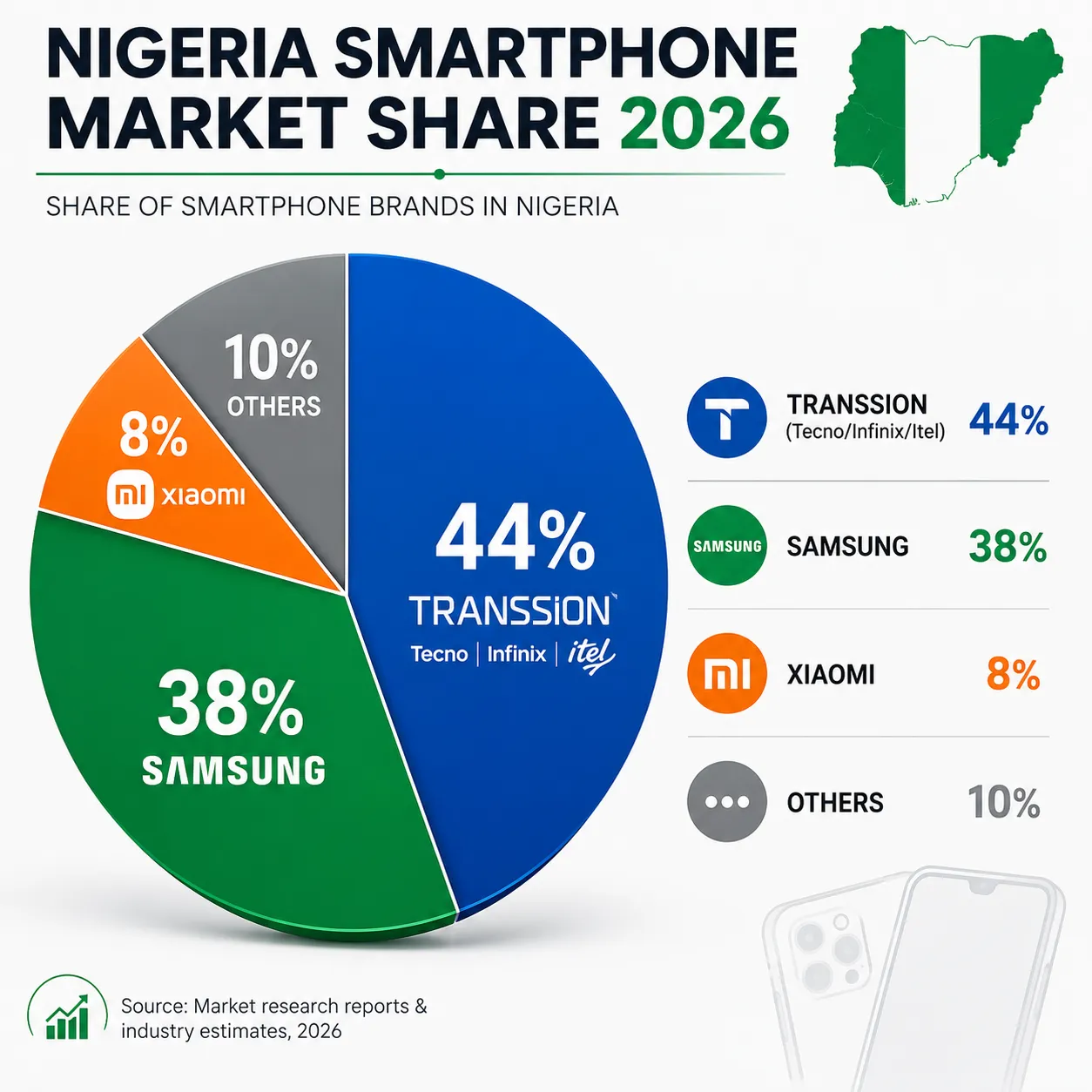
Samsung owns the premium segment. Galaxy S and A series sell well. Foldables gain interest among affluent users. Service centers exist in major cities.
Xiaomi competes in mid range with Redmi and POCO lines targeting youth while Flagship Mi series serves tech enthusiasts and after sales support improves.
Fragmentation increases with many brands. Different Android versions run simultaneously. Update timelines vary from weeks to never. Google works with OEMs to improve.
Connectivity Challenges
4G covers urban Nigeria well. Lagos Abuja Port Harcourt have strong coverage. Rural areas struggle with 3G or worse.
5G rolls out in major cities with MTN and Airtel leading while speeds improve but coverage remains limited and costs stay high for most users.
Android adapts to connectivity. Apps detect network quality. They adjust behavior automatically. Download content for offline use when connections are good.
Google Go apps optimize for slow networks. Files Go Maps Go and others use less data. Work well on low end devices. Popular in Nigeria.
Local Content and Services
Nigerian developers build local apps. GTBank Mobile Banking leads banking. Access Bank Opay and Palmpay follow. USSD codes still work for basic banking.
IROKOtv leads local streaming. Nollywood movies and series dominate. Music platforms like Boomplay and Audiomack cater to local tastes. MTN Music and Airtel Music offer carrier bundled options.
Play Store improves local discovery. Nigerian apps get better visibility. Local payment methods work. Mobile money wallet and card options available.
Local news apps grow with Punch Guardian and Vanguard offering digital versions while sports apps like Goal and Pulse track local and global sports and Bet9ja remains popular.
Data Costs and Optimization
Data remains expensive for many Nigerians. Average cost about 500 Naira per GB. Competition slowly reduces prices.
Android offers several data saving features. Data Saver in Chrome reduces usage by up to 60 percent. Lite mode in Chrome loads faster on slow networks.
Try Lite app versions. Facebook Lite Twitter Lite and Messenger Lite use less data while working well on low end devices and reducing battery usage.
Restrict background data per app. Settings Network and Internet Data Saver controls this. Choose which apps get unrestricted access. Saves data and battery.
PRO TIP: Google Files app cleans cached data and finds duplicates and large downloads while freeing up space regularly and offloading unused apps automatically.
Local Language Support
Android supports Yoruba Igbo and Hausa. Google Assistant understands these for basic queries. Translation works between them.
Keyboard support improves with Gboard adding local language packs and predictive text learning local patterns while voice input works reasonably well.
Local script typing gets easier with Yoruba characters appearing on long press and Hausa and Igbo keyboards available while switching between languages quickly.
Google Translate supports local languages. Camera translation works for signs and menus. Conversation mode helps with different languages.
Local Support and Services
Samsung has service centers in major cities like Lagos Abuja Port Harcourt and Kano with walk in repairs available and online support improving.
Transsion brands have extensive networks. Tecno and Infinix service centers widespread. Spare parts readily available. Quick turnaround times.
Google partners with local organizations. Digital skills training programs run. Developer support grows. Startup ecosystem benefits.
Warranty policies vary. Check before purchase. Some brands offer local warranties. Others require international claims. Know the difference.
Requirements Before You Start Building Your Ecosystem
Device Compatibility Check
Not all features work everywhere. Cross device handoff needs Android 17 on both ends. Samsung DeX needs specific devices.
Check Play Store device compatibility before buying. Wear OS features vary by watch model.
[IMAGE: Google Play Store device compatibility checker screen – Alt text: “Google Play Store showing device compatibility for an app”]Account Setup
Create a Google Account first. Use a strong password. Enable two factor authentication.
Samsung devices need Samsung Account too. It unlocks Samsung specific features.
Update Everything
Keep all devices current by checking Settings System Update regularly while Samsung devices need separate Software Update checks as older devices may lack new features and Android 17 needs 2GB RAM minimum.
Recommended Apps to Install
Install these on all devices. Google Chrome syncs bookmarks and history. Google Photos backs up images.
Google Keep syncs notes. Google Drive stores documents. Google Messages handles RCS.
Samsung users add Samsung Notes. Samsung Internet syncs browsing. Samsung Gallery manages photos.
Step by Step: Setting Up Your Android Ecosystem
Step 1. Create and Secure Your Google Account
Go to Settings Accounts and sync. Tap Add account then Google. Create or sign in.
Enable two factor authentication in Google Account security. Add recovery options.
Step 2. Set Up Sync Across Devices
On each device go to Settings Accounts and sync. Select your Google Account. Enable sync for needed categories.
Contacts and calendar sync automatically. Apps and settings need extra toggles.
Step 3. Configure Samsung Account on Samsung Devices
Go to Settings Accounts and backup. Tap Samsung Account. Sign in or create.
Enable sync for Samsung Notes Calendar and Contacts. These stay separate from Google data.
Step 4. Enable Cross Device Features
On Android 17 go to Settings Connected devices. Enable Nearby Share. Enable cross device copy paste.
Enable Phone Hub for PC connection. Samsung devices add Quick Share and Samsung Flow.
Step 5. Set Up Google One Storage
Install Google One from Play Store. Sign in with Google Account. Choose a plan.
Enable automatic backup for photos videos and documents. Data stays safe across devices.
Step 6. Configure Wear OS Watch
Install Wear OS app on phone. Pair watch following prompts. Enable notifications.
Select which apps send alerts. Set up fitness and health tracking. Sync with Google Fit.
Step 7. Connect to Android Auto
Download Android Auto app. Connect phone to car via USB or wireless.
Follow setup prompts. Enable voice control navigation and media. Customize the interface.
Step 8. Set Up Smart Home Controls
Install Google Home app. Add devices following manufacturer instructions.
Create rooms and groups. Set up routines for common actions. Good Morning can turn on lights and read calendar.
Common Android Ecosystem Problems and How to Fix Them
Problem: Apps Not Syncing Across Devices
Cause: Sync disabled for specific data types. Different accounts on devices.
Fix:
- Open Settings on the device missing data
- Go to Accounts and sync
- Select Google Account
- Enable sync for the needed app or data type
- Verify same account on all devices
Problem: Cross Device Copy Paste Not Working
Cause: Requires Android 12 plus on both devices. Same Google Account needed. Bluetooth and Wi Fi must be on.
Fix:
- Verify Android 12 or later on both devices
- Confirm same Google Account on both
- Enable Bluetooth and Wi Fi on both
- Go to Settings Connected devices on one device
- Check if other device appears. If not tap Add device
Problem: Samsung Specific Features Not Available
Cause: Region lock or device model limitation. Software may need updating.
Fix:
- Check device model support on Samsung website
- Update software via Settings Software update
- Change device region in Settings if region locked
- Contact Samsung support for guidance
Problem: Wear OS Watch Not Connecting
Cause: Bluetooth issues. Outdated Wear OS app. Phone software incompatibility.
Fix:
- Enable Bluetooth on phone and watch
- Open Wear OS app and check for updates
- Restart phone and watch
- Forget watch in Bluetooth settings. Pair again
- Verify phone runs compatible Android version
Problem: Android Auto Not Working in Car
Cause: Bad USB cable. Phone settings issue. Car system incompatibility.
Fix:
- Try different USB cable. Use original phone cable
- Disable USB debugging in Developer options
- Check Android Auto enabled in phone settings
- Restart phone and car system
- Update Android Auto app from Play Store
Problem: Data Not Syncing with Google One
Cause: Background data restricted. Insufficient storage. Sync disabled.
Fix:
- Open Google One app. Check storage usage
- Ensure enough space available
- Verify sync enabled for Drive and Photos in Settings
- Check background data not restricted for Google apps
- Manually trigger backup from Google One app
Tips and Pro Moves for Power Users
Use Multiple Google Accounts Effectively
Add up to 4 Google accounts to one device. Separate work and personal data.
Each account keeps its own contacts calendar and app data. Switch via profile icon in Google apps.
Nearby Share works across most Android devices. Quick Share is Samsungs alternative.
PRO TIP: Quick Share transfers large files faster on Samsung. Nearby Share works better cross brand.
[IMAGE: Nearby Share transferring file between two phones – Alt text: “Nearby Share transferring files between Android phones”]On Samsung swipe down with two fingers for Quick Share panel. Learn these shortcuts.
Automate Across Devices
Use Google Assistant routines. Create Bedtime routine to turn off lights silence phone set watch alarm.
Advanced users try Macrodroid or Tasker. Automate based on time location or conditions.
Optimize for Nigerian Network Conditions
Poor connectivity requires planning. Download Google Maps areas for offline use.
Enable Data Saver in Chrome. Use Lite app versions. Schedule downloads for off peak hours.
Secure Your Ecosystem
Enable Find My Device on all Android gear. Locate lock or erase lost devices remotely.
Use password manager like Google Password Manager or Bitwarden. Sync passwords across devices.
Enable encryption on all devices. Check Settings Security. Usually on by default.
Extend Battery Life Across Devices
Use Adaptive Battery on Android 17. It learns usage patterns. Optimizes for frequent apps.
Enable Battery Saver on Wear OS watches. Extends life significantly. Same charging routine helps all devices.
PRO TIP: Charge overnight. Avoid full drains. Maintains battery health across ecosystem.
Comparison: Android vs iOS Ecosystem in 2026
| Feature | Android Ecosystem | iOS Ecosystem |
|---|---|---|
| Device Variety | Hundreds of brands and prices | Apple devices only |
| Customization | High with launchers themes | Limited customization |
| App Store | Google Play third party sideloading | App Store only |
| Cross Device Sync | Google Account Samsung Account | Apple ID only |
| Desktop Features | Desktop mode Phone Hub | Continuity Handoff |
| Wearables | Wear OS many brands | Apple Watch only |
| Smart Home | Google Home SmartThings | HomeKit only |
| Car Features | Android Auto Automotive OS | CarPlay only |
| TV Features | Android TV Google TV | Apple TV only |
| Update Speed | Varies by manufacturer | Consistent updates |
| Price Range | Budget to premium | Premium only |
| Nigerian Share | About 70 percent | About 30 percent |
| Local Languages | Yoruba Igbo Hausa | Limited support |
| Offline Use | Strong offline support | Limited offline |
Frequently Asked Questions About the Android Ecosystem
Q: What is the Android ecosystem and how is it different from just using an Android phone?
A: The Android ecosystem connects devices services and apps across the platform. It includes phones tablets foldables wearables cars and smart home devices. Unlike a single phone it lets you start tasks on one device and continue on another. All share data and functionality.
Q: Do I need a Samsung device to use the Android ecosystem?
A: No. The Android ecosystem works across all Android devices. Samsung devices add One UI Samsung Account and exclusive features. These provide extra connectivity but are not required for core ecosystem benefits.
Q: How do I share files between my Android phone and tablet?
A: Use Nearby Share for most devices. Samsung devices use Quick Share. Cloud options include Google Drive and Samsung Cloud. For large files direct Wi Fi with Files by Google works well.
Q: Why do some features work on my phone but not on my tablet?
A: Features depend on Android version hardware and manufacturer customization. Check both devices run latest software. Verify they meet feature requirements.
Q: How do I make sure my data is backed up across all my Android devices?
A: Use Google One for comprehensive backup. Enable it in Google One app settings. Backs up photos videos contacts and app data. Samsung devices also use Samsung Cloud for Samsung specific data. Check both regularly.
Q: Can I use Android ecosystem features with an iPhone?
A: Some Google apps sync across iOS and Android. Gmail Photos and Drive work. Core Android features like cross device copy paste and Nearby Share do not work with iPhones. Full ecosystem needs all Android devices.
Q: What are the best Android devices for the ecosystem experience in Nigeria?
A: Samsung Galaxy S26 series and Galaxy Z Fold 6 offer premium experiences. Google Pixel provides pure Android with long updates. Budget options include Tecno Camon 20 Premier and Infinix Note 40 series with good local support.
Q: How do I fix sync issues between my Android phone and watch?
A: Ensure same Google Account on both. Enable Bluetooth on both. Restart both devices. In Wear OS app check for updates. Verify proper pairing. Unpair and pair again if needed.
Your Next Step in the Android Ecosystem
The Android ecosystem in 2026 delivers flexibility and integration. Start with what you have. Add one layer at a time.
A tablet boosts productivity. A watch improves fitness tracking. Smart home devices add automation. Each addition increases ecosystem value.
Use the same accounts everywhere. Enable sync features. Take advantage of cross device capabilities.
For more on file sharing check how to use Quick Share on Android. Explore Android AirDrop alternatives for more options.
What Android ecosystem feature do you wish worked better? Share in the comments.
Discover more from Cloudorian — Android, Samsung & Windows How-To Guides
Subscribe to get the latest posts sent to your email.



