

Last Updated on 21 Nov, 2026 by Montel Anthony
The Samsung Galaxy A71 5G in 2026 still calls, texts, and streams video on its bright AMOLED screen. Samsung stopped sending security patches to it years ago, so risk now matters more than speed. Here is what you need to know before you decide to keep it, buy it, or replace it.
Is the Samsung Galaxy A71 5G in 2026 Still Usable Day to Day?
Yes, the phone still handles everyday tasks. Calls, WhatsApp, maps, and video streaming all run well on the Exynos 980 chip. A GSMArena owner comment from January 2026 still praises the 6GB of RAM and the AMOLED screen.
The 6.7-inch Super AMOLED Plus display looks sharp at 1080 x 2400 pixels. Videos and photos still look good on it. The GSMArena specification sheet lists the full hardware.
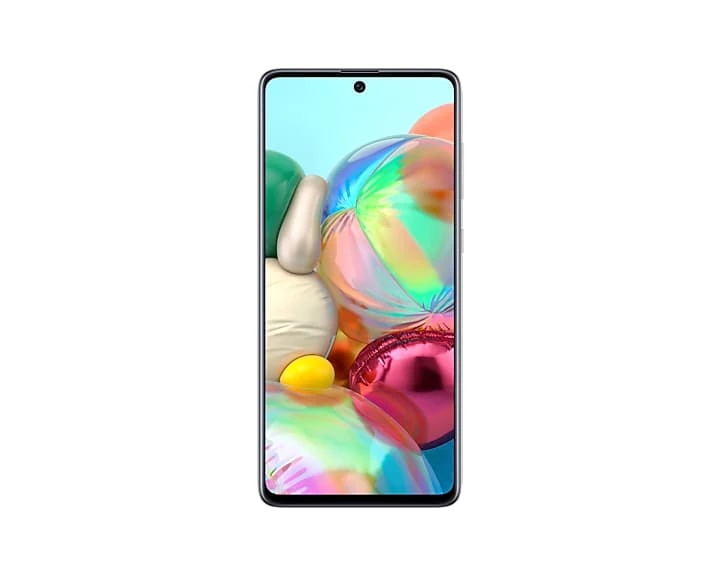
Older hardware also gives you extras that newer budget phones often skip. You get a 3.5mm headphone jack, FM radio, a microSD slot, and NFC in most markets. Those features make the phone a solid media device.
The front glass uses Gorilla Glass 3, an older and less scratch-resistant grade. A case and a screen protector matter for a phone this age. The body combines an aluminum frame with a plastic back and weighs 185 grams.
Does a phone that works well still deserve your trust with banking and personal data? Software support answers that question, so it comes next.
Galaxy A71 5G Software Support Status in 2026
Samsung launched the phone in June 2020 with Android 10 and One UI 2. It later received Android 11, Android 12, and Android 13. Android 13 with One UI 5.1 is the final major version.
Some US models also received One UI 5.1.1 in 2023. The Galaxy A71 5G never received Android 14. No further Android upgrade is coming.
Security patches lasted longer than feature updates. SamMobile documented a February 2024 patch for the international model that fixed 72 flaws. Some US owners report that their final Galaxy A71 5G software update arrived in 2023.
Public trackers now list the phone as unsupported. The endoflife.date Samsung tracker shows no security updates for it. Samsung’s own security update page is the final authority for your model number.
Open Settings, tap About phone, then tap Software information to see your patch date. If that date sits in 2024 or earlier, your phone has missed every fix since.
Samsung removes older phones from its update lists on a regular schedule. Our Samsung software roadmap for May 2026 tracked three more devices that lost support. Samsung shipped 39 security fixes on May 6, 2026, and your A71 5G will not receive them.
Unpatched phones carry known flaws that attackers can exploit. Opening unknown links or installing apps from outside Google Play raises that risk.
Google also ties app trust to patch freshness. Google’s Play Integrity announcement says the strong verdict needs a patch from the past year on Android 13 and later. Banking and government apps can limit sensitive features when a phone fails that check.
Each developer decides how strict to be. Some apps will keep working and others will block transfers or logins.
Do you use this phone for mobile banking or work email? If so, treat this section as your deciding factor.
| Support item | Galaxy A71 5G status in 2026 |
|---|---|
| Launch software | Android 10 with One UI 2 |
| Final Android version | Android 13 with One UI 5.1 |
| Android 14 | Never released for this model |
| Security patches | Ended, with final dates varying by region |
| Play Integrity strong verdict | Unlikely without a recent patch |
Galaxy A71 5G Performance in 2026: Apps, Games, Camera, and Battery
Apps and Multitasking
The Exynos 980 pairs two Cortex-A77 cores with six Cortex-A55 cores. Samsung built it on an 8 nm process. With 6GB or 8GB of RAM, the phone keeps several apps open at once.
Expect slower app launches than on a recent midrange phone. Heavy social apps and large web pages take longer to load. Messaging, maps, and streaming apps work well.
The UFS 2.1 storage stays quick when it has free space. A nearly full 128GB drive makes lag worse. Keep at least 15 percent of storage free.
Our Samsung dial code guide shows a quick storage cleanup. A weekly restart also helps, and our Galaxy auto restart guide explains the setup.
Gaming
The Mali-G76 MP5 GPU handles casual games and many 3D titles at medium settings. Demanding 2026 games force low settings and occasional frame drops. The 60Hz panel also limits smoothness in fast games.
Camera
The 64MP main sensor takes good daylight photos. Night shots show noise and softness, and the phone offers electronic stabilization only. The 5MP macro and depth cameras add little value.
The 32MP selfie camera works for video calls and social posts. Video tops out at 4K and 30 frames per second on the rear camera.
Battery
The 4,500 mAh cell was a strength in 2020. Galaxy A71 5G battery life drops after five or six years of charging cycles. Refurbished buyers in July 2026 report that a charge lasts about one day.
Charging peaks at 25W, so a full charge takes some time. The battery is sealed inside the body, so replacement needs a repair shop.
Connectivity
The international SM-A716B lists 5G bands n41 and n78. The US SM-A716U lists n2, n5, n41, n66, and n71. Check your carrier’s bands before you buy.
Wi-Fi 5, Bluetooth 5.0, and USB 2.0 cover daily needs. File transfers over USB 2.0 run slowly.
Common Problems with the Samsung Galaxy A71 5G in 2026 and What You Can Do
Battery Drains Faster Than It Did New
Lithium-polymer cells lose capacity with every charge cycle. After years of use, the A71 5G battery holds far less energy. A 2024 owner called the phone fast with all apps and said battery life had declined.
Lower your screen brightness and restrict background apps. The Samsung Members app includes a diagnostics tool that checks battery status. A replacement battery from a trusted repair shop restores most of the original runtime.
Screen Burn-In and Ghost Icons
AMOLED pixels wear unevenly when static elements stay lit for long periods. One owner reported icons burned into the screen in October 2024. Navigation bars and app icons cause most of this wear.
Use dark mode and a short screen timeout. Switch to gesture navigation and rotate your wallpaper now and then. A new panel costs a lot, so prevention saves money.
Slowdowns and Random Restarts
A nearly full drive, aging storage, and piled-up app caches slow older phones. Some owners also report random restarts. Heavy background apps make both problems worse.
Free storage, clear app caches, and remove apps you no longer use. Schedule a weekly restart. Back up your data and run a factory reset if the lag persists.
Wrong Model or Missing 5G
Sellers sometimes list the 4G Galaxy A71 as a 5G phone. Refurbished buyers in France and Germany reported receiving 4G units in 2026. The 4G model uses a different chip and different bands.
Check the model number before you pay. The 5G phone shows SM-A716, and the 4G phone shows SM-A715. Ask the seller for a screenshot of Settings, then About phone.
Fingerprint Reader Misses
The optical in-display sensor reads light patterns through the screen. Scratches, dirt, and thick protectors reduce its accuracy. Cold or wet fingers also cause failed reads.
Clean the screen and register the same finger twice. Use a thin protector that supports optical sensors. Check with a local repair shop about parts availability before you plan any screen repair.
Galaxy A71 5G Custom ROM and Unofficial Support Options
A custom ROM can give an old phone a newer Android version. The LineageOS wiki lists official builds for the Galaxy A71. The current build runs Android 16.
That listing covers the 4G model with a Snapdragon 730 chip. Your 5G phone uses the Exynos 980. Files built for the 4G phone will not work on it.
I found no official LineageOS build for the Galaxy A71 5G. Community work for the 5G model looks thin.
I found no maintained Galaxy A71 5G custom ROM that I would recommend. Check the XDA forums for your exact model number before you try anything.
Custom ROMs carry real costs. Flashing one trips the Samsung Knox counter, which cannot be reset. You lose Samsung Pay, and banking apps may refuse to run.
XDA ROM notes for the 4G phone also warn that VoLTE and IMS features may not work. Calls and mobile data can break on some networks. Back up everything before you flash anything.
| Option | Android version | Security patches | Main risk |
|---|---|---|---|
| Stay on stock One UI 5.1 | Android 13 | None | Unpatched flaws |
| LineageOS on the Galaxy A71 4G | Android 16 base | Regular maintainer builds | Wrong phone for 5G owners |
| Unofficial ROM on the A71 5G | Varies by build | Depends on one developer | Bootloops and abandoned builds |
| Replace the phone | Current Android | Years of vendor patches | Upfront cost |
Would you trust a one-person ROM project with your banking apps? Most owners should answer no. Stock software with careful habits is the safer path for this phone.
Who Should Still Keep or Buy the Galaxy A71 5G in 2026
- You want a spare phone for a drawer, a car, or a trip.
- You need a media device with an AMOLED screen, headphone jack, FM radio, and microSD slot.
- You mostly use calls, WhatsApp, maps, and video, and you keep banking on another device.
- You already own a healthy unit and plan to replace it within a year.
- You found a cheap SM-A716 unit with a return policy and a verified battery.
Google Play system updates and app updates still arrive on this phone. Keep Play Protect on and update Chrome often. Avoid installing apps from outside Google Play.
Who Should Avoid the Galaxy A71 5G in 2026
- You run banking, payment, or crypto wallet apps on your main phone.
- Your employer requires a patched device for email or work apps.
- You want three or more years of use from a new purchase.
- You play demanding games or edit video on your phone.
- You rely on strong low-light photography.
- You cannot confirm the model number or the seller’s return policy.
Never pay a premium for this phone. It has no security updates left, so the price must stay low.
Final Verdict and Better Alternatives to the Galaxy A71 5G
Keep it as a spare or a light-use phone. Do not buy it as your main phone in 2026. The screen, ports, and storage options still please, and the missing patches remove any reason to pay more.
Samsung’s newer A-series phones fix the support problem. The Galaxy A55 carries a promise of four Android upgrades and five years of security updates. Newer models such as the A56, A36, and A26 carry six-year promises.
Our Galaxy A55 review covers what you get at that price. Always check Samsung’s security update page before you buy any used Galaxy phone. A phone missing from that list has no future patches. Read The Complete Android Ecosystem Guide: 2026 Edition.
Frequently Asked Questions About Samsung Galaxy A71 5G in 2026
Is the Samsung Galaxy A71 5G still safe to use in 2026?
It is safe enough for low-risk tasks like calls, messaging, and video. It receives no new security patches, so avoid banking, wallets, and sensitive work data. Install apps only from Google Play.
Will the Galaxy A71 5G get Android 14 or later?
No. Android 13 with One UI 5.1 is the final major version. Samsung skipped Android 14 for this model.
Can I install LineageOS on the Galaxy A71 5G?
Official LineageOS builds cover the Galaxy A71 4G, which uses a different chip. I found no official build for the 5G model. Flashing 4G files onto a 5G phone can leave it unusable.
How long does the Galaxy A71 5G battery last now?
Expect roughly one day of light use on a worn battery. Heavy use drains it sooner. A new battery from a trusted repair shop restores most of the original runtime.
Does the Galaxy A71 5G still work with banking apps?
Most banking apps still install and open. Apps that demand Google’s strong integrity verdict may limit features.
That verdict needs a security update from the past year. Check your bank’s app notes or support page.
What is the Galaxy A71 5G worth on the used market?
Prices vary by country, so compare several local listings. A phone without security updates should cost little. Confirm the SM-A716 model number before you pay.
How do I tell the 5G model from the 4G Galaxy A71?
Open Settings, tap About phone, and read the model number. The 5G phone starts with SM-A716 and the 4G phone starts with SM-A715. The 5G model also lists 5G bands on its spec sheet.
Your Next Move with the Galaxy A71 5G This Month
The Samsung Galaxy A71 5G in 2026 deserves a limited role. Keep it for calls, messages, media, and travel. Move banking and work apps to a phone that still receives patches.
If you plan to replace it, start saving now and shop for a phone with a long update promise. Our Galaxy A55 review is a good first stop. Back up your photos before you sell or recycle the old phone.
How many hours of screen time does your A71 5G battery give you today? Share your number and your plans for the phone in the comments.
Discover more from Cloudorian — Android, Samsung & Windows How-To Guides
Subscribe to get the latest posts sent to your email.