

WhatsApp has become the messaging app of choice for over 2 billion people worldwide. Its user-friendly interface and versatile communication tools like messaging, calling, video chatting, and more make it easy to stay connected.
However, WhatsApp also has some privacy concerns. By default, it shows your “last seen” status, allowing anyone to see when you last used the app. This can lead to awkward situations if a contact notices you were online at odd hours.
To take control of your privacy, WhatsApp lets you turn off your last seen status. But it also takes away your ability to see others’ last seen. Here’s How to turn off WhatsApp’s last seen feature:
Key Takeaways:
- WhatsApp’s last seen feature shows your contacts when you last used the app. This compromises privacy.
- You can control who sees your last seen status in WhatsApp’s Privacy settings.
- Selecting “Nobody” turns off last seen entirely but also removes your ability to see contacts’ last seen.
- Choose “My Contacts” to balance privacy without losing last seen visibility for your contacts.
Understanding WhatsApp’s Last Seen Feature
Every WhatsApp user has a “last seen” status that shows your contacts the last time you opened the app. It appears under your profile name and updates whenever you open WhatsApp.
This lets your contacts see when you last used WhatsApp down to the last minute. While some may find it helpful to see if you’re actively online, it can also lead to uncomfortable situations.
For example, say a work colleague notices you were on WhatsApp late at night when you should’ve been sleeping. Or an overly clingy friend sees you’re avoiding their messages. Even scarier, a stalker could use it to monitor your activity.
Last seen can reveal more than you intend about your online habits. Thankfully, WhatsApp provides options to control your last seen visibility.
Adjusting Last Seen Privacy Settings
WhatsApp lets you choose who can view your last seen status in the app’s Privacy settings. You can set it to:
- Everyone – Last seen visible to all users, contacts and non-contacts. Provides no privacy.
- My Contacts – Only people in your contacts can see your last seen time. Balances visibility with privacy.
- My Contacts Except – Same as above, but lets you exclude specific contacts. Useful for restricting exes or avoiding awkwardness.
- Nobody – Completely turns off last seen for your account. Maximum privacy but you also can’t see any contacts’ last seen.
Here are step-by-step instructions to change these settings on both iOS and Android devices:
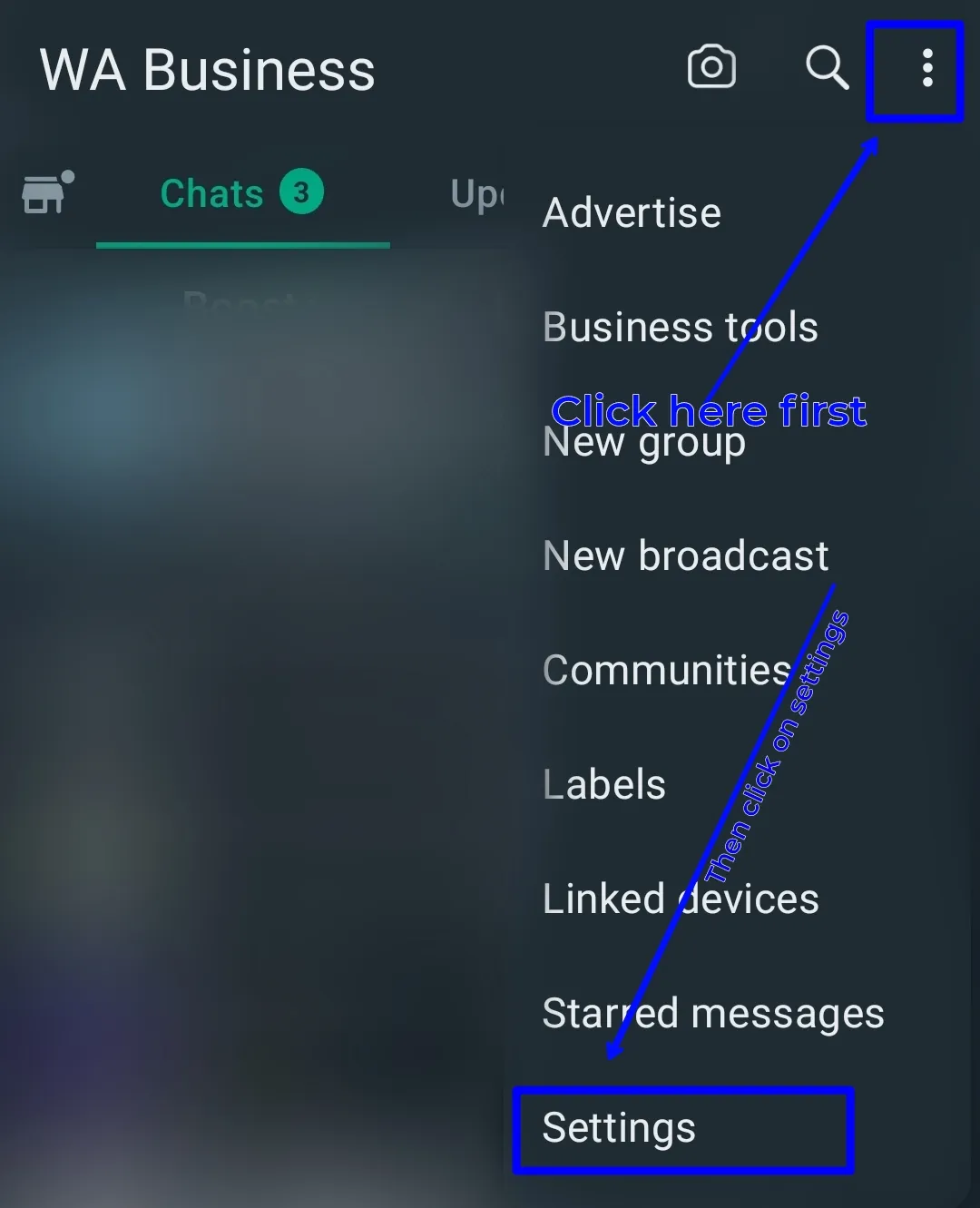
On Android:
- Open WhatsApp and tap the 3-dot menu in the top-right.

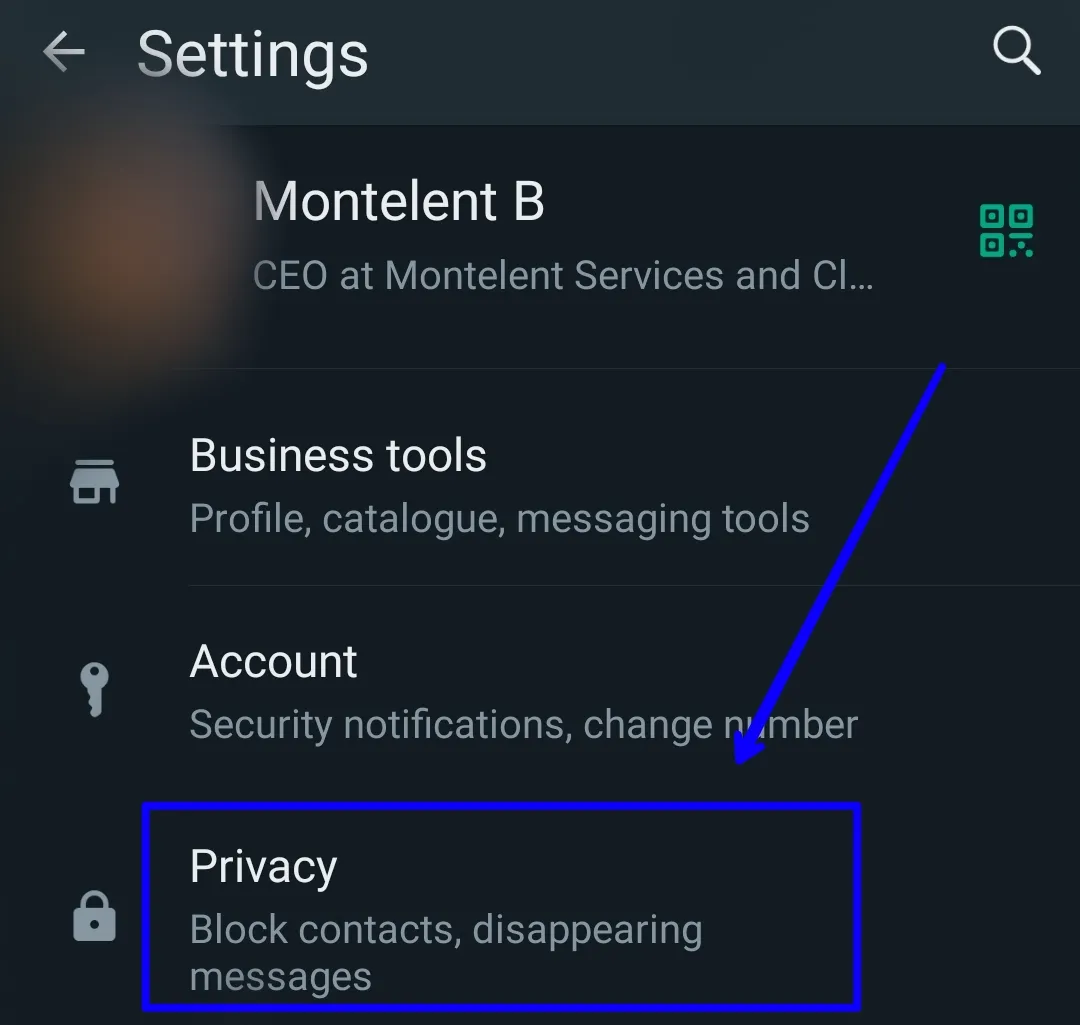
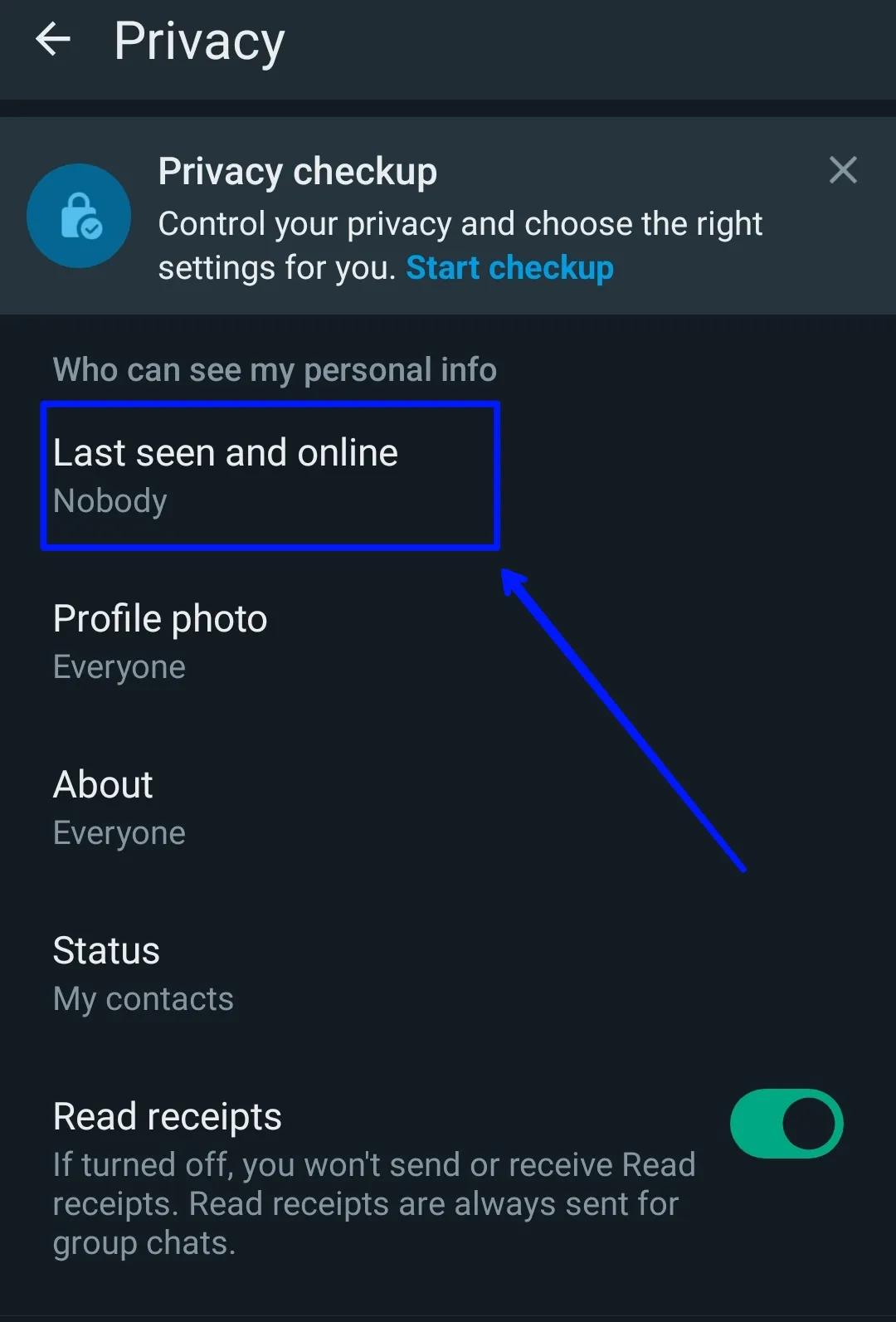
- Go to Settings > Account > Privacy.

- Tap on Last Seen.

- Select your preferred visibility option.
On iPhone:
- Open WhatsApp and go to your Profile tab.
- Tap on Privacy > Last Seen.
- Choose your desired last seen setting.
Once changed, your last seen status will update immediately based on the option you chose.
Balancing Privacy With Utility
The best last seen setting balances privacy without losing too much utility. Here are some guidelines:
- Everyone is risky and gives you no control over who sees your personal activity. Only choose this if you have no privacy concerns.
- My Contacts is ideal for most users. You maintain privacy from strangers while still allowing close friends and family to see your status.
- My Contacts Except takes it further by excluding specific people. Use it to block ex-partners, avoid awkwardness with certain contacts, etc.
- Nobody ensures complete privacy but also takes away your ability to see contacts’ last seen. You lose visibility into whether your messages are being ignored or seen.
Evaluate your priorities and choose the option providing enough privacy while still letting you see the status of trusted contacts. You can always change it later as needs evolve.
What About Read Receipts?
Beyond last seen, WhatsApp also has read receipts that show when a contact opens your chat. These can also raise privacy issues, especially when texting an ex or avoiding someone.
Read receipts are controlled separately from last seen in WhatsApp’s Chat settings:
- Android: Tap the contact, go to More > View Contact > Disable Read Receipts
- iPhone: Tap the contact, go to More > Turn Off Read Receipts
Disable read receipts for any chats where you want to avoid awkward “seen” notifications. Combined with adjusting last seen, you get full control over your messaging privacy.
Maintaining Privacy in WhatsApp Groups
WhatsApp’s last seen setting applies universally across all your chats – individual and groups. When part of groups, your last seen will be visible to all members by default based on your overall privacy setting.
To limit what group members can see, consider these options:
- Set last seen to My Contacts – Group members from your contacts will see it, others won’t.
- Create a separate WhatsApp account just for groups. Only give out that number to group members and keep your main account private.
- Use WhatsApp on desktop only for groups. Mobile retains privacy while still participating.
- Mute annoying groups so you don’t have to open them as often on mobile.
Additional Tips for Managing Your WhatsApp Privacy
Beyond fine-tuning your last seen and read receipt preferences, here are some other tips for keeping your WhatsApp activity private:
- Profile Photo – Set this to only be visible to contacts for privacy from strangers.
- About Info – Fill this sparingly or set to contacts-only to limit what’s public.
- Live Location – Only share live locations temporarily and only when needed. Disable when not actively using the feature.
- Groups – Review group members carefully before joining and leave any groups that no longer serve you.
- Verifications – Avoid verifying dubious accounts that could obtain your number to stalk you on WhatsApp.
- Block Users – Don’t hesitate to block anyone who makes you uncomfortable or harasses you on the platform.
Can Contacts See If You’re Using WhatsApp Even With Last Seen Off?
With last seen disabled, your contacts won’t see the last time you opened WhatsApp. However, they can still see if you’re actively online and using the app in real-time.
WhatsApp has a separate “online” status indicator that shows when you’re currently online, even if last seen is off. There’s no setting to disable this.
Once you close WhatsApp, your online status disappears. But contacts may still know you opened the app recently even if your last seen doesn’t show an exact time.
To avoid this, temporarily set your smartphone to airplane mode when opening WhatsApp if you want to browse without anyone knowing. Your online status will be hidden until you reconnect to the internet.
Troubleshooting Problems With Last Seen Privacy
Here are some common issues faced when trying to turn off last seen on WhatsApp and how to resolve them:
Problem: Your last seen setting reverts back to “Everyone” automatically.
Solution: WhatsApp maintains last seen visibility separately for each device you use. Check it’s disabled across all devices – phones, tablets, WhatsApp Web.
Problem: Some contacts can still see your last seen after setting it to “Nobody”.
Solution: Try force closing and reopening WhatsApp to refresh the privacy settings. If issue persists, uninstall and reinstall WhatsApp to wipe and reapply the settings.
Problem: You can’t see any contacts’ last seen after disabling yours.
Solution: This is expected behavior – turning off your last seen also disables the ability to view others’ last seen timestamps. There is no workaround unless you re-enable yours.
Conclusion
Your privacy is valuable. While WhatsApp provides great communication tools, its last seen feature can unintentionally share more personal info than you want. Take control by adjusting your WhatsApp privacy settings.
Find the right balance between maintaining privacy and utility based on your priorities. With your last seen status set properly, you can continue enjoying WhatsApp’s connectivity features while keeping your online habits private.
Frequently Asked Questions
Can I hide my last seen from specific contacts only?
Yes, choose the “My Contacts Except” option to exclude certain contacts from seeing your last seen time while allowing other contacts to view it.
Do read receipts also show if I’m online?
No, read receipts only indicate when a recipient opens your chat. They do not reveal your online/last seen status.
Can I see someone’s last seen if they have turned it off?
No, you cannot see a contact’s last seen timestamp if they have disabled the feature in their privacy settings. Turning off last seen is reciprocal – they won’t see yours either.
Can I get in trouble for turning off my last seen status?
No, it is perfectly acceptable to turn off your last seen time for more privacy. WhatsApp officially provides the option to disable it without any restrictions. Many users choose to keep theirs private.
Will turning off last seen affect my WhatsApp usage or functionality?
Turning off last seen does not affect your ability to send/receive messages and calls. All core messaging functions continue working normally. The only difference is you lose the ability to see contacts’ last seen who have also disabled it.
Can I only hide my last seen from a few chosen contacts?
Unfortunately, WhatsApp does not allow selectively hiding your last seen from just specific contacts. Your options are to either show it to everyone, contacts only, or no one. If needing more granular control, use a secondary WhatsApp account.
What happens if I disable last seen but a contact still sees it?
If certain contacts can still view your last seen after disabling it, first ensure you changed the setting on all devices. If issue persists, uninstall and fully reinstall WhatsApp to force a refresh of privacy settings.
Yes, you can deduce if a contact is likely on WhatsApp if you see their “online” indicator active, even if last seen is hidden. However, this only shows they have the app open – not necessarily actively messaging.
Unfortunately there is no setting to permanently disable your online indicator. When actively using WhatsApp in real-time, others will see your online status. You can temporarily hide it by enabling airplane mode before opening WhatsApp.
What are some alternatives if I want to hide my activity from specific contacts?
Use a separate WhatsApp account just for those contacts. Or try an app like Signal that allows more granular contact blocking. Restrict vulnerable contacts on your social media instead of WhatsApp to avoid them tracking your activity.
What happens if I block someone – can they still see my last seen?
No, blocking a contact on WhatsApp completely removes their ability to see your profile info and prevents any communication. Your last seen and online status will no longer be visible to blocked contacts.
Discover more from Cloudorian — Android, Samsung & Windows How-To Guides
Subscribe to get the latest posts sent to your email.



