

Krita ships more professional painting power for zero dollars than most paid suites charge hundreds to match. The deepest parts of that power sit buried under panels and menus that most people never open once. This guide drags those hidden layers into daylight so you actually use the free tool you already installed.
Key Takeaways
- Krita is a fully free, open-source painting studio built by artists, not a stripped trial version of paid software.
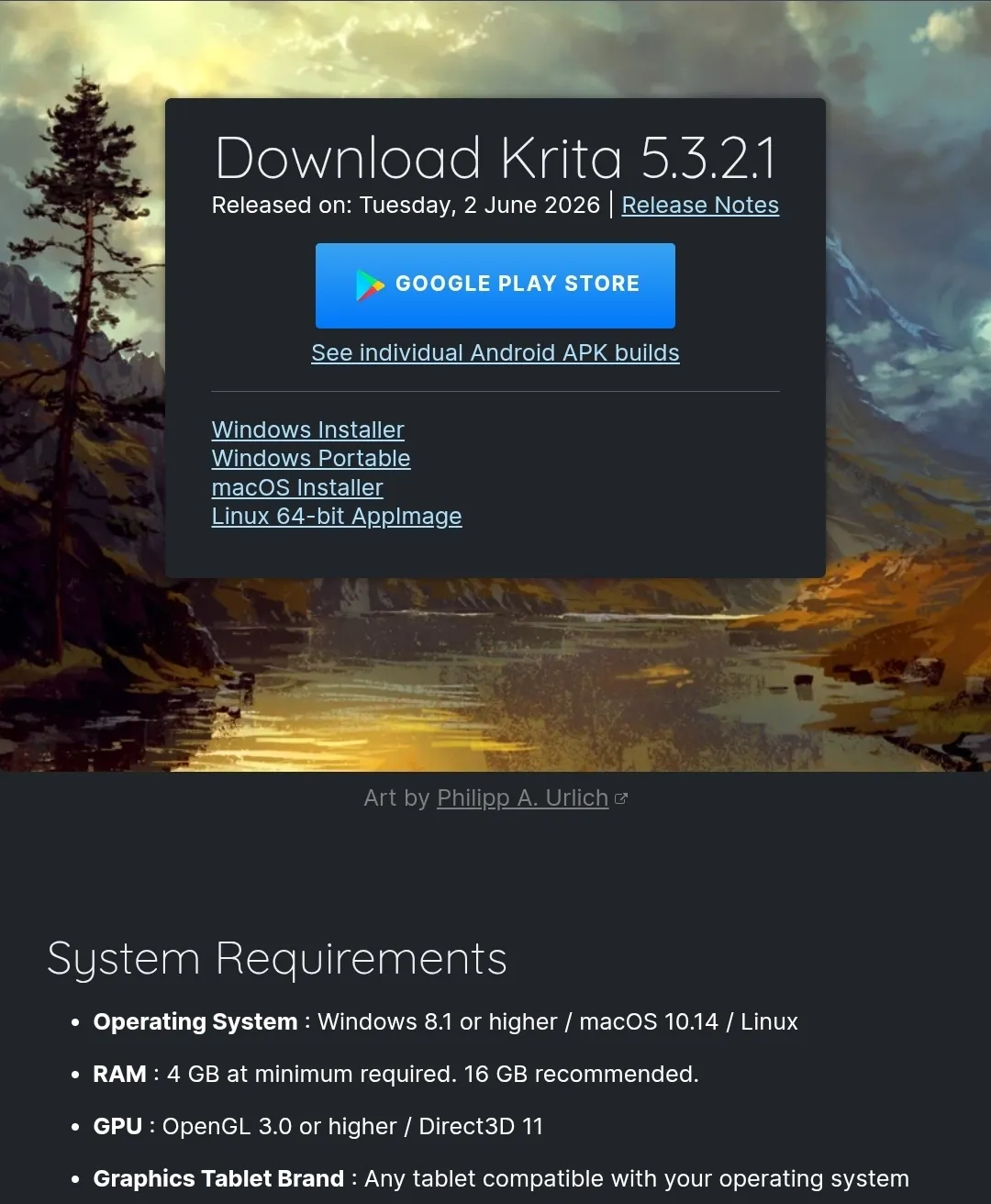
- The current stable build is Krita 5.3.2.1, with an experimental Qt6 branch numbered 6.0.2.1 running in parallel.
- Nine-plus brush engines, HDR painting, and a Python API separate Krita from lighter free editors.
- Most usability complaints trace back to GPU settings, tablet drivers, or third-party Windows apps interfering at startup.
What Krita Is and Why It Matters to Open-Source Users
Krita is a free, open-source painting program made by the artists who use it daily. The project vision calls it an end-to-end solution for creating digital art from scratch. It targets illustration, concept art, matte painting, textures, comics, and 2D animation, all in one application.
The distinction that matters for your workflow is intent. Krita builds for painters and drawers first, not photo retouchers. That focus shows in the brush behavior, the color handling, and the canvas performance under long sessions.
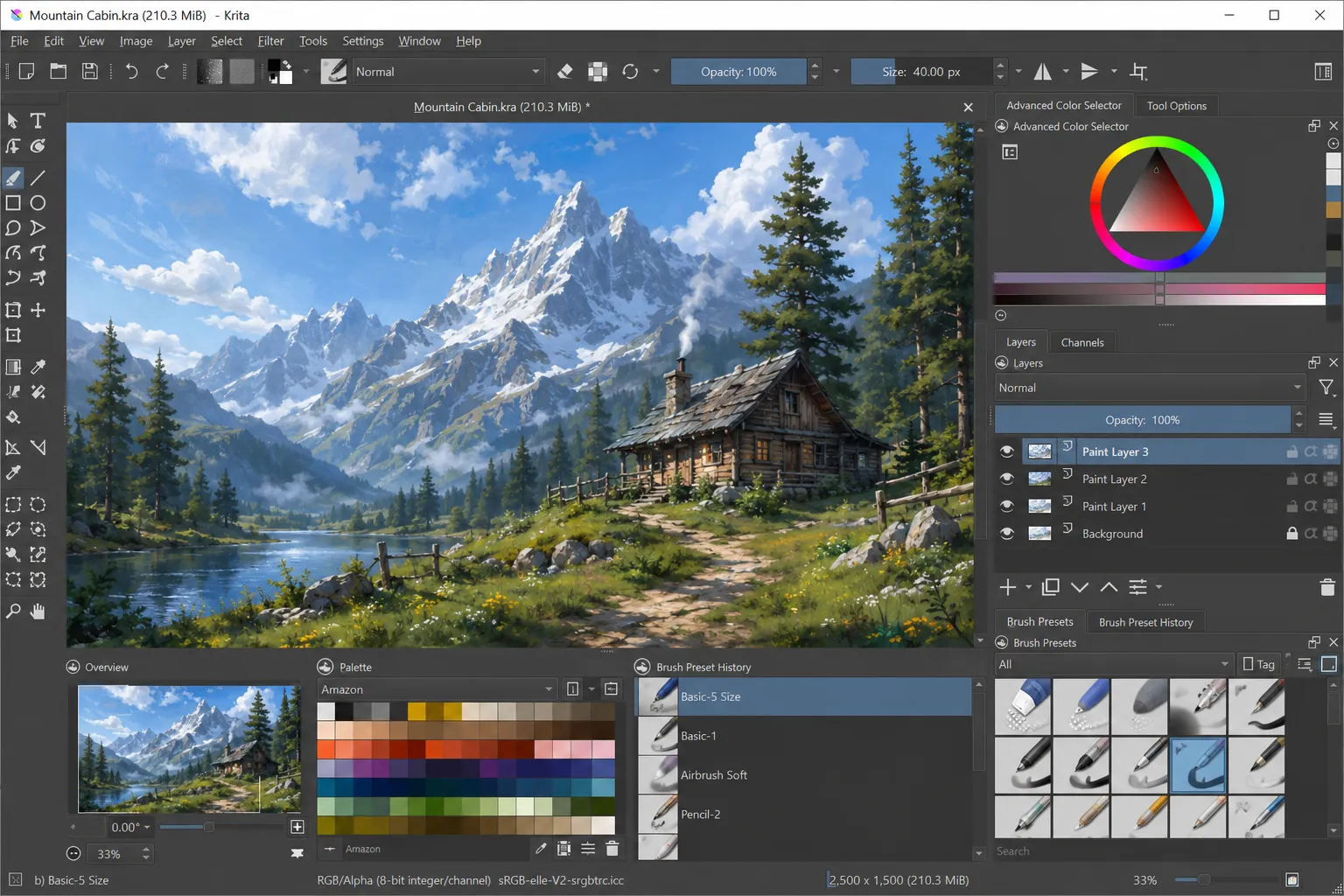
The code lives under the KDE community, and you can read the full feature breakdown on the official Krita features page. No trial timer, no subscription, no watermark on export. You own every file you make.
When did you last check which brush engine you were actually painting with? Most users never look, and that single blind spot is where the real capability hides.
Requirements Before You Install Krita
Krita runs on modest hardware, and the published minimums are honest rather than optimistic. Meeting them keeps the canvas responsive during large files and long strokes.
- Operating system support covers Windows 8.1 or higher, macOS 10.14 or higher, and most modern Linux distributions.
- Memory starts at 4 GB minimum, and the team recommends 16 GB for large canvases and animation timelines.
- The GPU needs OpenGL 3.0 or higher, or Direct3D 11 on the Windows build.
- Any graphics tablet compatible with your operating system works, since Krita reads standard pressure input.
WARNING: Apple iPads and iPhones are not supported. Krita on tablets means Android APK builds only, and the Qt6 branch does not yet run on Android or ChromeOS because Qt6 stays unstable there.
If you run Linux and want to know which distribution pairs well with a creative setup, our breakdown of the best Linux distributions for creative and developer workflows covers the trade-offs in plain terms.
Downloading and Setting Up Krita Step by Step
The install path changes slightly per platform, and picking the right package saves you from update headaches later. Follow the sequence for your system.
Step 1. Open the official download page and pick your platform. Go to the Krita download page and choose Windows Installer, Windows Portable, macOS Installer, or the Linux 64-bit AppImage.
Step 2. Run the installer or unpack the portable build. The Windows installer sets file associations automatically. The portable ZIP runs without installing and shares your settings with any installed copy.
Step 3. On Linux, mark the AppImage as executable. Right-click the file, open Properties, then enable “Allow executing file as program” before you double-click it.
Step 4. Prefer a package manager? Use Flatpak or Snap. Community maintainers publish Krita on Flathub and Snapcraft, which keeps updates tied to your usual system tooling.
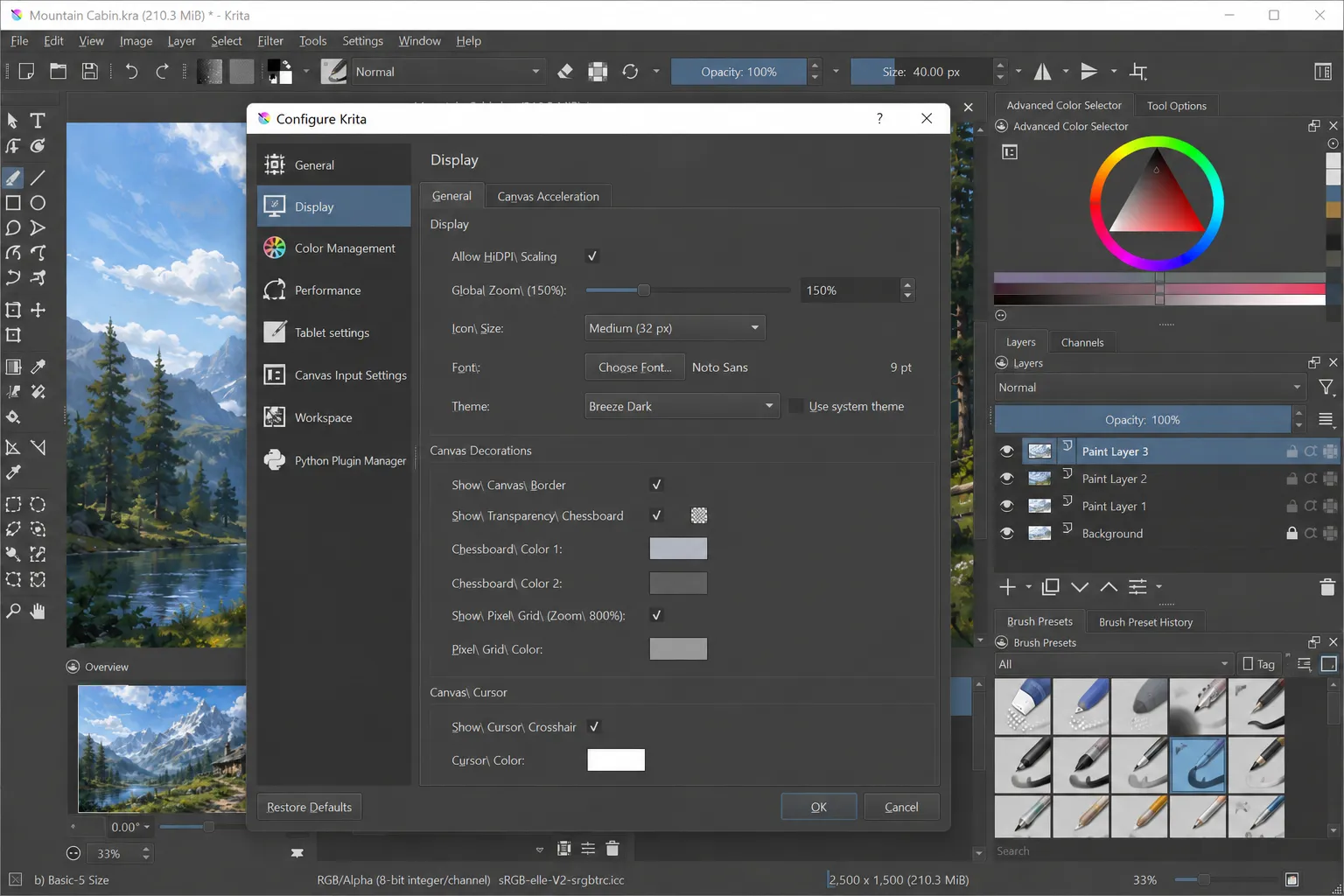
Step 5. Launch Krita and set your canvas GPU acceleration. Open Settings, then Configure Krita, then Display, and confirm OpenGL or ANGLE Direct3D is active for smooth zoom and rotate.
PRO TIP: The Steam, Microsoft Store, Epic, and Mac App Store versions cost money and stay functionally identical to the free download. Paying gets you automatic updates, and the money funds Krita development directly.
The Brush Engines and Deep Tools Competitors Rarely Mention
Krita ships more than 100 preloaded brushes, and the reason they feel so different comes from the engines underneath. The app runs over nine distinct brush engines, each with its own physics and settings.
The Color Smudge, Shape, Particle, and Filter engines each solve a specific painting problem. A smudge brush blends wet paint. A filter brush paints an effect like blur or sharpen straight onto the canvas.
How many of Krita’s 30-plus dockers have you ever opened? The Brush Editor, the Wrap-Around toggle, and the Assistant Tool alone change how you work once you find them.
- Brush stabilizers smooth shaky lines using three separate methods, and the Dynamic Brush tool adds drag and mass for weighted strokes.
- Wrap-around mode tiles your image live along the X and Y axes, so seamless textures render without manual offsetting.
- Drawing assistants lock your strokes to vanishing points, ellipses, and even a Fisheye Point for curvilinear perspective.
- Python scripting exposes a full API through PyQt, letting developers build custom dockers and automate repetitive tasks.
Krita also handles color at a professional grade. It supports full color management through LCMS for ICC profiles and OpenColorIO for EXR. It remains the rare painting app that lets you open, edit, and author HDR and scene-referred images directly.
For scripters, the developer documentation in the official Krita manual walks through the Python API with working examples. That single feature turns Krita from a painting app into a programmable canvas.
How Krita Compares to Other Painting Tools
Picking between free and paid painting software comes down to what you actually make. This table maps the trade-offs against the tools open-source users weigh most.
| Capability | Krita | GIMP | Adobe Photoshop | Clip Studio Paint |
| Price | Free and open source | Free and open source | Paid subscription | Paid, one-time or subscription |
| Primary focus | Digital painting and animation | Photo editing | Photo editing and design | Comics and painting |
| Brush engines | 9+ dedicated engines | Single engine, plugin-based | Multiple, raster-focused | Strong, comic-focused |
| 2D animation | Built in with onion skinning | Limited | Timeline based | Built in |
| HDR painting | Full OCIO and OpenEXR | Not native | Partial | Not native |
| Python scripting | Full API via PyQt | Script-Fu and Python | Limited scripting | No open API |
Common Krita Problems and How to Fix Them
Every tool breaks in predictable ways, and Krita’s failure modes cluster around three areas. Knowing the cause turns a frustrating crash into a two-minute fix.
Problem: Krita takes 30 seconds or longer to open on Windows. Cause: Third-party apps like Microsoft PowerToys FancyZones or the Google Drive plugin query every running app for accessibility features, which stalls Krita’s text engine. Fix:
- Close FancyZones or the Google Drive desktop plugin before launching Krita.
- Update to Krita 5.3.1 or newer, since that build added mitigations for the slowdown.
- Restart Krita and confirm the startup time returns to normal.
Problem: Brush strokes lag or the canvas feels sluggish. Cause: GPU acceleration is disabled or the display driver falls back to software rendering. Fix:
- Open Settings, then Configure Krita, then Display.
- Enable OpenGL, or switch to ANGLE Direct3D 11 on Windows if OpenGL misbehaves.
- Update your graphics driver, then relaunch Krita.
Problem: Your drawing tablet pressure sensitivity stops working. Cause: The operating system tablet driver conflicts with Krita’s input reading, common after a driver update. Fix:
- Reinstall the manufacturer tablet driver from the official vendor site.
- In Krita, open Settings, then Configure Krita, then Tablet, and switch between WinTab and Windows Ink.
- Test pressure in the brush preview, then restart if input stays flat.
This section reflects the actual quirks reported across recent 5.3.x releases. Reading the Krita release notes before updating saves you from surprise regressions.
Tips and Pro Moves for Krita Power Users
The features that separate casual users from fluent ones rarely appear in beginner tutorials. These moves come from watching how experienced painters set up their sessions.
- Save your panel arrangement as a custom Workspace so your layout survives updates and syncs your painting and animation setups.
- Import brush and texture bundles through the Resource Manager, then build and share your own bundles with other artists.
- Switch to the Animation workspace to turn Krita into a 2D studio with onion skinning, audio import, and tweening across thousands of frames.
- Open PSD files that even Photoshop refuses to load, then save back to PSD to move artwork between programs.
PRO TIP: Assign custom keyboard shortcuts to your five most-used tools under Settings, then Configure Krita, then Keyboard Shortcuts. Muscle memory on shortcuts cuts your session time more than any brush pack ever will.
Developers get the biggest hidden payoff. Pair the Python API with a few community plugins and you automate exports, batch color conversions, and custom UI panels. If free creative tooling is your thing, our roundup of free tools worth adding to your workflow pairs well with a Krita setup.
Frequently Asked Questions About Krita
Q: Is Krita really free, or is there a paid version? A: Krita is fully free and open source when downloaded from krita.org. The Steam, Microsoft Store, Epic, and Mac App Store versions cost money but stay functionally identical, and that purchase funds development while giving you automatic updates.
Q: What is the latest version of Krita? A: The current stable release is Krita 5.3.2.1, published on June 2, 2026. A parallel Qt6 branch numbered 6.0.2.1 exists, and the team labels it experimental until it becomes the main version.
Q: Can Krita open and save Photoshop PSD files? A: Yes. Krita opens PSD files, including some that Photoshop itself cannot load, and it saves back to PSD so you can move work between applications.
Q: Does Krita work for 2D animation? A: Yes. Krita includes a dedicated animation workspace with onion skinning, tweening, audio support, and timelines that hold thousands of frames, and it exports to video or image sequences.
Q: Can developers extend Krita with custom scripts? A: Yes. Krita ships a full Python API built on PyQt, and several plugins come preinstalled as reference, so developers can build custom dockers and automate repetitive tasks.
Where to Take Krita Next
Open Krita right now and set one custom workspace plus three keyboard shortcuts before you paint anything. That five-minute setup does more for your speed than any brush pack, and it locks in the hidden tools this guide surfaced.
From there, treat the Resource Manager and the Python API as your next two frontiers. For a wider look at free software that complements a painting setup, our guide to the best free tools for creators and developers is a solid next read.
Which Krita feature surprised you the most here, the brush engines, the HDR support, or the scripting API? Drop your answer in the comments and tell me what tripped you up during setup.
Discover more from Cloudorian — Android, Samsung & Windows How-To Guides
Subscribe to get the latest posts sent to your email.



