

Are you tired of the same old email provider? Maybe you’re looking for something with a little more privacy and security? If so, you might be considering a switch from Gmail to ProtonMail, the world’s largest encrypted email service.
ProtonMail is an encrypted email service that provides users with end-to-end encryption, meaning only the sender and receiver can read the message. It’s an ideal choice for those who want more privacy and security in their email communications. In this guide, we’ll cover everything you need to know about migrating from Gmail to ProtonMail.
How to Set a Status in Gmail and Google Chat
What Is ProtonMail?
ProtonMail is a free, open-source, and encrypted email service based in Switzerland. It was created in 2013 by a team of scientists at CERN and MIT with the mission of making email secure and private again.
ProtonMail uses the same encryption technology as banks and the military, making it one of the most secure email services available. All data is stored on servers located in Switzerland, meaning it is protected by some of the world’s strongest privacy laws.
What Are the Benefits of Using ProtonMail?
There are several benefits to using ProtonMail over other email services. Here are some of the most important ones:
- End-to-end encryption: ProtonMail offers end-to-end encryption, meaning only the sender and receiver can read the message. This ensures that no one else can access or view your emails.
- Swiss privacy laws: As mentioned above, all of your data is stored on servers located in Switzerland, giving you the protection of some of the world’s strongest privacy laws.
- Open-source: ProtonMail is open-source, meaning the code is publicly available for anyone to review and audit. This helps ensure that the code is secure and free of any backdoors or other vulnerabilities.
- Easy-to-use: ProtonMail is designed to be easy-to-use, even for those who are not technically savvy. It has an intuitive user interface and a wide range of features to make your email experience more efficient.
- Free: ProtonMail is completely free to use, although there are paid plans available for those who need more storage or features.
How to Migrate from Gmail to ProtonMail
Now that you know what ProtonMail is and what benefits it offers, let’s take a look at how you can migrate from Gmail to ProtonMail.
Step 1: Create a ProtonMail Account
The first step is to create a ProtonMail account. You can do this by visiting the ProtonMail website and following the sign-up process. Once you’ve created your account, you’ll be prompted to choose your email address and set a password.
Step 2: Enable Two-Factor Authentication
ProtonMail offers two-factor authentication for added security. We highly recommend enabling this feature to keep your account secure. To do this, go to your account settings and select “Two-Factor Authentication.” Follow the prompts to set up two-factor authentication using a code generator app, such as Google Authenticator.
Step 3: Initiate Easy Switch
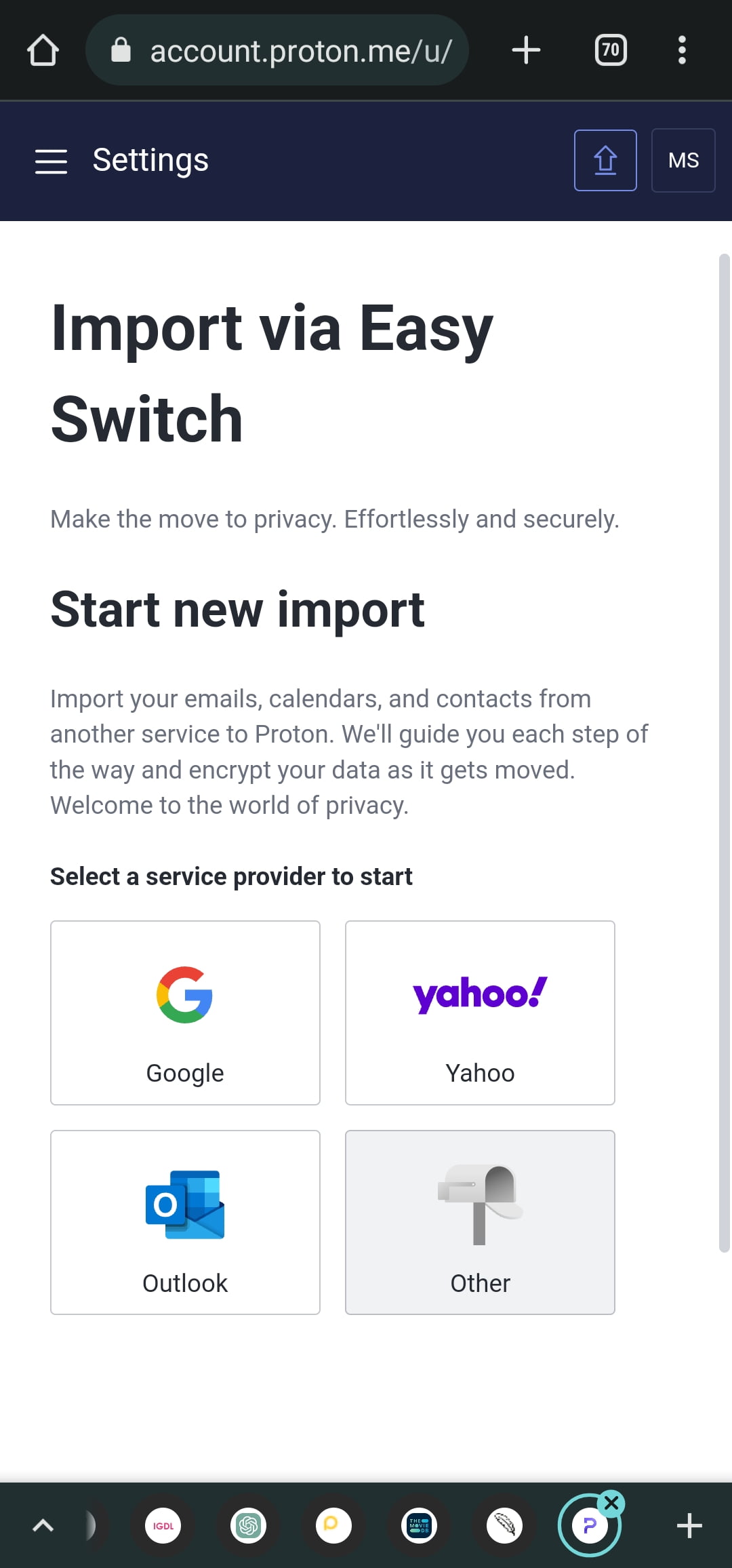
ProtonMail’s Easy Switch feature makes it easy to import your Gmail data into your ProtonMail account. To initiate the Easy Switch process, log in to your ProtonMail account, Go to Settings and select “Import via Easy Switch” from the settings menu.
Step 4: Connect Your Gmail Account
Once you’ve selected “Import via Easy Switch,” click on Google and Mark all necessary, you’ll be prompted to connect your Gmail account. Follow the prompts to sign in to your Gmail account and grant ProtonMail permission to access your data.
Step 5: Select the Data You Want to Import
After you’ve connected your Gmail account, you’ll be prompted to select the data you want to import. You can choose to import your emails, contacts, and calendar information. Once you’ve made your selection, click “Import.”
Step 6: Wait for the Import to Complete
The import process may take some time, depending on the amount of data you’re importing. You can check the progress of the import by navigating to the “Import-Export” section of your ProtonMail account settings.
Step 7: Update Your Contacts
Once the import process is complete, you’ll need to update your contacts. Make sure to let your contacts know that you’ve switched to ProtonMail and provide them with your new email address.
Conclusion
Migrating from Gmail to ProtonMail is a great way to get more privacy and security in your email communications. With ProtonMail’s end-to-end encryption, Swiss privacy laws, open-source code, easy-to-use interface, and free pricing, it’s an ideal choice for those looking for a secure email service. In this guide, we’ve covered everything you need to know about migrating from Gmail to ProtonMail, from creating an account to disabling your Gmail account. Remember to take the time to update your contacts to complete the migration process. Now that you know how to migrate from Gmail to ProtonMail, what are you waiting for? Get started today and enjoy the peace of mind that comes with secure email communication.
Discover more from Cloudorian — Android, Samsung & Windows How-To Guides
Subscribe to get the latest posts sent to your email.



