

Key Takeaways
- Ventoy 1.1.16 is the latest stable release, published June 25, 2026.
- It replaces 1.1.15 as the recommended download for Windows.
- New fixes cover old UEFI firmware, the latest Kicksecure boot issue, and a VentoyPlugson reset bug.
- The Windows package is 16.7 MB. Linux and bootable LiveCD builds are also available.
- Ventoy has used a new UEFI Secure Boot CA since v1.1.14. Anyone upgrading must enroll the new key on first boot.
Ventoy lets you build one USB drive that boots almost any ISO, WIM, IMG, VHD(x), or EFI file. You copy the files over and Ventoy handles the rest, with no reformatting between images. The latest stable release, Ventoy 1.1.16, arrived on June 25, 2026, with UEFI boot fixes and a VentoyPlugson bug fix. This guide covers what changed, the system requirements, and every official download link for Windows. See Rufus 4.15 Download for Windows.
What is Ventoy?
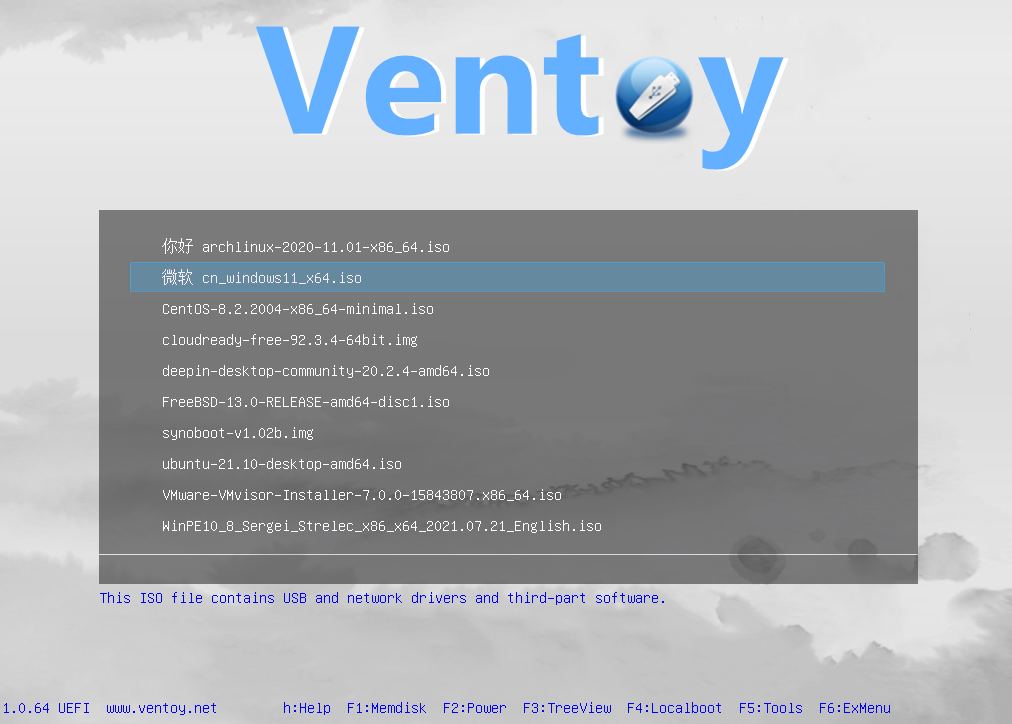
Ventoy is a free and open source tool for creating bootable USB drives. Unlike tools built around a single image, Ventoy lets you copy many ISO files onto one drive at once. It shows a boot menu at startup so you can pick which image to run.
History and Background
Ventoy was created by developer Hailong Sun, known online as longpanda. The project’s first release, version 1.0.00, shipped on April 5, 2020. It has since grown into one of the most widely used multiboot tools, with over 1400 tested images and support in 90%+ of the distros tracked by DistroWatch.
The source code is maintained on both GitHub and Gitee under the GPLv3 license.
Uses and Applications
Ventoy is commonly used for:
- Building a single USB drive that boots multiple Linux, BSD, or Unix distros
- Running live environments for testing, recovery, or hardware diagnostics
- Installing Windows or WinPE directly from an ISO file, no extraction needed
- Booting VHD(x), WIM, IMG, and EFI files without converting them first
- Browsing and booting image files stored on a local disk, not just a USB drive
What’s New in Ventoy 1.1.16
Ventoy 1.1.16 is a focused bugfix release. It follows the Secure Boot CA change introduced in 1.1.14 and refined in 1.1.15. Check ShotCut Free Open-Source Video Editor v24.09.13 Download.
Boot Fixes
- Fixed a boot issue on old UEFI firmware when Secure Boot is disabled.
- Fixed the latest Kicksecure boot issue (#3651).
VentoyPlugson Fix
Fixed a bug where the VTOY_WIN_UEFI_RES_LOCK option reset itself every time VentoyPlugson was opened.
Language Update
Ventoy 1.1.16 refreshes its bundled language files used in the boot menu.
Secure Boot Key Change Still Applies
Ventoy switched to a new UEFI Secure Boot CA starting with v1.1.14, to resolve a UEFI CA 2023 compatibility issue. If you are upgrading from an older release, you must enroll the new key the first time you boot after the update. Ventoy’s own documentation covers how to remove old Secure Boot keys if needed.
System Requirements
- Runs on 32-bit or 64-bit Windows with an Intel or AMD processor
- Also available for Linux, with GUI and command line install modes
- Supports x86 Legacy BIOS, IA32 UEFI, x86_64 UEFI, ARM64 UEFI, and MIPS64EL UEFI
- Main partition supports FAT32, exFAT, NTFS, UDF, XFS, Btrfs, or Ext2/3/4
- No fixed size requirement. Capacity just needs to fit the images you plan to copy.
Latest Releases — Ventoy 1.1.16 Download Links
| File | Platform | Size | Date |
|---|---|---|---|
| ventoy-1.1.16-windows.zip | Windows | 16.7 MB | 2026.06.25 |
| ventoy-1.1.16-linux.tar.gz | Linux | 20.3 MB | 2026.06.25 |
| ventoy-1.1.16-livecd.iso | LiveCD (Legacy + UEFI) | 196.0 MB | 2026.06.25 |
SHA-256 checksums:
7db5b3a1e23af39d0a648843c263eb5cf51493ccbf2a38c6a4315db80a4f9b58  ventoy-1.1.16-windows.zip
a9ffd7bd5e26df486cafff924b8dbcb6caae20cbe2b179a009fe59ae740c7572  ventoy-1.1.16-linux.tar.gz
6bf8e53de52289b8281705610a6a2c47c731e285ce28cfd18efa1b00b45ca535  ventoy-1.1.16-livecd.iso
Other versions (GitHub) | Source code (GitHub)
How to Download Ventoy 1.1.16
- Visit the official Ventoy download page.
- The ventoy.net server has limited bandwidth, so the site points to SourceForge for the actual files.
- Choose
ventoy-1.1.16-windows.zipfor a Windows install. - Save the ZIP file anywhere on your PC.
- Verify the SHA-256 hash against the values listed above before you extract it.
Using Ventoy 1.1.16
Installing Ventoy to a USB Drive
- Extract the downloaded ZIP file.
- Run
Ventoy2Disk.exe. - Select your USB drive under Device.
- Click Install, or Update if Ventoy is already on the drive.
- Type YES to confirm, since the drive will be formatted.
Ventoy2Disk.exe is a 32-bit application, but it runs on both 32-bit and 64-bit Windows. Native 64-bit and ARM builds are also included, inside the altexe folder of the ZIP.
Copying Image Files
After install, the drive gets a new exFAT partition (you can reformat it later if you prefer NTFS, FAT32, UDF, XFS, or Ext2/3/4). Copy any ISO, WIM, IMG, VHD(x), or EFI file onto that partition. Ventoy scans every folder and subfolder, then lists the files alphabetically in its boot menu.
Advanced Options
- Choose MBR or GPT partition style at install time.
- Enable Secure Boot support for compatible UEFI systems.
- Reserve space at the end of the disk for other data.
- Use VentoyPlugson to configure themes, passwords, and persistence for Linux distros.
Need a single-OS installer instead of a multiboot drive? See our guide on Rufus 4.14 Download for Windows.
Ventoy 1.1.16 vs Previous Versions
| Feature | Ventoy 1.1.11 (6th Anniversary) | Ventoy 1.1.16 |
|---|---|---|
| Release Date | April 5, 2026 | June 25, 2026 |
| UEFI Secure Boot CA | Original CA | New CA (since 1.1.14) |
| Kicksecure boot support | Boot issue | Fixed |
| Old UEFI firmware, Secure Boot disabled | Boot issue | Fixed |
| VentoyPlugson reset bug | Present | Fixed |
| Windows/WinPE UEFI display fix | Fixed | Carried forward |
Most of the work between 1.1.11 and 1.1.16 went into the Secure Boot CA migration and the boot compatibility fixes that followed it.
Common Issues and Troubleshooting
Secure Boot fails after updating
This happens because Ventoy 1.1.14 and later use a new UEFI Secure Boot CA. Enroll the new key the first time you boot after updating. Ventoy’s Secure Boot notes walk through the enrollment step.
Ventoy2Disk.exe fails to install
Try running it as administrator first. If it still fails, use the Ventoy LiveCD method instead, which installs Ventoy from a bootable environment rather than from Windows.
USB drive missing from the device list
Ventoy2Disk.exe only lists USB drives by default. Enable the Show all devices option if your drive still does not appear, but double-check you select the right disk before installing.
Old UEFI firmware fails to boot
This was a known issue with Secure Boot disabled on older UEFI firmware. Ventoy 1.1.16 includes a direct fix, so updating resolves it.
Update seems stuck or fails
Check the Ventoy2Disk update failure notes for the most common causes and workarounds.
Other Versions of Ventoy
Ventoy 1.1.15 and earlier 1.1.x builds
Ventoy 1.1.15 and 1.1.14 introduced the new Secure Boot CA and its first round of fixes. Ventoy 1.1.13 was published and then deprecated due to a packaging mistake, so skip it and use 1.1.14 or later if you need an older build. All releases are listed on the GitHub releases page.
Ventoy 1.0.x series
The 1.0.x series covers releases from 2020 through early 2025, ending at 1.0.99. These remain available for anyone who needs to match an older setup.
iVentoy for Network (PXE) Boot
If you need to boot and install operating systems over a network instead of from a USB drive, the developer’s other project, iVentoy, covers PXE-based deployment.
FAQs
What operating systems are supported by Ventoy 1.1.16?
Ventoy 1.1.16 supports Windows XP through Windows 11, WinPE, and over 1400 tested Linux, Unix, and BSD distros, in both Legacy BIOS and UEFI mode.
Can Ventoy create a multiboot USB drive?
Yes. Unlike single-image tools such as Rufus, Ventoy lets you copy multiple ISO files onto one drive and choose which one to boot from a menu.
Is Ventoy free to use?
Yes. Ventoy is open source and free, released under the GPLv3 license.
Do I need to reformat my USB drive for every new ISO?
No. That is the main advantage over single-image tools. Copy a new ISO file onto the drive and it shows up in the boot menu, with no reinstall needed.
Why do I need to enroll a new Secure Boot key?
Ventoy switched to a new UEFI Secure Boot CA starting with v1.1.14, to fix a UEFI CA 2023 compatibility issue. Anyone upgrading from an older release needs to enroll that new key on first boot.
Where can I find more help?
Visit the official Ventoy forums or open an issue on the Ventoy GitHub repository.
Conclusion
Ventoy 1.1.16 is a small but useful update, aimed squarely at boot reliability. Between the UEFI firmware fix, the Kicksecure fix, and the VentoyPlugson bug fix, it closes out the rough edges left by the Secure Boot CA migration in 1.1.14. If you already run Ventoy, this update is worth grabbing, and if you are new to it, 1.1.16 is the right version to start with.
Download Ventoy 1.1.16 from the official SourceForge mirror and build your multiboot USB drive in minutes.
Discover more from Cloudorian — Android, Samsung & Windows How-To Guides
Subscribe to get the latest posts sent to your email.



